Choosing the wrong migration tool compounds these risks, leading to extended downtime, data loss, and failed migrations. Tool selection is as critical as your migration strategy itself—and matching the right tool to your workload type, cloud target, and downtime tolerance is the first step toward a successful migration.
Key Takeaways
- Cloud migration tools automate moving workloads, databases, and applications from on-premises or legacy environments to the cloud
- Choosing the right tool starts with your migration type: database replication, lift-and-shift, app modernization, or cloud-to-cloud transfer
- Evaluate tools on automation depth, integration support, downtime tolerance, compliance requirements, and total cost of ownership
- Tools covered include cloud-native platforms, enterprise solutions, data pipeline tools, and migration analytics platforms
- No single tool fits every scenario, so use the selection criteria above to match the right solution to your migration strategy
What Is Cloud Migration and Why Does It Matter in 2025
Cloud migration is the process of moving digital assets—data, applications, workloads, or infrastructure—from on-premises systems or legacy cloud environments to modern cloud platforms such as AWS, Azure, or Google Cloud.
In 2025, cloud migration is no longer optional. Nearly half of all workloads and data now reside in the public cloud, driven by the need for agility, cost optimization, and scalability. The top two cloud initiatives for organizations are optimizing existing cloud use (71%) and migrating more workloads (58%).
Understanding the 6 R's of Cloud Migration
With migration activity accelerating, the tools you choose depend entirely on how you plan to migrate. The "6 R's" framework defines your approach:
- Rehost (Lift-and-Shift): Move workloads to the cloud without modification
- Replatform (Lift-and-Optimize): Make minor optimizations during migration
- Refactor (Re-architect): Redesign applications for cloud-native architecture
- Retire: Decommission systems that no longer serve a business purpose
- Retain: Keep specific workloads on-premises where migration isn't justified yet
- Repurchase: Swap out legacy software for SaaS alternatives
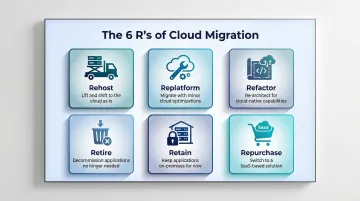
Each path demands a different toolset. A lift-and-shift VM migration requires very different capabilities than a data warehouse modernization — which is exactly why choosing the right tool starts with knowing your migration strategy.
The 14 Best Cloud Migration Tools in 2025
Choosing the wrong migration tool costs time, money, and uptime. Each tool below was evaluated on migration type coverage, ease of use, security features, integration breadth, pricing transparency, and real-world user ratings — spanning database migration, workload migration, data pipeline replication, and cloud-to-cloud transfers.
AWS Migration Hub
AWS Migration Hub is Amazon's centralized platform for planning, tracking, and executing cloud migrations to AWS. It provides a single dashboard to orchestrate multiple migration tools—including AWS DMS (Database Migration Service) and AWS Application Migration Service—across the full migration lifecycle.
Native deep integration with the full AWS ecosystem makes this the default choice for organizations already invested in AWS infrastructure. It supports both agentless and agent-based discovery, includes built-in cost estimation via AWS Migration Evaluator, and enables automated replication with near-zero downtime.
Critical update: AWS Migration Hub stopped accepting new customers as of November 7, 2025, with AWS transitioning users to AWS Transform, an AI-driven successor.
| Feature Category | Details |
|---|---|
| Key Features | Centralized migration tracking, AWS DMS for database migrations, Application Migration Service for lift-and-shift, agentless discovery |
| Pricing | Pay-as-you-go; AWS Migration Hub itself is free, costs apply to underlying services (e.g., DMS instance hours, Application Migration Service at $0.042/server/hour after 90 days) |
| Best For | Enterprises migrating to AWS infrastructure with complex multi-service environments |
Azure Migrate
Azure Migrate is Microsoft's unified platform for assessing and migrating on-premises servers, databases, web apps, and virtual machines to Microsoft Azure. It functions as a hub that integrates with partner tools and Microsoft-native services.
Built-in dependency analysis and agentless VMware discovery improve pre-migration planning. Seamless integration with Azure Arc enables hybrid scenarios, and deep compatibility with Microsoft workloads (SQL Server, SharePoint, Active Directory) makes this the natural choice for Microsoft-heavy environments. The assessment tool is free, and Azure Database Migration Service includes a free tier for basic migrations.
| Feature Category | Details |
|---|---|
| Key Features | Server assessment and migration, database migration via Azure DMS, web app migration, dependency visualization, Azure Arc integration |
| Pricing | Free for assessment; migration costs vary by underlying Azure compute and DMS tier (free tier available for basic migrations, Premium tier for online migrations) |
| Best For | Organizations running Microsoft-heavy stacks (SQL Server, Active Directory, SharePoint) migrating to Azure |
Google Cloud Migrate for Compute Engine
Formerly known as Velostrata, Google Cloud Migrate for Compute Engine handles VM workload migrations from on-premises VMware, AWS, or Azure environments directly into Google Cloud — with continuous replication and minimal cutover time.
Cloud-based processing of migration workloads eliminates the need for local conversion. Wave-based migration planning supports large environments, and native integration with Google Cloud's operations suite provides real-time monitoring during migration. Especially strong for VMware-to-GCP scenarios.
| Feature Category | Details |
|---|---|
| Key Features | VM workload migration, wave-based planning, continuous replication, real-time monitoring, multi-cloud source support (VMware, AWS, Azure) |
| Pricing | No separate licensing fee; standard GCP compute and storage costs apply during migration |
| Best For | VMware and multi-cloud environments migrating to Google Cloud |
IBM Turbonomic
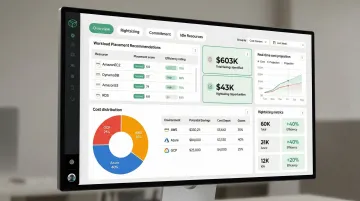
Cost overruns after migration are a common failure point — IBM Turbonomic addresses this directly. It's an AI-powered application resource management platform that automates workload placement decisions and generates optimized migration plans based on real-time performance and cost data.
AI-driven right-sizing recommendations before, during, and after migration reduce cloud spend significantly. The automated action engine ensures workloads land in the most cost-efficient configuration, with strong support for hybrid and multi-cloud environments including AWS, Azure, and GCP. An IBM-commissioned Forrester study reported 247% ROI over three years and a 35% reduction in public cloud costs.
| Feature Category | Details |
|---|---|
| Key Features | AI-powered migration planning, real-time resource optimization, cost forecasting, automated workload placement, hybrid cloud support |
| Pricing | Quote-based; 30-day free trial and sandbox environment available |
| Best For | Enterprises focused on cost optimization and right-sizing workloads across complex multi-cloud environments |
VMware HCX
VMware HCX (Hybrid Cloud Extension) is an application mobility platform designed to simplify large-scale VM migration between on-premises VMware environments and cloud-hosted VMware platforms (including VMware Cloud on AWS, Azure VMware Solution, and Google Cloud VMware Engine).
Live migration (vMotion) runs with zero downtime, bulk migration handles hundreds of VMs simultaneously, and on-premises networking extends to the cloud without re-IPing. HCX Replication Assisted vMotion (RAV) combines continuous replication with vMotion for large-scale, parallel migrations with zero downtime — the industry-leading choice for VMware-heavy organizations.
Following Broadcom's 2023 acquisition, HCX is now included with VMware Cloud Foundation (VCF) subscriptions.
| Feature Category | Details |
|---|---|
| Key Features | Live zero-downtime migration (vMotion), bulk VM migration, WAN optimization, network extension, cross-cloud mobility |
| Pricing | Included with VMware Cloud subscriptions; standalone licensing available (verify current pricing with VMware/Broadcom) |
| Best For | VMware-heavy enterprises requiring zero-downtime, large-scale VM migrations to cloud-hosted VMware environments |
Carbonite Migrate
Carbonite Migrate (part of OpenText following a 2019 acquisition) is a workload migration tool that supports physical-to-cloud, virtual-to-cloud, and cloud-to-cloud migrations. It is known for its flexibility across heterogeneous environments and operating systems.
Continuous block-level replication keeps source and target synchronized throughout migration, enabling a very short cutover window. It supports a wide range of source environments — Windows, Linux, physical servers, and VMs — and works across AWS, Azure, GCP, and private clouds.
| Feature Category | Details |
|---|---|
| Key Features | Continuous block-level replication, minimal cutover window, broad OS support, physical/virtual/cloud sources, automated failover testing |
| Pricing | Pricing upon request; contact OpenText for trial availability and pricing details |
| Best For | Organizations with heterogeneous environments (mixed OS, physical + virtual) requiring flexible, low-downtime migrations |
Dynatrace
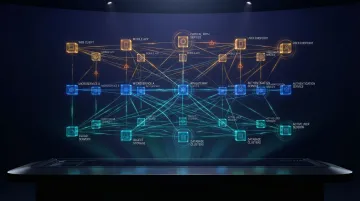
Most migration failures aren't caused by the move itself — they're caused by hidden dependencies discovered too late. Dynatrace is an AI-powered observability platform that provides full-stack visibility from infrastructure to application performance, before, during, and after cloud migration.
Automatic dependency mapping and the Davis AI engine identify performance risks and hidden dependencies before migration begins, reducing post-migration failures. Smartscape technology automatically discovers and maps billions of causal dependencies in real-time. Real-time monitoring during cutover ensures immediate detection of performance degradation.
| Feature Category | Details |
|---|---|
| Key Features | Automatic dependency mapping, AI-driven root cause analysis (Davis AI), full-stack monitoring, real-time migration visibility, integrations with Jenkins, Kubernetes, Azure, GCP |
| Pricing | Starting at $0.01/hour per host (~$7/month); Infrastructure Monitoring at $29/month per host; Full-Stack Monitoring at $58/month per 8 GiB host |
| Best For | Enterprises requiring deep observability and risk assessment across complex, microservices-heavy environments during migration |
CloudFuze
CloudFuze is a cloud content migration platform specializing in migrating files, emails, and collaboration data across cloud storage platforms including Google Drive, OneDrive, SharePoint, Box, and Dropbox, with a strong focus on enterprise-scale content migrations.
Purpose-built for content and collaboration workload migrations — not server or database migrations. It supports over 40 platforms, assigns a dedicated migration manager to enterprise projects, provides daily progress reporting, and preserves permissions and metadata to maintain data governance post-migration.
| Feature Category | Details |
|---|---|
| Key Features | Cloud-to-cloud content migration, permission and metadata preservation, multi-cloud support (40+ platforms), bulk user migration, dedicated migration manager |
| Pricing | Tailored pricing based on source/target clouds, user count, and data volume; contact CloudFuze for custom quote |
| Best For | Enterprises migrating collaboration and file storage content between cloud platforms (for example, Google Workspace to Microsoft 365) |
Cloudamize
Cloudamize is a cloud migration analytics platform that focuses on pre-migration assessment, workload analysis, and cost modeling to help organizations build accurate migration business cases before committing to a cloud provider or migration strategy.
It generates detailed cost projections across AWS, Azure, and GCP simultaneously, so teams can compare providers before committing. Application dependency mapping identifies migration risks, and rightsizing recommendations prevent over-provisioning. The TCO Designer supports custom "what-if" scenarios for adjusting pricing plans and instance families — particularly strong in the planning and assessment phases.
Cloudamize separated from its parent company in July 2025 and now operates independently.
| Feature Category | Details |
|---|---|
| Key Features | Multi-cloud cost modeling (AWS/Azure/GCP), workload assessment, dependency mapping, rightsizing recommendations, migration wave planning, TCO Designer |
| Pricing | Quote-based; demo required for pricing |
| Best For | Organizations in the planning phase needing data-driven cloud provider selection and cost justification |
Zerto
Zerto (acquired by HPE in 2021 for $374 million) is a cloud data management and protection platform that combines disaster recovery, backup, and workload mobility into a single continuous replication engine—making it a strong choice for organizations that want to migrate and protect workloads simultaneously.
Journal-based continuous data protection (CDP) enables migration with near-zero RPO (recovery point objective). It supports multi-cloud mobility for ongoing workload portability after the initial migration and integrates with VMware, AWS, Azure, and GCP — uniquely combining migration with ongoing DR continuity in a single platform.
| Feature Category | Details |
|---|---|
| Key Features | Continuous data protection (CDP), near-zero RPO/RTO, cloud mobility, DR and backup integration, multi-cloud support |
| Pricing | Quote-based; verify current pricing on Zerto/HPE's website |
| Best For | Organizations requiring simultaneous migration and disaster recovery continuity across cloud environments |
Integrate.io
Integrate.io is a cloud-based data pipeline platform offering ETL, ELT, and Change Data Capture (CDC) capabilities that make it a strong choice for data-focused cloud migrations—particularly for moving databases and SaaS application data into cloud data warehouses like Snowflake, BigQuery, or Redshift.
CDC-based replication enables zero-downtime database migrations by continuously syncing changes from source to target. 150+ pre-built connectors reduce integration effort, and a no-code interface lowers the barrier for data engineers. Fixed-fee pricing at $1,999/month for the Core plan keeps costs predictable regardless of data volume — well suited to phased data migration strategies.
| Feature Category | Details |
|---|---|
| Key Features | ETL/ELT/CDC pipelines, 150+ connectors, no-code interface, real-time data replication (sub-60-second CDC), data transformation, Snowflake/BigQuery/Redshift targets |
| Pricing | Fixed-fee unlimited usage model; Core plan at $1,999/month includes unlimited data volumes, pipelines, and connectors |
| Best For | Data teams migrating databases or SaaS application data into cloud data warehouses with minimal downtime |
Cloudsfer
Cloudsfer is a cloud-to-cloud and on-premises-to-cloud file migration tool supporting 30+ platforms, including AWS S3, Google Cloud Storage, OneDrive, Dropbox, and FTP servers. It is designed for simplicity and broad compatibility.
An intuitive interface with step-by-step migration prompts reduces the learning curve considerably. Multi-user batch migrations accelerate large team moves, and built-in permission preservation maintains access controls post-migration. Transparent pricing starting at $25/month makes it one of the more budget-friendly options for SMBs.
| Feature Category | Details |
|---|---|
| Key Features | 30+ cloud and on-premises platform support, multi-user batch migration, permission preservation, scheduled migrations, simple user interface |
| Pricing | Starting at $25/month for 25 GB of data transfer ($0.75/GB overage); free trial available (no credit card required) |
| Best For | SMBs and teams needing a simple, broad-compatibility tool for file and cloud storage migrations |
LeapLogic
Legacy data warehouse migrations are notoriously manual — LeapLogic was built to change that. An Impetus product, it's an AI-powered platform focused on automating the conversion of legacy on-premises data warehouses (Teradata, Netezza, Hadoop) and ETL pipelines to modern cloud platforms such as Snowflake, BigQuery, and Databricks.
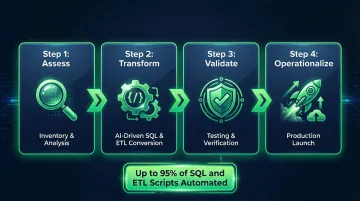
A standardized 4-step process (Assess → Transform → Validate → Operationalize) delivers consistent, repeatable migration outcomes. AI-driven code conversion automates up to 95% of SQL and ETL script rewriting, cutting manual effort substantially. Impetus/LeapLogic is an Elite Databricks Consulting Partner and was named 2024 Databricks Migration Partner of the Year.
| Feature Category | Details |
|---|---|
| Key Features | AI-driven SQL and ETL code conversion, legacy DWH migration (Teradata, Netezza, Hadoop), 4-step migration framework, Snowflake/BigQuery/Databricks targets |
| Pricing | Pricing upon request; free trial available |
| Best For | Enterprises modernizing legacy data warehouses and analytics pipelines to cloud-native platforms |
Morpheus Data
Morpheus Data (acquired by HPE in August 2024) is a hybrid cloud management and automation platform that unifies provisioning, orchestration, and governance across public clouds (AWS, Azure, GCP), private clouds, and on-premises infrastructure—supporting cloud migration as part of a broader multi-cloud management strategy.
Self-service provisioning with policy-based governance lets teams spin up and migrate workloads to any cloud target while maintaining cost controls and compliance. It integrates with existing ITSM and DevOps toolchains, supports Kubernetes-based containerized workload migrations alongside traditional VM migrations, and deep ServiceNow integration automates incident, change request, and CMDB updates.
| Feature Category | Details |
|---|---|
| Key Features | Multi-cloud provisioning, self-service portal, policy governance, Kubernetes and VM support, ITSM integrations (ServiceNow), cost management |
| Pricing | Pricing upon request; contact HPE for current pricing |
| Best For | Enterprises managing multi-cloud environments who need a unified platform for ongoing workload mobility and governance post-migration |
How We Chose These Cloud Migration Tools
Each tool on this list was assessed across six dimensions:
- Migration type coverage (database, workload, content, data warehouse)
- Automation depth
- Integration breadth with major cloud providers
- Downtime minimization capabilities
- Security and compliance features
- Total cost transparency
Common mistakes organizations make:
- Selecting a tool based solely on brand familiarity rather than migration type fit
- Underestimating the importance of post-migration support and monitoring
- Ignoring total cost of ownership beyond initial licensing fees
The final list deliberately spans different migration categories because no single tool addresses every migration scenario:
| Category | Tools Covered |
|---|---|
| Infrastructure lift-and-shift | AWS Migration Hub, Azure Migrate, VMware HCX |
| Data pipeline migration | Integrate.io, LeapLogic |
| Content migration | CloudFuze, Cloudsfer |
| Assessment and planning | Cloudamize, Dynatrace |
| Disaster recovery and replication | Zerto, Carbonite Migrate |
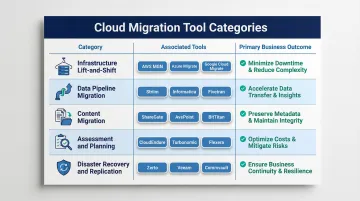
Each category maps to concrete business outcomes: minimizing downtime, reducing cloud spend, maintaining data integrity, and managing risk through recovery planning.
Vorstel Technologies' cloud and infrastructure consulting team works through tool selections like these across client engagements, helping organizations identify the right combination for their specific migration scenario, from initial assessment through post-migration optimization.
Conclusion
The "best" cloud migration tool is never universal. The right choice depends on what you're migrating (VMs, databases, files, or analytics workloads), where you're migrating to, and your organization's tolerance for downtime and disruption. Getting that match wrong is one of the most expensive mistakes enterprises make.
Before committing to any tool or vendor, start with a thorough assessment of your current environment:
- Map application and infrastructure dependencies
- Estimate data volumes and transfer timelines
- Model costs across target cloud providers
If you're working through that assessment and need an outside perspective, Vorstel Technologies offers zero-fee solution evaluations and can step into cloud migration engagements at any stage — from tool selection and strategy through full execution and post-migration optimization. Reach out to schedule a free consultation.
Frequently Asked Questions
What are cloud migration solutions?
Cloud migration solutions are tools and platforms that automate and manage the process of moving data, applications, workloads, or IT infrastructure to a new cloud environment. They typically cover assessment, replication, transfer, and post-migration validation.
What are the main cloud migration strategies (the 5 R's and other options)?
The core strategies are Rehost (lift-and-shift), Replatform (lift-and-optimize), Refactor (redesign for cloud-native), Retire (shut down unneeded systems), Retain (keep on-premises), and Repurchase (move to SaaS). Your chosen strategy directly determines which tools are appropriate.
What tools are used for cloud migration?
Tool choice depends on the migration scenario: AWS Migration Hub and Azure Migrate for infrastructure migrations; Integrate.io and LeapLogic for data warehouse and database migrations; CloudFuze and Cloudsfer for content and file migrations; Dynatrace and Cloudamize for assessment and observability; and VMware HCX or Zerto for zero-downtime workload mobility.
How much does cloud migration cost?
Migration costs vary widely based on data volume, complexity, downtime requirements, and tool licensing. Tool costs range from free tiers (AWS Migration Hub, Azure Migrate basic) to enterprise contracts worth six figures. McKinsey reports that migration inefficiencies cost the average company 14% more than planned. Remember that post-migration cloud running costs are often the larger ongoing consideration.
How do I choose the right cloud migration tool for my environment?
Start by identifying your migration type (infrastructure, database, file, or application), your target cloud provider, and your downtime tolerance. From there, shortlist tools that match those constraints — most vendors offer free assessments or trials that help validate fit before committing.
What is the role of a cloud migration specialist?
A cloud migration specialist assesses existing infrastructure, designs the migration strategy, configures the right tools, executes the move with minimal disruption, and validates the environment post-migration. Organizations without in-house expertise often engage consulting partners like Vorstel Technologies to take on this role.