Introduction
Most enterprise IT infrastructure wasn't built for what organizations demand of it today. Systems designed for predictable, on-premises workloads now struggle under hybrid cloud complexity, remote access demands, and real-time data requirements they were never architected to handle.
The consequences show up in predictable ways: unplanned outages that cost six figures per incident, cloud bills that climb without corresponding business growth, and applications that lag precisely when demand spikes. According to the Uptime Institute's 2024 outage analysis, 54% of respondents said their most recent significant outage cost more than $100,000 — and that figure doesn't account for reputational damage or lost productivity.
For most organizations, the path forward isn't a wholesale replacement — it's a disciplined optimization of what already exists.
This guide covers end-to-end best practices for IT infrastructure optimization: from initial assessment through network, hardware, cloud, automation, monitoring, and security, with a focus on outcomes you can actually measure.
Key Takeaways
- Start with a structured audit: inventory assets, benchmark performance, and quantify technical debt
- Network, hardware, and software improvements often deliver the fastest ROI before major cloud migrations begin
- Multi-cloud is now the default; 89% of enterprises operate across multiple clouds, so governance and cost visibility are essential from the start
- Continuous monitoring with tools like Prometheus, Datadog, and Nagios reduces MTTR and prevents outages
- Build security and compliance into the optimization roadmap from day one — not after incidents force the issue
What Is IT Infrastructure Optimization and Why It Matters
IT infrastructure optimization is the ongoing process of evaluating, refining, and improving the hardware, software, networks, cloud resources, and data center components that support business operations. It differs from a one-time modernization project — optimization is continuous, driven by shifting workloads, tightening security requirements, and wherever the business is heading next.
The Business Case
The ROI is well-documented. An IDC study commissioned by Google Cloud found that infrastructure modernization delivered 318% five-year ROI, 51% lower operations costs, and 75% faster feature deployment for organizations that moved to cloud IaaS. Even accounting for the vendor-commissioned source, the directional signal is hard to ignore: optimized infrastructure directly compresses costs and accelerates delivery.
Core business benefits of optimization include:
- Cuts costs by eliminating waste from over-provisioned resources and redundant systems
- Improves application response times and overall availability
- Scales with demand rather than breaking under it
- Reduces exploitable gaps through patched, governed systems
- Frees teams from constant firefighting so they can focus on building
Warning Signs Optimization Is Overdue
Recognize these patterns in your environment:
- Recurring unplanned outages with no root cause resolution
- Application performance degrading during peak demand
- Cloud or energy costs rising without proportional business growth
- Siloed systems that can't share data or integrate with modern tools
- Compliance gaps discovered only during audits
McKinsey estimates technical debt equals 20–40% of the technology estate's value before depreciation, with organizations paying 10–20% more on new projects just to work around existing debt. That cost accumulates quietly across every project — and the warning signs above are usually the first indication that the debt is already overdue for a reckoning.
How to Assess Your Current IT Infrastructure
Optimization without a baseline is guesswork. A structured infrastructure audit gives you the data needed to prioritize spending, justify investment, and avoid repeating the same problems.
What the Audit Should Cover
A thorough assessment inventories:
- All hardware assets — servers, storage, networking equipment, age, and lifecycle status
- Software licenses — active vs. unused, end-of-life applications, patch levels
- Network architecture — topology, traffic patterns, redundancy gaps
- Cloud resources — active instances, utilization rates, cost allocation, "zombie" resources
- Performance benchmarks — current throughput, latency, and capacity headroom against actual workload demands
One metric that consistently reveals waste: Uptime Institute's 2024 survey found one in four data centers operating below 40% of available UPS capacity, yet only 31% of operators collect server utilization data for reporting. Without that baseline data, even obvious inefficiencies stay invisible — and unfixed.
Security and Compliance Gaps
Many organizations discover significant exposure during infrastructure assessments. The Verizon DBIR 2025 found vulnerability exploitation now accounts for 20% of initial access vectors — a 34% increase year-over-year — with a median remediation time of 38 days for critical vulnerabilities. Edge devices and VPNs account for a disproportionate share of that exposure.
During your assessment, specifically check for:
- Systems running without current patches
- Unmanaged or shadow devices with access to corporate resources
- Configurations that violate GDPR, HIPAA, or ISO 27001 requirements
- Identity and access controls that haven't been reviewed recently
Building the Optimization Roadmap
Once the audit surfaces security gaps, performance issues, and compliance risks, the next step is turning that list into a sequenced plan. Categorize every finding by business impact and urgency:
- Resolve immediately — active security vulnerabilities, systems at failure risk, compliance violations with active penalty exposure
- Address in the next cycle — performance bottlenecks affecting end users or revenue-generating applications
- Schedule for later — legacy system replacements, non-urgent hardware refreshes, incremental optimizations
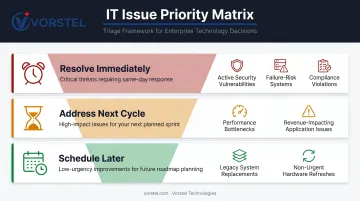
Map every finding to a business goal. Without that mapping, fixes get applied in isolation — and six months later, teams are troubleshooting problems that the earlier work quietly introduced.
Best Practices: Network, Hardware, and Software Optimization
Network Performance Optimization
The network is the connective tissue of everything else. Poor network performance degrades applications, slows cloud access, and creates latency that compounds across every dependent system.
Core network optimization practices:
- Map topology and traffic flows before making changes — most teams are surprised by what's actually running where
- Implement load balancing to distribute workloads and prevent any single path from becoming a bottleneck
- Configure routing protocols efficiently — unnecessary hops add latency that's easy to eliminate
- Apply bandwidth management to prioritize critical traffic during peak demand periods
Uptime Institute reported IT and network system failures rose 8 percentage points from 2023, now accounting for roughly 23% of impactful outages. Real-time network monitoring tools that surface latency spikes and packet loss before users report them have become baseline requirements at this scale.
Physical hardware upgrades to switches and routers often deliver the highest-impact, lowest-complexity gains available. They're frequently deferred due to budget cycles and low visibility — but the performance improvement is immediate and measurable.
Hardware and Software Optimization
Hardware priorities:
- Replace aging servers with energy-efficient models — Uptime Institute notes operators can typically remove at least two legacy devices per new unit deployed, with six-year-old infrastructure potentially reaching five-to-one consolidation ratios
- Deploy SSDs for storage workloads requiring fast random I/O (databases, virtualization hosts)
- Implement redundant hardware configurations to eliminate single points of failure
- Right-size server capacity to actual workload demands — most environments are over-provisioned at purchase and under-utilized in production
Software optimization:
- Remove redundant and end-of-life applications that accumulate security exposure without delivering value
- Maintain regular OS and firmware patching cycles — the 38-day median remediation lag identified by Verizon is a significant window of exposure
- Adopt software-defined networking (SDN) for more flexible, programmable infrastructure management
- Use AI-driven monitoring tools that predict degradation trends before they produce user-visible failures
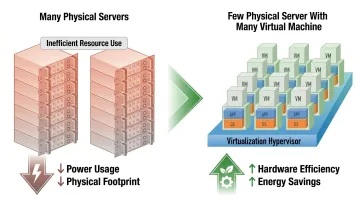
Server consolidation through virtualization addresses hardware and cost simultaneously. Running multiple virtual machines on fewer physical servers reduces energy consumption, cooling requirements, and physical footprint. ENERGY STAR confirms that server virtualization directly decreases electricity consumption — and at five-to-one consolidation ratios on aging infrastructure, that translates to measurable reductions in both capital spend and ongoing operating costs.
Cloud, Virtualization, and Automation as Performance Multipliers
The shift from purely on-premises infrastructure to hybrid and multi-cloud is largely complete for enterprises. Flexera's 2024 State of the Cloud report surveyed 753 IT professionals and executives and found 89% multi-cloud adoption. The question is no longer whether to use cloud — it's how to govern and optimize it.
Cloud adoption delivers genuine performance advantages:
- Dynamic auto-scaling matches resources to real demand rather than worst-case estimates
- Geographic redundancy improves availability without requiring duplicate on-premises investments
- Pay-as-you-go pricing removes the over-provisioning that plagues physical hardware purchases
- Teams shift from maintenance-heavy hardware management to higher-value optimization work
Cloud Migration and Optimization Best Practices
Getting onto the cloud is the easy part. Keeping it performing and cost-controlled requires ongoing discipline:
- Implement auto-scaling policies tied to actual load metrics, not static schedules
- Audit cloud resource utilization regularly — unused instances and over-provisioned services accumulate faster than most teams realize
- Adopt FinOps principles for continuous cloud cost governance; Flexera reports FinOps teams now operate in 63% of enterprises
- Use load balancers to distribute cloud traffic and eliminate hot spots
Vorstel Technologies' cloud and infrastructure-as-a-service practice helps enterprise clients navigate this complexity — delivering outcomes including a 45% reduction in system downtime and 92% faster deployment cycles. Results like those come from treating cloud migration as an ongoing optimization discipline, not a one-time transition.
Automation and DevOps Integration
Manual infrastructure management doesn't scale. Automation handles routine tasks at machine speed and keeps configurations consistent across environments — eliminating the drift that quietly destabilizes production systems.
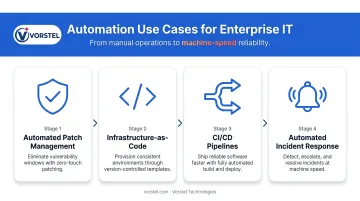
Key automation use cases:
- Automated patch management — removes the 38-day remediation window that leaves systems exposed
- Infrastructure-as-Code (IaC) — consistent, repeatable provisioning that eliminates configuration drift across environments
- CI/CD pipelines — faster, validated software deployment with fewer manual handoffs
- Automated incident response — pre-defined workflows that trigger the moment anomalies are detected, reducing MTTR before an engineer even picks up the phone
DevOps culture matters as much as the tooling. When development and operations teams share ownership of infrastructure reliability rather than guarding separate silos, the result is faster deployment, fewer configuration errors, and more resilient systems. CNCF's Cloud Native 2024 survey found 38% of respondents had 80–100% of releases automated, with 77% following GitOps principles. At that level of automation maturity, teams spend far less time on incident response and far more on delivering capability.
Monitoring, Analytics, and Capacity Planning
Continuous Monitoring
You cannot optimize infrastructure you cannot observe. Comprehensive monitoring covers:
- CPU utilization and memory consumption — the baseline for identifying over/under-provisioned resources
- Disk I/O and storage throughput — especially critical for database and virtualization workloads
- Network throughput and latency — caught early, most network degradation is fixable without outages
- Application response times — the end-user metric that everything else ultimately feeds
Widely deployed monitoring tools include Nagios for infrastructure health alerts, Datadog for full-stack observability with cloud integrations, and Prometheus (production use at 70% of CNCF survey respondents) for metrics collection in containerized environments. Each serves different needs — most mature organizations combine them.
A Forrester TEI study on New Relic found that comprehensive observability delivered 70% lower MTTR, 40% fewer customer-impacting outages, and 267% ROI with payback in under six months. At that payback window, the investment justifies itself before most hardware refresh cycles complete.
Moving from Threshold Alerts to Predictive Analytics
Traditional monitoring sets thresholds and fires alerts when something crosses a line. Useful, but reactive. Machine learning-driven analytics detect anomalous patterns in system behavior before thresholds are breached — a CPU trending upward at an unusual rate, memory leak signatures, or network latency consistent with prior failure patterns.
The practical difference between the two approaches:
| Reactive Monitoring | Predictive Analytics |
|---|---|
| Alerts after threshold breach | Flags anomalies before breach |
| Teams respond to incidents | Teams prevent incidents |
| MTTR measured in hours | Intervention happens in minutes |
| Root cause found post-failure | Pattern matched pre-failure |
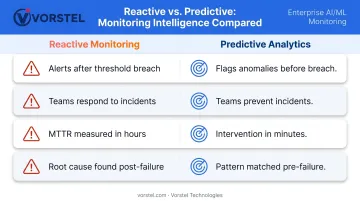
That shift changes how infrastructure teams spend their time — and what they're explaining to stakeholders on Monday morning.
Capacity Planning
Strategic capacity planning answers a question most teams answer too late: when will current infrastructure fail under projected demand?
The core practices:
- Establish performance baselines under normal conditions before demand spikes test your limits
- Run periodic load and stress tests to validate actual limits — not the numbers your vendor quoted
- Choose scaling strategy deliberately — horizontal scaling (more servers) suits distributed workloads; vertical scaling (bigger servers) suits stateful applications with data locality requirements (where data stays close to compute)
- Forecast against business trajectories — seasonal peaks, product launches, and projected user growth should all feed capacity models before they arrive
Teams that skip validated performance limits typically discover those limits during a peak sales event or a product launch — the worst possible time to find out.
Embedding Security and Compliance into Your Optimization Strategy
Security is not a performance trade-off. Secured, well-governed infrastructure performs better because it fails less. IBM's 2024 data breach report puts the global average breach cost at $4.88M, with extensive use of security AI and automation reducing that exposure by $2.22M. The optimization and security budgets are funding the same outcome.
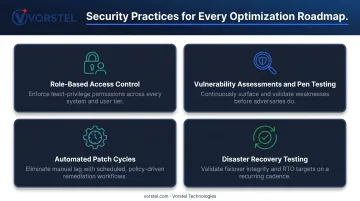
Core security practices that belong in every optimization roadmap:
- Role-based access control (RBAC) : limit exposure by ensuring users and systems access only what they need
- Regular vulnerability assessments and penetration testing : continuous validation, not annual checkboxes
- Automated patch cycles : the 38-day median remediation window is a structural risk; automation closes it
- Tested disaster recovery plans : untested failover procedures are documentation, not disaster recovery
Compliance as Infrastructure Design
Compliance requirements — GDPR, HIPAA, ISO 27001 — are typically treated as audit-time problems. Treating them that way is expensive: GDPR Article 83(5) infringements can reach €20M or 4% of annual global turnover, whichever is higher, and discovering compliance gaps after infrastructure is already provisioned means rework at full cost.
Building compliance into provisioning templates and configuration baselines from the start reduces audit overhead because evidence is generated automatically. It also prevents costly remediation cycles from retrofitting controls onto non-compliant systems.
NIST's SSDF framework makes the same point for software: addressing security earlier requires significantly less effort and cost than late-stage fixes.
Vorstel Technologies' cloud and security consulting practice integrates compliance considerations into infrastructure design at the architecture stage, helping enterprises avoid the costly compliance rework that derails optimization programs.
Frequently Asked Questions
What is IT infrastructure optimization?
It's the ongoing process of evaluating and improving hardware, software, network, and cloud components to maximize performance, reliability, and cost efficiency across an organization's IT environment. Unlike a one-time modernization project, optimization is continuous and evolves with changing business demands.
What are the most common signs that IT infrastructure needs optimization?
Frequent unplanned downtime, slow application response times, rising cloud or energy costs without corresponding business growth, security vulnerabilities from unpatched systems, and inability to scale during demand peaks are the clearest indicators.
How does cloud migration contribute to IT infrastructure performance?
Cloud adoption enables dynamic resource scaling and eliminates the over-provisioning inherent in physical hardware purchases. Geographic redundancy improves availability, while shedding maintenance-heavy on-premises management shifts IT capacity toward higher-value infrastructure work.
What role does automation play in IT infrastructure optimization?
Automation reduces human error, accelerates provisioning and patch management, and enforces consistent configurations across environments. Pre-defined incident response workflows also cut MTTR significantly, giving IT teams more capacity for strategic priorities.
How do you measure the success of an IT infrastructure optimization initiative?
Measure performance against a pre-optimization baseline using these key metrics:
- Uptime percentage
- Application response times
- Infrastructure cost trends
- Deployment cycle speed
- MTTR after incidents
Comparing before-and-after data across these areas shows whether changes are delivering real, quantifiable results.
What is the difference between IT infrastructure optimization and IT infrastructure modernization?
Optimization refines existing systems for better performance and efficiency. Modernization typically replaces legacy architectures with cloud-native or microservices-based alternatives. Both are part of the same digital transformation journey. In practice, optimization often precedes modernization or runs in parallel with it.