Cloud migration offers a strategic response to these challenges, shifting digital assets from costly, inflexible on-premises environments to scalable, pay-as-you-go cloud platforms. This guide covers everything you need to execute a successful migration: the definition and deployment models, key benefits backed by industry data, the 7Rs strategies framework, migration types, a step-by-step process, and how to avoid common pitfalls that derail projects.
Key Takeaways
- Cloud migration moves data, applications, and IT workloads from on-premises data centers to public, private, or hybrid cloud environments
- Organizations typically achieve 20-30% cost reductions by shifting from capital expenditure to pay-as-you-go operational spending
- The 7Rs framework (Rehost, Replatform, Refactor, Repurchase, Relocate, Retire, Retain) guides how each workload should transition
- Migration follows three phases: Assess, Mobilize, and Migrate & Modernize — each building toward a stable, optimized cloud environment
- Technical complexity, security risks, and cost overruns are all manageable with rigorous upfront planning
What is Cloud Migration?
Cloud migration is the process of moving digital assets—applications, data, and IT infrastructure—from on-premises data centers to a cloud environment, or between cloud providers. It is a planned, deliberate process, not a one-time event.
Organizations migrate to access elastic scalability, reduce infrastructure costs, improve security, and accelerate innovation.
The destination—cloud computing—is defined by the National Institute of Standards and Technology (NIST) as "a model for enabling ubiquitous, convenient, on-demand network access to a shared pool of configurable computing resources that can be rapidly provisioned and released with minimal management effort."
Deployment Models: Public, Private, and Hybrid Cloud
Cloud migration targets three primary deployment models:
- Public cloud: Shared infrastructure from providers like AWS, Microsoft Azure, or Google Cloud Platform (GCP), offering the broadest service catalog and lowest upfront cost
- Private cloud: Dedicated environment with higher control, often used for sensitive workloads requiring strict compliance or data residency
- Hybrid cloud: A mix of public and private, allowing workloads to be distributed based on security, performance, or regulatory needs
Cloud-to-cloud migration—moving workloads between two cloud providers—is also increasingly common. Google Cloud defines it as "moving data and applications from one cloud provider to another," often triggered by cost optimization, mergers, or access to specific AI tools.
With 89% of enterprises now operating in a multi-cloud environment, most organizations will encounter this migration path at some point — making it a scenario worth planning for from the start.
Why Migrate to the Cloud? Key Benefits
Cost Efficiency
Migrating to the cloud eliminates the capital expenditure associated with physical hardware, data center maintenance, power, and cooling. NIST defines this shift as a "measured service," where resource usage is monitored and reported on a pay-per-use basis. Organizations pay only for what they consume, without requiring long-term contracts.
When executed correctly, the financial benefits are substantial:
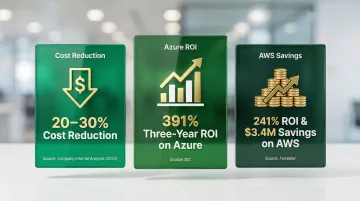
- Cloud migration drives an average 20-30% reduction in costs compared to traditional on-premises infrastructure
- An IDC study on Microsoft Azure migrations revealed a 391% three-year ROI
- A Forrester Total Economic Impact study on AWS Cloud Operations demonstrated a 241% ROI and $3.4 million in cost savings
Elastic Scalability
On-premises data centers force enterprises to purchase hardware based on maximum potential peak traffic, leading to massive inefficiencies. The Uptime Institute reports that one in four data centers typically operates at under 40% utilization. Cloud elasticity directly addresses this over-provisioning waste by allowing resources to scale up and down dynamically.
Consider a retail company handling a flash sale: during the Black Friday and Cyber Monday weekend, Shopify processed over $1.5 billion in merchandise on Google Cloud Platform, handling nearly 11,000 orders per minute and 100,000 requests per second without incident. By relying entirely on GCP rather than legacy data centers, Shopify eliminated the risk of performance degradation during peak traffic while avoiding the cost of idle capacity during slow periods.
Enhanced Security and Compliance
Leading cloud providers invest heavily in security capabilities—including encryption, multi-factor authentication (MFA), automated patching, and compliance certifications—that most organizations could not afford to replicate on-premises.
Azure maintains the largest compliance portfolio in the industry across more than 60 regions, while AWS supports 143 security standards and compliance certifications.
However, security operates under a shared responsibility model:
- Provider ("Security OF the cloud"): Hardware, software, networking, and facilities that run cloud services
- Customer ("Security IN the cloud"): OS configuration, application software, firewall rules, data encryption, and access management
Misconfigurations by the customer remain the primary vulnerability. IBM's 2024 Cost of a Data Breach Report found that 40% of breaches involved data stored across multiple environments (public cloud, private cloud, and on-premises), costing over $5 million on average.
Improved Performance and Availability
Enterprise workloads require stringent uptime guarantees. Major cloud providers back their infrastructure with financially backed Service Level Agreements (SLAs) that far exceed typical on-premises capabilities:
- AWS EC2: 99.99% uptime across multiple Availability Zones (AZs)
- Azure Virtual Machines: 99.99% uptime across multiple AZs
- GCP Compute Engine: 99.99% uptime (Premium Tier, Multiple Zones)
Globally distributed data centers and Content Delivery Network (CDN) capabilities reduce latency, improve load times, and enable near-continuous uptime.
Disaster recovery also shifts from expensive standby infrastructure to automated, software-driven replication. AWS Elastic Disaster Recovery enables recovery point objectives (RPOs) of seconds and recovery time objectives (RTOs) of minutes, while Azure Site Recovery uses real-time replication to meet similarly aggressive targets.
Business Agility and Access to Innovation
Reliable infrastructure is only part of the value. The bigger competitive advantage comes from what that infrastructure unlocks: access to advanced Platform as a Service (PaaS) offerings—specifically Artificial Intelligence (AI), Machine Learning (ML), and serverless computing. According to Flexera's 2025 State of the Cloud Report, 79% of organizations are using or experimenting with AI and ML PaaS services, and 72% use Generative AI.
This access directly accelerates innovation timelines. McKinsey reports that companies adopting cloud platforms can bring new capabilities to market 20-40% faster. A Forrester study on AWS Marketplace noted a 30% faster time to market for development tools. In practice, A+E Networks migrated to a serverless architecture using Amazon DynamoDB and AWS Lambda, which sped up product deployment from hours to minutes and allowed them to launch a new application in just six months.
Cloud Migration Strategies: The 7Rs Explained
The framework for categorizing how applications are moved to the cloud originated with Gartner's "5 Rs" in 2010. AWS expanded this to the "6 Rs" in 2016 and finally the "7 Rs" in 2017. This industry-standard approach helps organizations determine how each application or workload should be handled during migration. No single strategy fits all workloads—a mix is typically used within the same migration program.
Rehosting and Relocating
Rehosting (Lift and Shift): Moves applications to the cloud with no modification to code or architecture. This is the fastest migration path, best suited for large-scale programs where exiting a data center quickly takes priority. The trade-off: it may not unlock cloud-native benefits like auto-scaling or managed services.
Relocating (Lift and Optimize): Applications move as-is, then transition to cloud-native services post-migration—for example, moving from a self-managed VM to a managed database, or transferring VMware workloads to VMware Cloud on AWS. It's a pragmatic middle step that captures early speed without abandoning longer-term optimization goals.
Refactoring and Replatforming
Refactoring (Rearchitecting): The most transformative strategy—rearchitecting applications to be cloud-native, often decomposing monolithic apps into microservices or serverless functions. Best suited for applications that need improved performance, scalability, or new features that the legacy architecture cannot support. While this requires the highest upfront investment, it delivers the greatest long-term ROI and lowest operational costs.
Replatforming (Lift, Tinker, and Shift): Makes targeted optimizations—such as swapping a manual database for an autonomous cloud database with built-in machine learning—without a full redesign. According to a Red Hat survey, 47% of companies plan to replatform before refactoring. The staged approach lets teams capture meaningful cloud gains without committing to full rearchitecture upfront.
Repurchasing, Retiring, and Retaining
Repurchasing: Replacing an existing on-premises application with a cloud-based SaaS solution. For example, switching from an on-premises CRM to Salesforce or Microsoft Dynamics. This often means retiring existing software licenses and can accelerate time-to-value by eliminating custom code maintenance.
Retiring: Decommissioning workloads that are redundant or no longer needed, reducing migration scope and cost. Organizations often discover "zombie" applications during the assessment phase that consume resources but deliver no business value.
Retaining: Deliberately leaving certain workloads on-premises for now—often recently upgraded systems or those with regulatory constraints. Periodically reassess retained workloads as cloud capabilities evolve and compliance frameworks adapt.
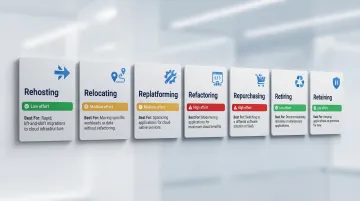
Here's a quick-reference summary of all seven strategies:
| Strategy | Effort Level | Best For |
|---|---|---|
| Rehosting | Low | Speed-driven data center exits |
| Relocating | Low–Medium | Incremental cloud optimization post-move |
| Replatforming | Medium | Targeted gains without full redesign |
| Refactoring | High | Performance-critical or scalability-constrained apps |
| Repurchasing | Medium | Replacing legacy software with SaaS |
| Retiring | Low | Eliminating redundant or unused workloads |
| Retaining | None | Regulated or recently upgraded systems |
Types of Cloud Migration
Not all migrations follow the same path. The right migration type depends on what you're moving, where it's going, and how much disruption you can tolerate.
Application and Database Migration
Application migration moves apps between environments using rehosting, replatforming, or refactoring approaches. Database migration transfers data stores with careful attention to schema transformation, data integrity, and downtime minimization.
Key considerations for this migration type:
- Schema compatibility between source and target environments
- Data integrity validation before and after transfer
- Dependency mapping for tightly coupled legacy systems
- Downtime windows, especially for production databases
Legacy mainframe migrations sit at the complex end of this spectrum — they typically require specialized tooling to untangle decades of undocumented dependencies.
Hybrid and Data Center Migration
Hybrid cloud migration moves select workloads to the cloud while keeping others on-premises. For most enterprises, this is the first phase of a longer migration journey — not a final destination.
Full data center migration takes this further, moving an entire physical infrastructure (servers, storage, networking) to the cloud. This scope demands the broadest application of the 7Rs framework across the whole IT estate and requires detailed inventory assessment upfront.
Cloud-to-Cloud Migration
Organizations switch cloud providers to cut costs, access better services, meet regulatory requirements, or consolidate infrastructure after a merger. Common decision factors include egress fees, data transfer speed, downtime risk, and long-term vendor lock-in exposure.
This migration path has become routine: 89% of enterprises now operate in a multi-cloud environment, which means most organizations will navigate at least one cloud-to-cloud move during their digital transformation lifecycle.
The Cloud Migration Process: Step by Step
The migration process follows a three-phase framework used by leading cloud practitioners. AWS calls this the Migration Acceleration Program (MAP) framework: Assess, Mobilize, and Migrate & Modernize. Azure's Cloud Adoption Framework (CAF) follows a similar methodology. While the phases are sequential, they often overlap and require continuous iteration.
Phase 1: Assess
The assessment phase is the foundation of successful migration. McKinsey found that inefficiencies in coordinating migrations cost the average company 14% more in migration spend than planned each year, and rushing this phase is one of the top causes of failed migrations.
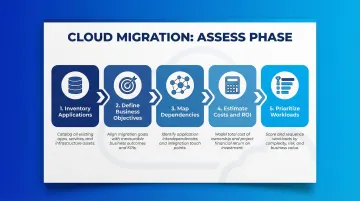
Key activities include:
- Inventory all applications and workloads - Document every system, database, and integration point
- Define business objectives - Establish clear success criteria beyond "move to cloud"
- Identify technical dependencies and compatibility constraints - Map application interdependencies to prevent outages
- Estimate migration costs and expected ROI - Calculate Total Cost of Ownership (TCO) including staffing, tooling, and downtime
- Prioritize workloads - Rank based on business value, migration complexity, and risk tolerance
Organizations that skip or rush this phase face severe consequences: 75% of cloud migrations run over budget, and 38% are delayed by more than a quarter.
Phase 2: Mobilize
The mobilization phase prepares both the organization and the technical environment for migration.
Key activities include:
- Building the cloud team - Assemble architects, developers, security leads, and DevOps engineers with appropriate cloud expertise
- Developing a detailed migration plan - Create timelines, milestones, and wave groupings for workload migration
- Configuring the cloud environment securely - Establish the landing zone with proper network segmentation, identity management, and governance policies
- Running pilot migrations - Validate the strategy on lower-risk workloads before full-scale execution to refine cost models and identify unforeseen issues
According to Flexera's 2025 State of the Cloud Report, 75% of organizations cite a lack of resources or expertise as a top cloud challenge, making the mobilization phase critical for addressing skills gaps through training or partnerships.
Phase 3: Migrate and Modernize
The execution phase applies lessons from pilots to migrate workloads at scale.
Key activities include:
- Migrating workloads in waves - Execute migrations in prioritized groups, monitoring each wave before proceeding
- Optimizing application architecture - Take advantage of cloud-native features like auto-scaling, managed databases, and serverless computing
- Continuously monitoring performance, security, and costs - Implement FinOps practices to prevent the 27% cloud waste that Flexera reports organizations experience post-migration
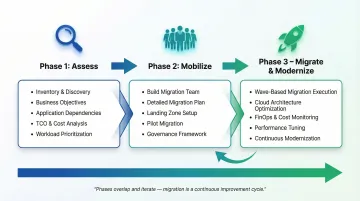
Migration is not the finish line—ongoing modernization and optimization are critical to realizing long-term cloud value. Vorstel Technologies supports clients at any stage of this journey—whether that's scoping the initial assessment, configuring a secure landing zone, or optimizing architecture post-migration—bringing cloud and infrastructure expertise directly to where it's needed.
Common Challenges and How to Overcome Them
Technical Complexity and Skills Gaps
Legacy system interdependencies, incompatible architectures, and in-house teams unfamiliar with cloud platforms are among the most common blockers. HashiCorp reports that 64% of respondents do not have the staff expertise needed to support their cloud infrastructure strategy.
Practical steps include:
- Map application dependencies during the assess phase using automated discovery tools to document relationships before any workload moves
- Migrate in small waves rather than a single "big bang" cutover — this limits simultaneous risk and makes rollback manageable
- Close the skills gap through targeted cloud training or by partnering with a migration consultancy that can accelerate ramp-up
AWS now offers AI tools like AWS Transform that use agentic AI to automate dependency mapping and code refactoring, saving thousands of hours of manual effort.
Security, Compliance, and Data Integrity Risks
Data exposure, data loss, and regulatory non-compliance during migration are significant risks — particularly when moving sensitive workloads. As noted earlier, 80% of organizations experienced a cloud security breach in the past year.
One foundational step: train IT teams on the shared responsibility model — the line between "security OF the cloud" (provider's obligation) and "security IN the cloud" (your obligation) is where most breach exposure lives.
To stay protected:
- Verify a provider's compliance certifications match your regulatory obligations before signing any agreement
- Implement data classification policies alongside Identity and Access Management (IAM) controls from day one
- Validate data integrity and security posture at every migration wave checkpoint — not just at the end
Cost Overruns and Scope Creep
Cloud migration costs can spiral without a clear budget framework and scope definition. A 2025 CloudBees study found that 57% of IT leaders spent over $1 million on platform migrations in the last year, facing an average project cost overrun of 18%. McKinsey estimates that these cost overruns add up to more than $100 billion in wasted spend globally over a three-year period.
Keep costs in check by:
- Calculate total migration cost upfront — include staffing, tooling, downtime, and "bubble costs" where on-premises and cloud environments run in parallel
- Run pilot migrations to validate cloud resource consumption assumptions before committing to full-scale execution
- Adopt a cloud governance framework post-migration, including automated rightsizing policies and a FinOps function to catch runaway spend early
Vorstel's Zero-Fee Solution Evaluation allows organizations to pressure-test their migration approach with expert guidance before committing resources, helping to identify potential cost overruns early.
Frequently Asked Questions
What is cloud migration?
Cloud migration is the process of moving digital assets—data, applications, and IT infrastructure—from on-premises environments to a cloud platform, or between cloud providers, to improve agility, scalability, and cost efficiency.
What are the common cloud migration strategies?
The 7Rs framework covers Rehosting, Relocating, Replatforming, Refactoring, Repurchasing, Retiring, and Retaining. Most organizations apply a mix of these strategies based on each workload's complexity, cost, and cloud-readiness.
What are the different types of cloud migration?
The five main types are application migration, database migration, hybrid migration, data center migration, and cloud-to-cloud migration. Each addresses a different scope—from moving a single workload to relocating an entire physical infrastructure.
What is the process of cloud migration?
Cloud migration follows three phases: Assess (inventory and prioritize workloads, define business objectives, estimate costs), Mobilize (prepare teams, configure cloud environment securely, run pilot migrations), and Migrate & Modernize (execute at scale, optimize architecture, continuously monitor performance and costs).
How much does cloud migration cost?
Migration costs vary based on workload count, chosen strategy, staffing, tooling, data volume, and legacy system complexity. DuploCloud estimates the average enterprise migration costs around $1.2 million. A detailed cost assessment with your cloud provider or consulting partner is the best starting point.
What are cloud migration services?
Cloud migration services are professional or managed offerings—from cloud providers or consultancies—covering assessment, architecture design, data transfer, security configuration, testing, and post-migration support. The goal is to minimize disruption and keep performance stable throughout the transition.