Introduction
Cloud migration is one of the most consequential decisions an organization can make—yet 50% of cloud-native transformations fail, not because of technology limitations, but because of missing or poorly defined strategies. The stakes are high: mismanaged migrations lead to prolonged downtime, budget overruns, and critical security gaps.
For 90% of mid-size and large enterprises, a single hour of downtime costs over $300,000. That number alone makes "all-at-once" Big Bang migrations an unacceptable risk for most organizations.
This article covers what a cloud migration strategy is, the 7 Rs framework for choosing the right approach, how the process unfolds phase by phase, what it costs, and the pitfalls that derail even well-funded projects.
Key Takeaways
- A cloud migration strategy documents how workloads, applications, and data move from on-premises infrastructure to the cloud
- The 7 Rs (Rehost, Replatform, Refactor, Repurchase, Relocate, Retain, Retire) define strategic approaches for each workload
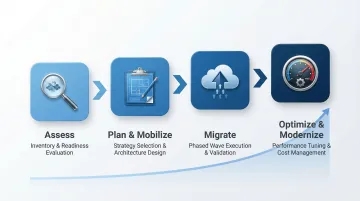
- Migration follows four phases: Assess, Mobilize, Migrate, and Optimize
- Costs vary by scope and provider; pricing calculators and TCO comparisons give the most reliable estimates
- Proper planning eliminates compatibility issues, vendor lock-in, security gaps, and budget overruns before they occur
What Is a Cloud Migration Strategy?
A cloud migration strategy is a documented roadmap for moving digital assets—applications, databases, networking, and security infrastructure—from on-premises environments to the cloud. It also covers cloud-to-cloud migrations, where organizations shift between providers or consolidate multi-cloud setups.
Why Strategy Matters as Much as Technology
Organizations that attempt to migrate without a structured plan run into costly disruptions, data loss risks, and misaligned infrastructure. The strategy component matters because technology execution alone cannot compensate for poor planning. According to CIO Dive, failures occur most often when technology initiatives are not aligned with business objectives.
One of the clearest business drivers is the shift from capital to operational spending. Instead of large, one-time investments in hardware and data centers, cloud infrastructure converts those costs into predictable, flexible recurring expenses. 50% of organizations now prefer to fund tech infrastructure as an operating expense rather than a capital one — a model that makes budgeting more agile and easier to scale.
Core Benefits of a Well-Executed Strategy
- Cost reduction through elimination of hardware refresh cycles and data center overhead
- Scalability with elastic resources that grow or shrink based on demand
- Faster performance with reduced latency through managed services
- Compliance readiness through built-in governance and audit tools
- Enhanced security posture with identity management and encryption
- AI/ML capabilities unlocked through access to advanced cloud services
The 7 Rs of Cloud Migration Strategy: Choosing the Right Approach
The 7 Rs framework is the industry-standard way to categorize migration approaches for each workload or application. Not every application should be migrated the same way—the right "R" depends on the application's age, architecture, business criticality, and cloud-readiness.
The framework originated in 2010 when Gartner introduced the "5 Rs" (Rehost, Refactor, Revise, Rebuild, Replace). AWS expanded it to the "6 Rs" in 2016 by adding "Retire," then finalized the modern "7 Rs" in 2017 by adding "Retain."
Enterprise migration portfolios show a preference for incremental modernization. A 2024 Konveyor report found that replatforming is the most common approach at 20%, with pure refactoring at 15%.
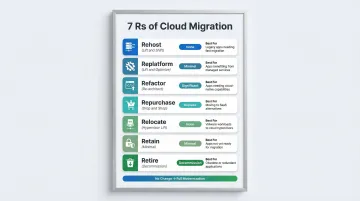
The seven strategies divide into two practical groups: the first three address how much you change the application code; the last four address what you do with the application itself. Here's a quick reference before the breakdown:
| Strategy | Nickname | Code Change | Best For |
|---|---|---|---|
| Rehost | Lift and Shift | None | Speed, predictable workloads |
| Replatform | Lift and Optimize | Minimal | Performance gains without full rebuild |
| Refactor | Re-architect | Significant | Legacy modernization, cloud-native capabilities |
| Repurchase | Drop and Shop | Replace entirely | Standardized business functions (CRM, ERP) |
| Relocate | Hypervisor Lift | None | VMware environments, hardware refresh avoidance |
| Retain | — | None | Compliance, dependency, or cost constraints |
| Retire | — | Decommission | Unused or underutilized applications |
Rehost, Replatform, and Refactor
Rehost (Lift and Shift) moves applications to the cloud as-is with no code changes. A Palo Alto Networks survey indicates that 36% of applications are deployed this way—making it the most widely used entry point. The tradeoff: it skips cloud-native capabilities entirely and often creates technical debt that requires attention later.
Replatform (Lift and Optimize) involves targeted modifications—such as migrating to managed databases or containers—without fully rearchitecting. It captures meaningful performance gains while avoiding the cost and complexity of a ground-up rebuild.
Refactor / Re-architect means rewriting or restructuring application code to be cloud-native: breaking monolithic apps into microservices, containerizing workloads, and enabling auto-scaling. This is the right call for legacy systems where cloud-native capabilities like AI/ML or elasticity are strategically important. Highest effort of the three—and highest long-term ROI.
Repurchase, Relocate, Retain, and Retire
Repurchase (Drop and Shop) replaces an on-premises application with a SaaS equivalent—moving a legacy CRM to Salesforce, for example, or shifting an on-prem ERP to a cloud-hosted SAP version. It's often the fastest route for standardized business functions where customization isn't a priority.
Relocate is a hypervisor-level lift-and-shift, most commonly used to move VMware workloads to cloud-based VMware environments. Useful when organizations need to avoid a hardware refresh cycle with minimal operational disruption.
Retain means keeping certain applications on-premises. Keep applications on-premises when compliance requirements, dependency chains, or cost projections make migration premature. It's a deliberate holding decision, not a failure to act—and it keeps migration scope manageable.
Retire covers decommissioning applications that are no longer needed. AWS defines "zombie applications" as prime retirement candidates—average CPU and memory usage below 5%; applications between 5% and 20% usage over 90 days qualify as "idle" and should also be evaluated for retirement. Cutting these frees up budget and narrows the migration scope significantly.
The Cloud Migration Process: Four Key Phases
Cloud migration is not a single event—it is a phased program. Organizations that treat it as a "big bang" cutover face higher risk. The four phases build on each other sequentially.
Phase 1 – Assess
Start by taking a full inventory of current IT assets: applications, servers, databases, dependencies, and security policies. From there, identify cloud-eligible workloads, map application interdependencies, and evaluate security and compliance requirements.
Cloud Readiness Assessment Dimensions:
- Business goals alignment
- People and skills availability
- Governance frameworks
- Platform compatibility
- Security posture
- Operational readiness
Tools like AWS Cloud Readiness Assessment or Azure Migrate support this phase by automating discovery and dependency mapping.
Phase 2 – Plan and Mobilize
Planning centers on selecting migration strategies (the 7 Rs) for each workload, designing the target cloud architecture (compute, networking, storage, security), and building a phased migration timeline with clear milestones.
Key Planning Activities:
- Set measurable KPIs (application response time, error rates, monthly downtime, storage costs)
- Prioritize low-risk, high-value workloads for early migration waves
- Define rollback procedures and stakeholder sign-off checkpoints before each wave
- Design landing zones with security and identity management
Phase 3 – Migrate
Execute migration in waves rather than all at once. Each wave is validated before proceeding, lessons learned from early waves are applied to later ones, and parallel environments are maintained temporarily for critical systems.
Migration Tools:
- AWS Transform: As of November 2025, AWS Migration Hub is no longer open to new customers and has been replaced by AWS Transform, an agentic AI service that automates discovery, planning, and execution
- Azure Migrate: Central hub for discovering, assessing, and migrating on-premises servers, with Wave Planning introduced in late 2025
- Google Migration Center: Unified platform providing rapid cost estimation, automated asset discovery, and technical fit assessments
Phase 4 – Optimize and Modernize
Once workloads are live, the focus shifts to continuous performance monitoring, cost optimization (rightsizing, reserved instances, autoscaling), security validation, and gradually modernizing legacy workloads that weren't refactored during migration.
Critical Point: Most cloud cost overruns emerge in the months after migration — not during it. Treat optimization as a standing workstream, with regular rightsizing reviews and autoscaling policies tuned to real usage patterns.
How to Build a Cloud Migration Plan
A cloud migration plan is the tactical document that puts into action the strategy. It should include a workload inventory with assigned migration strategy (the 7 Rs), responsible team members, estimated timelines per phase, dependencies, rollback procedures, and a budget estimate.
The Migration Business Case
A migration business case justifies the migration to stakeholders with expected costs, projected savings, risk analysis, and ROI timeline. This document secures executive buy-in and aligns technology initiatives with business objectives.
Selecting the Right Cloud Model and Provider
Cloud Model Options:
- Public cloud (AWS, Azure, Google Cloud)
- Private cloud
- Hybrid cloud
- Multicloud
Key Selection Criteria:
- Regulatory and compliance requirements
- Workload performance needs
- Licensing constraints
- Geographic data residency requirements
- Existing technology investments (e.g., Microsoft stack may reduce friction with Azure)
Many enterprises opt for hybrid or multicloud architectures to balance control and flexibility.
Phased, Wave-Based Migration Over Big Bang
Each wave should be defined, tested, validated, and documented before the next begins. A "Big Bang" approach migrates all workloads simultaneously, which creates high initial disruption, amplifies the blast radius of any failure, and creates serious user adoption challenges.
Wave-Based Advantages:
- Groups applications by dependency and business value
- Allows testing, validation, and rollback capabilities
- Reduces risk by isolating failures to individual waves
- Builds organizational confidence through early wins
Include disaster recovery plans and rollback procedures for each phase.
How Vorstel Supports Cloud Migration Planning
Vorstel Technologies' cloud and infrastructure consulting services support organizations at any stage of the planning process — from initial cloud readiness assessment through phased execution. With 30+ global clients served and a track record of 92% faster deployment cycles compared to industry averages, Vorstel brings both strategy and execution expertise to reduce risk across complex migrations for enterprises and fast-moving startups.
Organizations can also use Vorstel's Zero-Fee Solution Evaluation to get expert guidance on scoping and estimating their cloud migration before committing to a budget.
Cloud Migration Costs: What to Budget For
Managing cloud spend is the top challenge for 84% of organizations. Cloud migrations consistently exceed financial projections, with average projects running 17% to 18% over budget.
Main Cost Categories
- Assessment and Planning — Internal labor, third-party consulting fees, and discovery tooling
- Migration Execution — Data transfer fees, parallel environment costs, downtime exposure, and tooling subscriptions
- Ongoing Cloud Operations — Compute instances, storage, networking, and managed service subscriptions
- Training and Change Management — Cloud operations training, certifications, and organizational readiness
Why Costs Are Underestimated
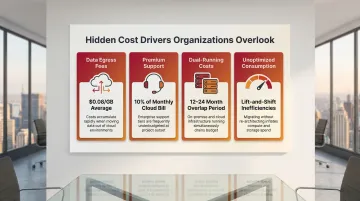
Organizations focus on licensing savings but overlook critical cost drivers:
- Data egress fees: Moving data out of a provider's network averages $0.08 per GB
- Premium support: Enterprise-grade support typically consumes 10% of the total monthly cloud bill
- Dual-running costs: Organizations pay for both on-premises infrastructure and cloud services simultaneously during 12-24 month migration periods
- Unoptimized consumption: Lift-and-shift migrations transfer inefficiencies into consumption-based billing models
Total Cost of Ownership (TCO) Comparison
These hidden drivers make on-premises infrastructure more expensive than it appears on paper. A comprehensive 5-year TCO model must account for:
- Hardware depreciation and refresh cycles
- Maintenance contracts (10-15% of purchase price annually)
- Power and cooling (facility PUE of 1.56 adds significant overhead)
- Staffing overhead for patching, backups, and compliance
Cost Estimation Tools
Run both scenarios side-by-side before committing to a migration timeline — the gap between perceived and actual on-premises costs often changes the business case.
Common Cloud Migration Challenges (and How to Address Them)
Application Compatibility
Legacy or custom-built apps may not function in cloud environments without significant refactoring. Thorough dependency mapping during the assessment phase helps identify which applications need code changes before they move.
Security and Compliance Gaps
Cloud security operates differently from on-premises. Gartner predicts that through 2025, 99% of cloud security failures will be the customer's fault. Identity and Access Management (IAM) becomes the new security perimeter.
Google Cloud threat intelligence reveals that weak or absent credentials account for 47.1% of observed cloud security incidents, while misconfigurations represent 29.4%. To close these gaps, organizations should:
- Enforce the Principle of Least Privilege across all user and service accounts
- Use automated posture management tools to continuously audit permissions
- Treat IAM policy reviews as an ongoing process, not a one-time setup
Cost Overruns
Cloud pricing models are complex, and organizations frequently overprovision at the start — resulting in bills that exceed projections. Keep costs in check by:
- Monitoring spend regularly with native cost management tools
- Rightsizing instances based on actual usage data
- Leveraging reserved instances for predictable workloads
- Implementing autoscaling to avoid paying for idle capacity
Skills Gaps and Organizational Resistance
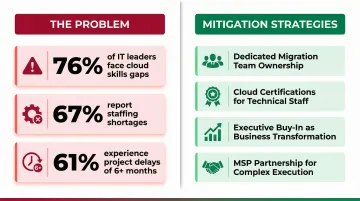
76% of IT decision-makers face critical skills gaps in cloud computing, with 67% of organizations reporting overall staffing shortages. This leads to project delays of six months or more for 61% of IT leaders.
Mitigation Strategies:
- Establish a dedicated migration team with clear ownership
- Invest in cloud certifications for key technical staff
- Position the migration as a business transformation initiative to secure leadership buy-in
- Consider partnering with Managed Service Providers (MSPs) to handle complexity
Vendor Lock-In Risk
Building deep dependencies on one cloud provider's proprietary services can limit future flexibility. Reduce vendor lock-in risk by:
- Using Docker containers and Kubernetes for application portability
- Building on open standards like SQL, Linux, and REST APIs
- Defining resources using Infrastructure as Code (IaC) tools like HashiCorp Terraform
- Enforcing uniform bucket-level access and data portability controls
Frequently Asked Questions
What is cloud migration strategy and process?
A cloud migration strategy is a documented plan for moving IT assets to the cloud — structured, low-risk, and aligned with business goals. It covers everything from initial readiness assessment through phased execution to post-migration optimization.
What are the steps in cloud migration?
Cloud migration follows five core steps:
- Assess current infrastructure and cloud readiness
- Select migration strategies per workload using the 7 Rs framework
- Execute migration in phased waves
- Validate each wave before proceeding
- Optimize post-migration for cost efficiency and performance
What are the 4 phases of cloud migration?
The four phases are Assess (inventory and readiness evaluation), Plan/Mobilize (strategy selection and architecture design), Migrate (phased execution and validation), and Optimize/Modernize (ongoing performance tuning and cost management). Skipping or rushing any phase typically surfaces as cost overruns or performance issues post-launch.
What are the 7 cloud migration strategies?
The 7 Rs are Rehost (lift and shift), Replatform (lift and optimize), Refactor (re-architect for cloud-native), Repurchase (replace with SaaS), Relocate (hypervisor-level shift), Retain (keep on-premises temporarily), and Retire (decommission obsolete applications). Each applies to different workloads depending on complexity, business value, and cloud compatibility.
What are the 6 R's of cloud migration strategy?
The 6 Rs is a condensed version of the 7 Rs framework (often omitting Relocate) and includes: Rehost, Replatform, Refactor, Repurchase, Retain, and Retire. The choice of framework depends on which cloud provider or consultant you're working with, though the 7 Rs has become the modern standard.