Introduction
As companies scale, business leaders face a critical technology decision: CRM or ERP—or both? Many struggle with stagnant sales pipelines, fragmented customer data, inventory chaos, and delayed financial reporting all at once. Yet implementing both systems simultaneously risks organizational burnout, while choosing the wrong one first can cost months of productivity and significant capital.
Here's the core distinction:
- CRM (Customer Relationship Management) manages how your business interacts with customers — tracking leads, automating sales processes, and centralizing marketing campaigns. It's a front-office tool built for revenue generation.
- ERP (Enterprise Resource Planning) manages internal operations — finance, supply chain, inventory, HR, and procurement. It's a back-office tool built for operational efficiency.
They are not interchangeable, and most growing businesses eventually need both. The real question is which to prioritize first — and that answer depends entirely on where your biggest bottleneck sits right now. This guide breaks down the differences, trade-offs, and decision criteria to help you choose.
Key Takeaways
- CRM focuses on customer-facing processes — sales pipelines, marketing automation, and customer service
- ERP manages back-office operations — finance, inventory, supply chain, and HR
- Key difference: CRM drives revenue growth; ERP drives operational efficiency
- Most businesses need both eventually — prioritize based on your biggest bottleneck
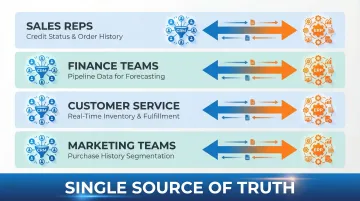
- Connecting CRM and ERP eliminates data silos and gives every team a single source of truth
CRM vs. ERP: Quick Comparison
Here's how CRM and ERP stack up across the dimensions that matter most to business decision-makers.
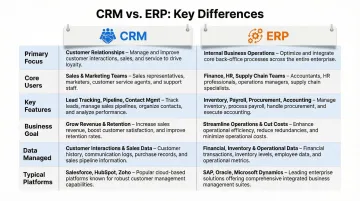
| Dimension | CRM | ERP |
|---|---|---|
| Primary Focus | Customer acquisition, retention, satisfaction | Operational efficiency, cost control, compliance |
| Core Users | Sales reps, marketing teams, customer service agents | Finance teams, operations managers, procurement, HR |
| Key Features | Lead tracking, sales automation, marketing campaigns, service tickets | Financial management, inventory control, supply chain, payroll |
| Business Goal | Increase revenue, improve customer relationships | Reduce costs, streamline operations, ensure compliance |
| Data Managed | Customer interactions, preferences, purchase history, communication logs | Invoices, inventory levels, payroll records, financial ledgers |
| Typical Platforms | Salesforce, Microsoft Dynamics 365 CRM, HubSpot | SAP, Oracle NetSuite, Microsoft Dynamics 365 ERP |
Note: Some platforms like Microsoft Dynamics 365 cover both CRM and ERP — but the two remain distinct modules with separate functions, users, and data sets.
What is CRM?
Customer Relationship Management (CRM) software centralizes and automates all customer-facing interactions—from lead generation and sales pipeline tracking to customer service tickets and marketing campaigns. For businesses where revenue growth depends on managing large volumes of customer relationships efficiently, CRM is essential infrastructure.
The global CRM market backs this up. According to Fortune Business Insights, the market was valued at $112.91 billion in 2025 and is projected to reach $320.99 billion by 2034, representing a 12.40% compound annual growth rate.
Core benefits linked to business outcomes:
- Improves sales forecast accuracy by up to 42%
- Cuts sales cycle length by 8-14 days on average through automated workflows
- Mobile CRM users hit quotas at a 65% success rate, versus 22% for non-users
- Companies implementing CRM report 21-30% increases in sales revenue
Use Cases of CRM
CRM touches your revenue process at every stage — from the first prospect interaction to post-sale retention. Here's where it typically does the most work:
- Tracking leads from first contact through closed deals
- Automating follow-up email sequences and task reminders
- Managing post-sale customer support tickets and service requests
- Running targeted marketing campaigns based on customer segments
- Generating pipeline analytics and revenue forecasts
The industries that get the most from CRM tend to share one thing: high-volume customer relationships where consistency matters.
- B2B sales organizations — complex sales cycles with multiple stakeholders require detailed opportunity tracking
- E-commerce companies — managing thousands of purchase histories and customer records at scale
- Retail businesses — running loyalty programs and personalized promotions across large customer bases
- Service companies — where repeat revenue and referrals depend on relationship quality
CRM platforms typically cover these core capabilities:
- Contact and account management with full interaction history
- Sales force automation — opportunity tracking, quote generation
- Marketing automation — email campaigns, lead scoring
- Customer service ticketing and case management
- Analytics dashboards for pipeline visibility and forecasting
What is ERP?
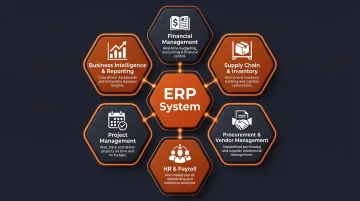
Enterprise Resource Planning (ERP) software connects and automates an organization's core back-office functions into a single shared database. Finance, supply chain, inventory, procurement, HR, and project management all feed into one system — eliminating data silos and giving every department access to the same operational picture.
The global ERP market was estimated at $77.08 billion in 2025, projected to reach $157.07 billion by 2033 at a 9.5% CAGR. Manufacturing currently represents the largest vertical for ERP adoption.
Core benefits linked to operational outcomes:
- 30% faster financial close by 2028, per Gartner, for organizations using AI-embedded cloud ERPs
- 91% of organizations report successful inventory optimization after ERP implementation
- 78% of companies report measurable operational efficiency gains
- 62% of businesses reduce costs, primarily in purchasing and inventory management
Use Cases of ERP
ERP touches nearly every department — here's where it delivers the most impact:
Primary applications include:
- Automating accounts payable/receivable and financial reconciliation
- Managing purchase orders and vendor relationships
- Tracking inventory across multiple warehouses in real time
- Running payroll and managing employee records
- Generating consolidated financial reports across business units
Industries where ERP is most critical:
- Manufacturing — complex supply chains, production planning, and material requirements
- Distribution — multi-warehouse inventory tracking and order fulfillment
- Retail — order fulfillment at scale with real-time inventory visibility
- Multi-national enterprises — consolidated financial reporting across countries and currencies
Core ERP modules typically include:
- Financial management (general ledger, AP/AR, asset management)
- Supply chain and inventory management
- Procurement and vendor management
- HR and payroll administration
- Project management and resource allocation
- Business intelligence and reporting dashboards
CRM vs. ERP: Key Differences That Actually Matter
Front-Office vs. Back-Office Distinction
The foundational difference: CRM supports revenue-generating, customer-facing departments (sales, marketing, customer service), while ERP supports operational and financial departments (finance, operations, HR, supply chain). They solve distinct problems.
CRM answers: Who are our customers? What's in our sales pipeline? How do we improve customer satisfaction?
ERP answers: What are our costs? Do we have inventory to fulfill orders? Are we compliant with financial regulations?
Scope and Data Handled
CRM manages customer data:
- Customer interactions and communication history
- Purchase preferences and buying patterns
- Sales opportunities and pipeline stages
- Marketing campaign responses
- Support tickets and service requests
ERP manages transactional and operational data:
- Financial ledgers and accounting records
- Inventory levels and warehouse locations
- Purchase orders and vendor invoices
- Payroll records and employee data
- Production schedules and material requirements
One boundary worth noting: ERP systems may include basic CRM modules for contact management, but CRM systems do not include ERP functionality or handle transactional financial data.
Primary Users
CRM users tend to cluster in customer-facing roles:
- Sales representatives tracking opportunities
- Marketing teams running campaigns
- Customer service agents managing tickets
- Sales managers forecasting revenue
ERP reaches further into the organization:
- Finance teams closing books and generating reports
- Operations managers tracking inventory
- Procurement officers managing purchase orders
- HR administrators running payroll
- Supply chain planners coordinating logistics
That broader ERP footprint is one reason implementations take longer — more departments means more stakeholders, more data migration, and more process alignment work upfront.
Why One Cannot Replace the Other
A company running only CRM gains visibility into its pipeline but loses unified financial and operational oversight. One running only ERP maintains tight control over costs and inventory while potentially under-serving the customer relationships driving revenue. The functions don't overlap enough for either system to substitute for the other.
Attempting to use ERP for sales pipeline management — or CRM for financial consolidation — typically results in data gaps, manual workarounds, and reporting blind spots that compound over time.
Which Should You Choose – CRM, ERP, or Both?
Choose CRM First If...
Your primary bottleneck is customer acquisition, sales pipeline visibility, or customer retention. This is common in:
- B2B service companies — Where sales cycles are complex and customer relationships drive revenue
- SaaS startups — Needing to scale customer acquisition rapidly
- E-commerce businesses — Managing large customer bases with personalised marketing
- Professional services firms — Where client relationships are the core asset
Start with CRM when speed matters: Implementing CRM first establishes a clean customer data foundation. These projects deliver faster time-to-value, and the revenue gains can fund the more capital-intensive ERP project later.
Choose ERP First If...
Your primary bottleneck is operational—fragmented financial data, supply chain inefficiencies, inventory problems, or scaling past what spreadsheets can manage. This is common in:
- Manufacturing companies — Managing complex supply chains and production planning
- Distribution businesses — Tracking multi-warehouse inventory
- Retail companies — Handling order fulfillment at scale
- Organizations with compliance requirements — Needing audit trails and financial controls
Prioritise ERP when operations are failing: Stockouts, delayed financial close, and compliance exposure can't wait for a CRM rollout. Fix the foundation first.
When You Need Both (And How Integration Works)
Most growing businesses eventually need both systems. When CRM and ERP data is integrated, the combined value is substantially greater than either system alone.
Integration benefits:
- Sales reps access customer credit status and order history from ERP while in CRM
- Finance teams see CRM pipeline data to improve revenue forecasting
- Customer service checks real-time inventory and order fulfillment status
- Marketing teams segment customers based on actual purchase history from ERP
According to MuleSoft's research, API-led connectivity platforms deliver a 445% ROI, returning $5.45 for every dollar spent on integration. Organizations also report 25% reductions in IT operational costs by eliminating manual data syncs.
Yet only 28–29% of enterprise applications are currently integrated — meaning most organizations are paying for two systems while capturing a fraction of the possible benefit.
Expert Guidance from Vorstel Technologies
Navigating that gap is where implementation experience matters most. Vorstel Technologies brings 200+ SAP ERP projects and a 95% Salesforce CRM implementation success rate to help businesses identify which system — or combination — fits their current stage of growth. For organizations unsure where to start, Vorstel offers a Zero-Fee Solution Evaluation: a structured expert consultation focused specifically on your CRM, ERP, or integration needs, delivered through virtual meetings with no upfront commitment.
Ready to make the right choice? Book a free consultation with Vorstel to map out your implementation roadmap.
Frequently Asked Questions
What is the difference between an ERP and CRM?
CRM manages customer-facing processes (sales, marketing, service) while ERP manages internal business operations (finance, supply chain, HR). Both are enterprise software solutions but serve distinct functions: CRM drives revenue growth, ERP drives operational efficiency.
What are the 4 types of CRM?
The four main CRM types are:
- Operational: Automates sales, marketing, and service processes
- Analytical: Analyzes customer data to surface actionable insights
- Collaborative: Improves information sharing across departments
- Strategic: Focuses on long-term customer relationship development
Can ERP replace CRM?
No. While some ERP systems include basic CRM modules for contact management, they cannot fully replace dedicated CRM platforms. CRM systems offer depth in customer interaction tracking, sales automation, and marketing tools that ERP systems are not designed to replicate.
Do I need both CRM and ERP for my business?
Most growing businesses will eventually need both. The decision of which to implement first depends on whether your primary pain point is customer revenue generation (CRM first) or internal operational efficiency (ERP first). Integration between both systems delivers the greatest value.
Can CRM and ERP systems be integrated?
Yes. CRM and ERP systems can be integrated either natively (when built on the same platform) or through middleware and API-led connectivity solutions. Integration enables direct data sharing between front-office and back-office teams, giving both sides a more complete picture for faster, better-informed decisions.