ERP implementation isn't a single event or a simple software installation. It's a structured, multi-phase transformation that touches every department—from finance and HR to supply chain and manufacturing. Success depends on how well you plan, execute, and support the process from day one through post-launch optimization.
This guide explains what ERP implementation is, breaks down the key phases, compares the four major methodologies, and identifies what separates successful deployments from costly failures.
Key Takeaways
- ERP implementation is the end-to-end process of deploying an enterprise resource planning system across your business functions
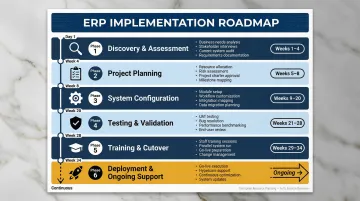
- Typical timeline spans 4 to 12 months across six phases: discovery, design, configuration, testing, deployment, and support
- Your deployment methodology — Big Bang, Phased, Pilot, or Hybrid — should match your organization's size and risk tolerance
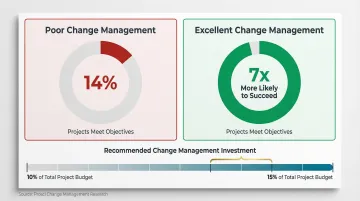
- Projects with excellent change management are seven times more likely to meet objectives
- Success hinges on executive sponsorship, experienced partners, clean data, and sustained change management
What Is ERP Implementation?
ERP implementation is the structured process of integrating an enterprise resource planning system into your organization's operations. It covers planning, configuration, data migration, user training, and go-live.
A successful implementation delivers a unified, real-time view of business operations. It eliminates data silos, reduces manual processes, and enables better decision-making across departments. Finance, HR, and supply chain stop operating in isolation — they share the same data, updated in real time.
Implementation differs from selection and maintenance:
- ERP selection ends when you choose the software
- ERP implementation is the bridge: getting the system live and operational
- ERP maintenance begins after the system stabilizes post-launch
Implementation is also where plans meet reality — budget overruns, scope creep, and data migration issues are among the most common obstacles organizations face before go-live.
The Key Phases of ERP Implementation
Most implementations follow a six-phase lifecycle. Skipping or rushing any phase is one of the most common causes of failure. Gartner warns that by 2027, more than 70% of recently implemented ERP initiatives will fail to fully meet their original business case goals, often because organizations underestimate the complexity of these phases.
Phase timelines overlap in practice, but the objectives hold regardless of whether you're deploying SAP, Microsoft Dynamics, Oracle, or another platform. Knowing what each phase demands — before you're in it — is what separates successful rollouts from costly overruns.
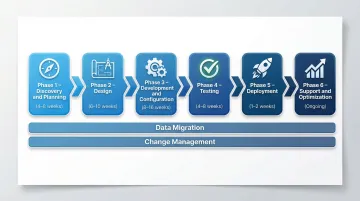
Two critical activities run across all phases:
- Data migration requires its own dedicated plan and runs in parallel across multiple phases to ensure data quality in the new system
- Change management is continuous, not a single phase—it requires clear internal communication and structured training from discovery through post-go-live
With those foundations in place, here's what each phase actually involves.
Going live is not the finish line — it marks the start of optimization, user adoption tracking, and continuous improvement. Keep that in mind as you work through each phase below.
Phase 1: Discovery and Planning
Establish your project team and set the foundation:
- Assign an executive sponsor, project manager, department representatives, and implementation partner
- Define business requirements and set scope boundaries
- Develop a realistic timeline and budget
- Research or finalize the ERP system to be deployed
Timeline: 4-8 weeks
Phase 2: Design
Map your current business processes against the new system's capabilities:
- Identify gaps requiring customization or process changes
- Develop a detailed blueprint for how the ERP will be configured
- Redesign workflows to align with system strengths
- Document all configuration decisions
This phase often takes longer than expected. Gaps between current processes and out-of-the-box ERP functionality are almost always more extensive than initial assessments suggest.
Timeline: 6-10 weeks
Phase 3: Development and Configuration
Configure the ERP system to align with the approved design:
- Build required customizations or integrations with third-party tools
- Begin developing training materials
- Initiate data cleansing in preparation for migration
- Set up user roles and permissions
Timeline: 8-16 weeks
Phase 4: Testing
Validate that the system works as designed:
- Conduct module-level testing followed by full end-to-end system testing
- Include user acceptance testing (UAT) with real staff
- Validate migrated data integrity
- Run parallel tests to catch workflow or integration issues before deployment
Timeline: 4-8 weeks
Phase 5: Deployment (Go-Live)
Execute the final cutover:
- Complete final data migration
- Provision user access
- Communicate the go-live plan to the organization
- Launch the system with project team and implementation partner on standby
Timeline: 1-2 weeks
Phase 6: Support and Optimization
Monitor, refine, and improve:
- Gather user feedback and resolve post-launch issues
- Provide ongoing training for new staff
- Monitor system performance against predefined KPIs
- Plan for future module expansions or capability upgrades
Timeline: Ongoing (first 3-6 months are critical)
ERP Implementation Methodologies: Choosing the Right Approach
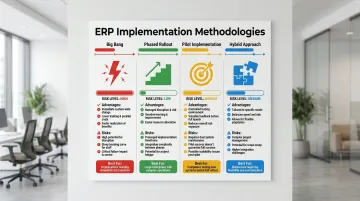
Selecting the right implementation methodology affects timeline, risk exposure, cost, and business continuity. The right choice depends on your organization's size, risk appetite, and operational complexity — there is no single answer that works for everyone.
Big Bang
All modules go live simultaneously across the entire organization on a single cutover date.
Advantages:
- Faster time-to-value
- Lower parallel-running costs
- Single training and communication effort
Risks:
- Highest risk—any failure at launch affects the entire business
- No room for incremental learning
- Maximum operational disruption
Best for: Smaller organizations with simpler processes and tight timelines.
Phased Rollout
The ERP system is deployed in stages — by module, department, or geography — allowing issues to be caught and resolved before the next phase begins.
Advantages:
- Lower risk
- Time to fix issues before they cascade
- Employees adapt gradually
Risks:
- Slower overall timeline
- Higher operational costs due to maintaining legacy and new systems concurrently
- Requires strong integration between old and new systems
Best for: Large or complex enterprises managing multiple business units or locations.
Pilot Implementation
A single business unit or location deploys the ERP first as a controlled test before company-wide rollout.
Advantages:
- Generates real-world feedback at lower risk
- Validates configurations before full commitment
- Builds stakeholder confidence before full commitment
Risks:
- Pilot site may not represent all business scenarios
- Adds time to overall deployment
- Requires careful selection of pilot location
Best for: Organizations where stakeholders need confidence before committing to full deployment.
Hybrid Approach
Combines elements of multiple strategies — for example, a phased rollout for core modules with a big bang for a specific subsidiary.
Advantages:
- Maximum flexibility to balance speed, risk, and cost
- Tailored to specific organizational context
- Can adapt to different business unit needs
Risks:
- Introduces complexity in resource allocation
- Requires robust integration tools
- Demands strong project management
Best for: Global enterprises with diverse operational environments. According to the 2024 ERP Report by Panorama Consulting Group, the hybrid approach is now the most widely adopted strategy, with fewer than one in four organizations still opting for a pure Big Bang implementation.
Key Factors That Determine ERP Implementation Success
Executive Sponsorship and Organizational Buy-In
Surface-level buy-in rarely moves projects forward — active, visible C-suite sponsorship is what actually drives outcomes.
Prosci's research shows that effective executive sponsors increase a project's chances of achieving its intended business benefits from 25% to 85%. Projects with extremely effective sponsors meet or exceed their objectives 79% of the time, compared to just 27% for projects with ineffective sponsors.
What active sponsorship looks like:
- Champions the change across the organization
- Resolves resource conflicts quickly
- Maintains direct communication with project teams
- Communicates the strategic rationale repeatedly
Selection of an Experienced Implementation Partner
Sponsorship sets the strategic tone — but execution depends heavily on who leads the implementation. Attempting to implement an ERP system using only internal IT staff is a primary driver of failure. Organizations that engage experienced ERP consultants achieve an 85% success rate, whereas implementations without specialist guidance fail 50% of the time on their first attempt.
Vorstel Technologies draws on 200+ SAP project deployments, giving the team the pattern recognition to anticipate and address common failure points early in the engagement.
What to look for in a partner:
- Platform-specific expertise (SAP, Dynamics, Oracle, etc.)
- Proven track record across your industry
- Methodology alignment with your risk profile
- Post-go-live support capabilities
Data Quality and Migration Planning
83% of data migration projects either fail outright or significantly exceed their allocated budgets and timelines. Poor data migration is cited as a critical root cause in 38% of ERP implementation failures.
Many implementations stall or produce unreliable outputs because organizations migrate dirty, duplicate, or irrelevant legacy data. Data migration typically consumes 10-15% of the total project budget when handled comprehensively.
Data migration best practices:
- Cleanse data before migration, not after
- Transfer data selectively (not all historical records belong in the new system)
- Validate data integrity after migration
- Run parallel tests to catch discrepancies
Change Management and User Training
Clean data sets the technical foundation — but people determine whether the system actually gets used. Projects with excellent change management are approximately seven times more likely to meet objectives than those with poor change management.
Yet many organizations underinvest. The most common percentage of a project budget allocated to change management is just 10%, and companies that dedicate 10-15% to structured change management activities achieve dramatically better results.
Why training matters:
- Role-based training ensures relevance
- Superuser programs create internal champions
- Ongoing learning supports new hires and system updates
- Early involvement reduces resistance
Scope Management and Realistic Scheduling
Scope creep affects 57% of ERP projects and represents 25-30% of all project delays. Adding requirements mid-project without adjusting timelines or resources is one of the most common causes of cost overruns.
Average implementation timelines:
- Small and midsize businesses: 3 to 9 months
- Large enterprises: 6 to 18 months
- Industry median: 15.5 months
Scope management best practices:
- Define clear go/no-go criteria early
- Document all change requests with impact assessments
- Revisit the schedule at key milestones, not only at go-live
- Resist the temptation to add "just one more feature"
Common ERP Implementation Mistakes and Misconceptions
Treating Go-Live as the End of the Project
One of the most persistent misconceptions is that implementation is complete the day the system goes live. In practice, the go-live date marks the beginning of a new phase — not the finish line.
Post-launch support, user adoption monitoring, and iterative optimization determine whether the organization actually realizes the value it invested in. The first 3–6 months after go-live are critical for stabilization and improvement.
Migrating All Legacy Data Without Cleansing or Rationalization
Organizations often assume that more data migrated equals more value. Migrating outdated, duplicate, or irrelevant records creates system noise, slows performance, and introduces errors that compound over time.
The transition is an opportunity to clean up the data estate, not just copy it. Teams uncover data quality issues in 85% of projects during migration — and fixing them mid-stream is far costlier than addressing them before cutover.
Underestimating the Role of Change Management
Many implementation teams focus heavily on technical configuration while underinvesting in user readiness. Resistance from end users who weren't prepared or involved early is a leading cause of low adoption rates and unrealized ROI.
Involvement and communication must begin at phase one, not phase five. That means explaining the "why" behind process changes, not just rolling out training materials two weeks before launch.
Key change management actions that improve adoption:
- Assign internal ERP champions within each business unit
- Run workflow walkthroughs before go-live, not during it
- Create feedback loops so users can flag friction points early
- Tie adoption milestones to project success criteria
Conclusion
ERP implementation is a structured, multi-phase process that demands deliberate planning, the right methodology, experienced resources, and a commitment to change management. Done well, it reshapes how an organization operates — not just how its software runs.
Organizations that approach implementation strategically — rather than rushing to go-live — consistently achieve better adoption, faster ROI, and fewer post-launch disruptions. The ones that succeed treat it as a business transformation with technical components, not the other way around.
Before moving forward, it's worth anchoring on the factors that separate successful rollouts from costly ones:
- Define clear business objectives before selecting a system
- Secure executive sponsorship early and keep it visible throughout
- Invest in change management alongside technical configuration
- Plan for post-go-live stabilization, not just cutover day
- Measure outcomes against pre-defined success metrics
If your organization is evaluating ERP systems or needs an independent assessment of where to start, Vorstel Technologies offers a Zero-Fee Solution Evaluation — a no-cost expert review to assess readiness and identify the right implementation path for your specific context.
Frequently Asked Questions
What is an ERP implementation?
ERP implementation is the end-to-end process of deploying an enterprise resource planning system — covering planning, configuration, data migration, training, and go-live. It touches every department and typically takes several months from start to finish.
What are the stages of ERP implementation?
The six standard phases are discovery and planning, design, development and configuration, testing, deployment (go-live), and post-launch support and optimization. Phases may overlap depending on the methodology used.
What is the best ERP implementation methodology?
The right methodology depends on company size, risk tolerance, and complexity. Smaller organizations often benefit from a Big Bang approach, while larger enterprises typically favor Phased or Hybrid strategies.
What is ERP and how does it work?
ERP is software that integrates core business functions (finance, HR, supply chain, manufacturing, and more) into a single system. It enables real-time data sharing, process automation, and centralized reporting across the entire organization.
What are the four types of ERP?
The four common ERP deployment types are on-premises, installed on your own infrastructure; cloud-based, hosted by the vendor as a SaaS solution; hybrid, combining both environments; and two-tier, where headquarters runs a full ERP while subsidiaries use a lighter, separate system.