Introduction
Legacy systems and fragmented infrastructure are no longer just technical headaches—they're strategic roadblocks. According to a January 2025 IDC Survey Spotlight, organizations estimate that more than 37% of their application portfolios require modernization today, with roughly 33% projected to still need modernization in three years.
Gartner reports that about 40% of infrastructure systems carry technical debt concerns. The modernization backlog isn't shrinking; it's a permanent operational liability.
Azure Migrate is Microsoft's unified platform for moving from discovery and assessment to full cloud execution—covering servers, databases, web apps, SAP, Oracle, Linux, Java, .NET, and more. This guide breaks down how it works, what the latest AI-powered innovations deliver, and how to build a migration plan that actually ships.
Key Takeaways
- Azure Migrate is a free Microsoft platform centralizing discovery, assessment, and migration of on-premises workloads to Azure
- Supports servers, databases, web apps, SAP, Oracle, Linux, Java, .NET—all from a single hub
- Migration strategies match workloads using the 5 R's framework, with automated assessments selecting the right path
- New agentic AI features and GitHub Copilot integration are cutting migration timelines by weeks
- Consulting-led migrations reduce downtime and compress time-to-cloud
What Is Azure Migrate?
Azure Migrate is Microsoft's unified service for planning, assessing, and executing migrations of on-premises infrastructure—servers, databases, web apps, virtual desktops, and large offline data—to the Azure cloud platform. Originally announced in September 2017 as a basic migration tool, it has evolved into a full-stack migration platform.
In July 2023, Microsoft expanded the platform into the Azure Migrate and Modernize (AMM) program, adding deeper partner incentives, specialized workload support (including HPC, Oracle, Linux, SAP, and mainframe migrations), and modernization capabilities beyond simple lift-and-shift.
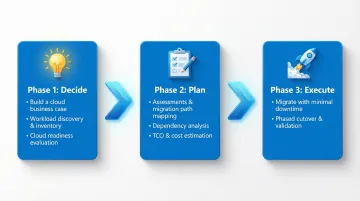
That expanded scope is organized through a structured approach designed to reduce guesswork at every stage. Azure Migrate guides teams through three phases:
- Decide - Build a business case, identify workloads through discovery, and evaluate readiness
- Plan - Assess workloads, map migration paths, analyze dependencies, and estimate costs
- Execute - Perform the actual migration with minimal downtime
Each phase draws on Microsoft-native tooling, third-party partner integrations, and specialized funding options from the AMM program—giving organizations a repeatable path from initial assessment through go-live.
Azure Migrate's Core Capabilities: Discover, Assess, and Execute
Continuous Discovery and Inventory
The lightweight Azure Migrate appliance performs agentless, continuous discovery of servers, databases, web apps, dependencies, and installed software across VMware, Hyper-V, physical servers, and other cloud environments (AWS, GCP)—without requiring agents on source machines. The appliance supports up to 10,000 servers per instance for VMware and 5,000 for Hyper-V.
Recent additions extend what the appliance can detect:
- Arc-based discovery for Azure Arc-enabled servers (currently in preview)
- SSH-based Linux server discovery (generally available as of July 2025), covering guest discovery, software inventory, and Java Tomcat application discovery
- Software inventory with security classification that maps OS versions and installed software to the National Vulnerability Database (NVD), surfacing CVEs by risk level
- Multi-server dependency visualization (public preview) that maps network connections across servers from different appliances, helping define application boundaries
Assessment and Business Case Building
Azure Migrate generates readiness assessments, right-sizing recommendations, and cost projections across multiple Azure targets, so teams can compare migration paths before committing resources:
- Azure VMs
- Azure SQL (Database, Managed Instance, or SQL on VM)
- Azure Kubernetes Service (AKS)
- Azure App Service
- Azure VMware Solution (AVS)
The Business Case feature produces a comprehensive financial projection including:
- On-premises vs. Azure Total Cost of Ownership (TCO) comparison
- Year-over-year cash flow analysis
- Savings from Azure Hybrid Benefit, Extended Security Updates (ESUs), and Azure savings plans for compute
IT and finance leaders can use these outputs to build a board-ready migration case, with specific savings figures tied to their actual infrastructure profile.
Migration Execution: Agentless vs. Agent-Based
Once the assessment is complete, Azure Migrate supports two execution methods depending on your environment:
Agentless migration — orchestrated through the virtualization platform with no software installed on source VMs. Recommended for VMware and Hyper-V environments.
Agent-based migration — installs Azure Migrate software directly on source machines. Used for physical servers, AWS/GCP VMs, or environments with storage IOPS constraints.
Test Migration feature allows teams to spin up cloned workloads in an isolated Azure sandbox environment to validate applications and catch configuration issues before the production cutover, reducing the risk of unexpected downtime.
Migration Strategies: Understanding the 5 R's of Azure Migration
While the industry commonly refers to the "5 R's," Microsoft's Cloud Adoption Framework officially endorses an 8 R's taxonomy. The core five remain the most widely applied:
The 5 R's framework:
- Rehost (lift-and-shift) - Move to Azure VMs with minimal changes; ideal for time-sensitive migrations where speed matters more than optimization
- Refactor - Minor code adjustments to leverage PaaS services; suitable when applications need modest updates to benefit from managed services
- Rearchitect - Redesign application architecture for cloud-native patterns; best when scalability and resilience are top priorities
- Rebuild - Rewrite the application from scratch on Azure; appropriate when legacy code is unmaintainable or blocking innovation
- Replace - Retire the legacy app and adopt an equivalent SaaS solution; makes sense for commodity functions like email or CRM
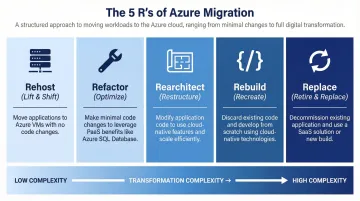
Choosing the right "R" for each workload is where Azure Migrate's assessment output earns its value. It flags migration blockers, estimates costs across target services, and scores readiness — giving teams a concrete basis for decisions rather than relying on assumptions or vendor recommendations alone.
The Wave Planning capability (public preview) extends this further for large organizations, letting teams apply different strategies to different workload groups and sequence migration waves by business criticality and complexity. In practice, this means lower-risk workloads move first, validating the process before business-critical systems follow.
What's New: Agentic AI and the Latest Azure Migrate Innovations
AI-Powered Guidance Embedded in Azure Migrate
Microsoft is integrating generative AI into the migration workflow to compress timelines and reduce manual effort. The new agentic AI capabilities (currently in preview) include:
- AI agents that automate key migration tasks
- Guided experience across planning and assessment phases
- Surface recommendations that reduce the expertise required to get started
GitHub Copilot integration creates a connected workflow between Azure Migrate and GitHub Copilot's app modernization agents for Java and .NET. IT teams planning infrastructure migration and developer teams modernizing application code can now work from a unified plan. Real-world impact: the Microsoft Teams organization cut months of .NET upgrade effort down to just hours using these capabilities.
Application-Awareness and Expanded Workload Support
The new application-awareness feature provides portfolio-wide visibility and deep per-application insights—mapping dependencies, grouping related resources, and surfacing migration readiness and recommended Azure targets for the full stack (app servers, web apps, databases together). This enables smarter, application-centric migration planning rather than treating each component in isolation.
Expanded database support includes:
- PostgreSQL discovery and assessment (on-premises, AWS, GCP to Azure Database for PostgreSQL flexible server) - public preview
- MySQL assessment for migration to Azure Database for MySQL - public preview
- Continued support for SQL Server, Oracle, and SAP workloads
Organizations with diverse data estates can now consolidate migration tooling into a single platform, reducing coordination overhead across teams.
Security, Compliance, and Governance Enhancements
Security insights capability (preview) auto-detects security risks in on-premises environments:
- Unsupported OS versions
- Unpatched software
- Known CVEs
- Security tooling fragmentation
Azure Migrate then recommends remediation steps including Microsoft Defender for Cloud onboarding, making security posture improvement a built-in part of migration planning rather than an afterthought.
New RBAC roles give organizations granular control over who can do what, supporting least-privilege access policies across migration teams:
- Full access across all phases — Azure Migrate Owner
- Discovery and assessment only — Azure Migrate Decide and Plan Expert
- Migration execution only — Azure Migrate Execute Expert
IaC-based Windows and Linux Server redeployment (preview) enables repeatable, automated migration pipelines using Infrastructure as Code templates—perfect for organizations managing multiple waves or standardized deployments.
The Business Case for Azure Migrate: Key Benefits
Cost Transformation
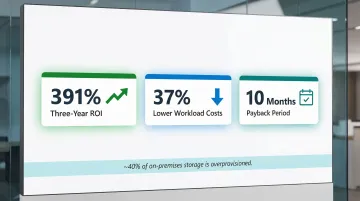
Azure Migrate helps organizations eliminate capital expenditure on aging hardware by shifting to Azure's pay-as-you-go model. An IDC Business Value study found that organizations migrating and modernizing on Azure achieved a 391% three-year ROI, a 10-month payback period, and 37% lower costs to run equivalent workloads.
The Business Case tool quantifies this shift with year-on-year cashflow analysis, factoring in:
- Savings from Azure Hybrid Benefit and Extended Security Updates
- Reserved instance pricing adjustments
- Actual storage utilization data (Microsoft finds nearly 40% of on-premises storage is overprovisioned — using real utilization prevents inflated cloud cost projections)
Security and Resilience at Scale
Azure Migrate also improves security posture as part of the migration process, not just after it. Key capabilities include:
- CVE detection integrated directly into the assessment workflow
- Defender for Cloud alignment for continuous threat visibility post-migration
- Zone-Redundant Storage (ZRS) disks that synchronously replicate data across three availability zones, delivering 99.9999999999% (12 9s) durability
Speed of Innovation
Replacing legacy infrastructure with Azure's scalable, cloud-native foundation gives organizations direct access to AI, machine learning, advanced analytics, and multi-region deployment — capabilities that are simply out of reach on aging on-premises hardware. With agentic AI now embedded in the migration workflow, the gap between planning and production is closing faster than ever.
Working with experienced cloud consultants accelerates this further. Organizations partnering with Vorstel Technologies achieve 92% faster deployment cycles compared to industry averages — a result of combining Azure's tooling with structured migration expertise.
How to Start Your Azure Migration Journey
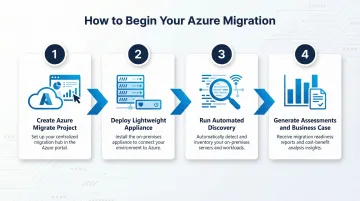
Practical first steps:
- Create an Azure Migrate project in the Azure portal
- Deploy the lightweight appliance to your on-premises environment
- Run automated discovery to build a complete inventory
- Generate assessments and a business case to quantify costs and savings
The core discovery and assessment tooling is available at no charge—Azure costs are only incurred during actual migration execution. Server Migration is free for the first 180 days per machine; afterward, a $25/month charge per replicated instance applies, plus standard Azure consumption costs for compute, storage, and networking.
Why expertise matters:
While Azure Migrate provides powerful built-in tooling, the speed and success of migration depends on strategy and execution expertise. Organizations that partner with experienced cloud consultants avoid common pitfalls like incorrect sizing, missed dependencies, and scope creep that can derail timelines and inflate costs.
Vorstel Technologies is a Microsoft cloud consulting partner with 200+ SAP project experiences and a 97% client satisfaction rate across global engagements. The team can join at any stage of your journey—from business case development through full execution—and offers a Zero-Fee Solution Evaluation to help enterprises and fast-moving startups build a clear, actionable Azure migration roadmap. Whether you're navigating a first-time cloud move or modernizing legacy workloads, Vorstel brings the cross-domain expertise to keep complex migrations on time and on budget.
Frequently Asked Questions
What is Azure Migrate?
Azure Migrate is Microsoft's free, unified platform for discovering, assessing, and migrating on-premises workloads—including servers, databases, web apps, and virtual desktops—to Azure. It covers the full migration lifecycle from planning through execution.
How much does Azure Migrate cost?
Azure Migrate's core discovery and assessment tools are available at no cost. Charges apply only to Azure resources consumed during actual migration (compute, storage, networking). Server Migration is free for the first 180 days per machine; afterward, a $25/month charge applies per replicated instance.
What are the Azure migration tools?
Key built-in tools include the Discovery and Assessment tool (with the Azure Migrate appliance), the Migration and Modernization tool (for server replication and cutover), Azure Database Migration Service (for databases), and integrations with GitHub Copilot and third-party partner tools.
What are the 5 R's of Azure migration?
The 5 R's are: Rehost (lift-and-shift), Refactor (minor optimization), Rearchitect (redesign for cloud-native), Rebuild (rewrite from scratch), and Replace (adopt SaaS). Azure Migrate's assessment output helps teams decide which strategy fits each workload using readiness scores and cost estimates.
What is the Azure Migration Program?
The Azure Migrate and Modernize (AMM) program bundles tooling, expert guidance, partner funding, and specialized support for complex workloads—SAP, Oracle, HPC, Linux, and mainframe. It gives organizations a structured path to plan and execute cloud migration while managing complexity at scale.
What are the 7 types of cloud migration?
Most frameworks reference seven strategies: the 5 R's (Rehost, Refactor, Rearchitect, Rebuild, Replace), plus Retire (decommission obsolete workloads) and Retain (keep on-premises for now). Each strategy maps to a workload's technical readiness and business requirements.