Introduction: The Stakes of Getting Cloud Migration Right
Cloud migration has become one of the most consequential decisions an enterprise can make. It reshapes infrastructure, security, cost structure, and competitive positioning at the same time — and the effects compound fast.
Most organizations understand why they need to migrate. Escalating data center costs, inability to scale on demand, slow deployment cycles, and growing compliance pressure make the case obvious. The harder question is how to execute without derailing operations.
According to McKinsey, companies incur an average of 14% more annual migration spend than planned, and 38% face delays exceeding one quarter. Both figures hold consistently for migrations that start without a documented strategy.
This guide covers the six best practices that separate successful migrations from expensive failures, the 7Rs framework for workload classification, and a real-world case study that ties the methodology together.
Key Takeaways
- Most cloud migrations fail due to poor planning, not cloud limitations
- A phased approach beats "big bang" migrations every time
- The 7Rs framework determines the right path for each workload
- Security and compliance must be built in from day one, not bolted on after the fact
- Post-migration optimization is where the biggest ROI gains actually appear
Why Cloud Migrations Fail Without a Clear Strategy
The most common failure in cloud migration isn't a technical one. It's the absence of a documented plan before workloads start moving.
"Big bang" migrations — where organizations attempt to move everything at once — compress all risk into a single event. The results are consistent: unexpected downtime, budget overruns, cost overruns, and compliance gaps that only surface after systems are already live in the cloud.
The Risk Areas Organizations Consistently Underestimate
Before migration begins, most enterprises haven't fully mapped:
- Application dependencies — which systems talk to which, and what breaks when one moves without the other
- Data compatibility issues — format mismatches, latency sensitivities, and regulatory constraints on data residency
- Internal skills gaps — the difference between managing on-premises infrastructure and operating in a cloud-native environment
These gaps rarely surface until something breaks. By then, rollback is costly and stakeholder trust — both technical and executive — is already eroding.
The Compounding Cost of a Stalled Migration
IDC reported that close to half of cloud buyers spent more on cloud in 2023 than they anticipated — and 84% of organizations cite cloud spend management as a top challenge. McKinsey estimates that global migration inefficiencies could waste more than $100 billion over three years.
Unplanned downtime adds another layer of exposure. Key findings from ITIC's 2024 Hourly Cost of Downtime Report (1,000+ firms surveyed):
- One hour of downtime costs more than $300,000 for over 90% of mid-size and large enterprises
- 41% of organizations report downtime costs between $1M and $5M+ per hour
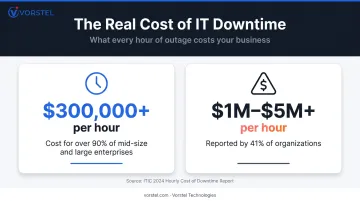
Without a structured migration plan, these costs don't stay theoretical — they accumulate at every phase where decisions were deferred.
Cloud Migration Best Practices: 6 Steps That Separate Success From Failure
Step 1: Conduct a Cloud Readiness Assessment First
Before any workload moves, organizations need a complete inventory of what they have and how it behaves. This baseline shapes every decision that follows.
A thorough assessment covers:
- Workload inventory — every application, database, and infrastructure component
- Dependency mapping — how applications interact and what breaks if sequencing is wrong
- Risk classification — which workloads are safe to move early versus which require careful handling
- Compliance gap analysis — what regulatory requirements apply and whether the target environment meets them
- Skills evaluation — whether internal teams can operate the destination environment
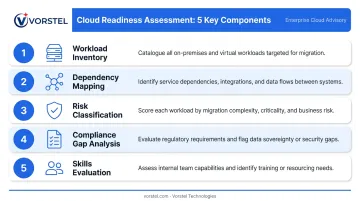
Skipping this step is the single most reliable predictor of a troubled migration. Vorstel Technologies structures every cloud engagement around this discovery phase — producing a dependency map, risk tier classification, and a sequenced migration roadmap before a single workload moves.
Step 2: Set Migration Goals and Define KPIs Upfront
"Move to the cloud" is not a migration goal. Vague objectives produce vague outcomes.
Successful organizations tie migration to specific business results and assign measurable targets before the first workload moves. Common KPIs worth tracking include:
- Application response time and error rates
- Monthly downtime and mean time to recovery
- Infrastructure and storage cost per workload
- CPU and memory utilization (to identify over-provisioned resources)
- Deployment frequency and lead time
- Compliance audit pass rate
These metrics serve two purposes: they keep the migration accountable during execution, and they provide the evidence base for demonstrating ROI to leadership after completion.
Step 3: Choose the Right Cloud Provider and Deployment Model
Provider selection should start with workload constraints — not brand preference.
| Deployment Model | Best Fit |
|---|---|
| Public Cloud | Scalability-first workloads, variable demand, cost optimization |
| Private Cloud | Strict data sovereignty, highly sensitive workloads |
| Hybrid Cloud | Mix of regulated and non-regulated systems; 73% of enterprises operate this model |
| Multi-Cloud | Avoiding vendor lock-in, best-of-breed services; used by 89% of organizations |
Compliance certifications are a hard filter, not a nice-to-have. AWS supports 143 security standards including PCI-DSS, HIPAA/HITECH, and GDPR. Azure and Google Cloud maintain comparable compliance centers. For organizations in regulated industries — financial services, healthcare — these certifications must be validated against specific service scope before migration, not assumed.
Step 4: Migrate in Phases, Not All at Once
A phased approach starts with lower-risk, non-critical workloads. This builds team confidence, exposes unforeseen issues early, and validates the migration methodology before mission-critical systems are touched.
Capital One's migration is the clearest enterprise proof point. The bank began its AWS migration in 2012, ran it for eight years, exited eight on-premises data centers, and migrated nearly 2,000 applications — building 80% of them from the ground up. Average development-environment build time dropped from 3 months to minutes.
Those gains came from structured waves and sustained commitment — not a single cutover event. The phased model gave teams time to learn, adjust, and validate at each stage before raising the stakes.
Step 5: Embed Security and Compliance From Day One
Security cannot be retrofitted after migration. Every migration plan must address:
- Data encryption in transit and at rest
- Identity and access management (IAM) configuration
- Vulnerability scanning cadence
- Compliance audit trail and documentation
- Network segmentation and perimeter controls
Major cloud providers offer compliance frameworks out of the box, but organizations with specialized regulatory requirements must go further. For enterprises operating across multiple jurisdictions — Germany, Singapore, Finland, and India, for example — regional frameworks like GDPR and PDPA introduce additional requirements that need workload-by-workload validation before cutover.
Step 6: Monitor Continuously and Optimize Post-Migration
Migration completion is a milestone, not an endpoint. Without a pre-migration performance baseline, post-migration deviations stay invisible until they become outages.
Post-migration optimization — right-sizing resources, eliminating idle workloads, adjusting pricing models — is typically where the largest ROI gains are realized. Yet many organizations stop at migration completion and miss this phase entirely.
Ongoing monitoring should cover:
- Performance against established baselines
- Cloud spend versus budget (with tagging and FinOps governance)
- Application availability and error rates
- Security posture and compliance drift
Choosing the Right Migration Strategy: The 7Rs Explained
Not every application deserves the same migration path. The 7Rs framework — sourced from AWS Prescriptive Guidance — gives teams a consistent way to classify each workload.
| Strategy | What It Means | When to Use It |
|---|---|---|
| Rehost | Lift-and-shift with minimal change | Speed priority; large volumes of workloads |
| Replatform | Minor adjustments to gain cloud benefits without full redesign | Near-term performance gains with moderate effort |
| Refactor | Rearchitect for cloud-native performance | High-value legacy systems needing long-term optimization |
| Repurchase | Replace with SaaS alternative | When custom ownership is no longer strategic |
| Relocate | Platform-level move (e.g., VMware to cloud) | Minimal application change needed |
| Retain | Keep on-premises for now | Compliance, timing, or risk argues against migration |
| Retire | Decommission unused or low-value applications | Before migration — reduce scope first |
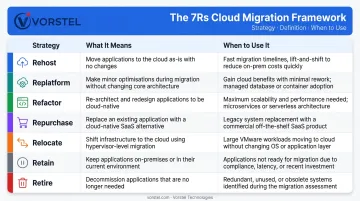
Going Deeper on the Three Most Common Strategies
In practice, three of these strategies account for the vast majority of enterprise workloads. Understanding their tradeoffs helps teams avoid over-engineering — or under-investing.
Rehost is the fastest path and costs the least upfront. The tradeoff is preserved technical debt — workloads run in the cloud but don't benefit from cloud-native capabilities.
For workloads that need a performance boost without a full rebuild, Replatform hits the right balance. A database moved to a managed cloud service, for example, gains automatic scaling and reduced admin overhead with minimal code changes.
Refactor delivers the highest long-term value but comes with real costs. AWS notes that refactoring can take 20 times longer than rehosting or replatforming. Reserve it for systems where the performance gains offset a multi-quarter engineering commitment — not every legacy app meets that bar.
How to Decide Which R Applies
Use these criteria to classify each workload:
- Business criticality — how much disruption does failure cause?
- Complexity — how many dependencies, integrations, and custom components?
- Compliance requirements — are there regulatory constraints on where or how data is processed?
- Expected lifespan — is this system being replaced in 18 months anyway?
- Cost of rearchitecting vs. cost of not doing so — what does technical debt cost over three to five years?
Cloud Migration in Action: An Illustrative Case Study
The following scenario is built from common enterprise migration patterns and reflects the type of engagement Vorstel Technologies supports.
The Challenge
A mid-size enterprise with operations across three regions was running aging on-premises infrastructure with a portfolio of more than 60 applications. Server provisioning took weeks. Unplanned downtime was a recurring issue, costly both operationally and reputationally. For enterprises at this scale, downtime routinely exceeds $300,000 per hour. Siloed data systems made real-time reporting impossible, and the infrastructure team spent the majority of its capacity on maintenance rather than innovation.
Those pressures created a clear mandate to act: the organization needed a migration plan that could address cost, scalability, release velocity, and compliance simultaneously.
The Approach
The engagement began with a structured cloud readiness assessment — inventorying all workloads, mapping dependencies, and classifying each application using the 7Rs framework. The assessment identified:
- 15 applications suitable for immediate rehosting (low complexity, low risk)
- 22 candidates for replatforming over two subsequent phases
- 8 legacy systems flagged for refactoring due to business criticality
- 9 applications retired before migration, reducing scope and cost
A phased migration plan was built around this classification. Lower-risk workloads moved first, validating the cloud environment and building team capability before mission-critical systems were touched. Security compliance checkpoints were built into each phase, not retrofitted afterward.
Vorstel joined the engagement mid-stream after an initial internal attempt had stalled. Rather than starting over, the team assessed what had already moved, identified what needed remediation, and continued with a corrected plan. This kind of mid-engagement entry — across DevOps, cloud architecture, and security disciplines — is a core part of how Vorstel operates.
The Outcome
Post-migration results included:
- 92% faster deployment cycles compared to the pre-migration baseline
- 45% reduction in system downtime across enterprise applications
- Infrastructure provisioning time reduced from weeks to minutes for new environments
- Real-time data access enabled faster decision-making across regional operations
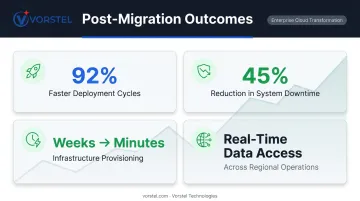
Beyond the IT metrics, the organization gained the ability to scale infrastructure on demand during peak periods, meet compliance requirements across jurisdictions without manual processes, and redirect internal IT capacity from maintenance to product development.
What Successful Cloud Migrations Have in Common
Across the documented migrations at Netflix, Capital One, Unilever, and Experian, several patterns repeat:
- Strategy preceded execution — every successful migration began with a clear plan tied to business outcomes, not just a technical objective
- Phased or structured approaches were used without exception — no major enterprise success story involved a big bang migration
- Investment in people matched investment in technology — McKinsey found that outperformers were 57% more likely to hire for DevOps and FinOps skills alongside technical migration work
Cross-functional alignment proved decisive. Migrations that were treated as IT projects — without active participation from finance, operations, security, and senior leadership — consistently underperformed. Capital One's migration had C-suite sponsorship from the start. Netflix rebuilt its entire operating model alongside its infrastructure.
The role of experienced partners recurs throughout major case studies. Microsoft's Cloud Adoption Framework explicitly notes that external expertise can validate strategies, recommend tools, establish realistic timelines, and reduce implementation risk. The key distinction McKinsey draws is that partner incentives must be tied to migration outcomes — not just time and materials.
This is where partner selection makes or breaks a migration. Vorstel Technologies structures every engagement around that standard: fees tied to measurable business value, not hours logged. Whether engaging at the strategy phase or stepping in mid-migration, the focus stays on delivering the expected outcome — not extending scope. That approach has earned 97% client satisfaction across engagements in Germany, India, Singapore, and beyond.
Frequently Asked Questions
What is the most common reason cloud migrations fail?
Poor upfront planning — specifically, the absence of a documented migration strategy, incomplete workload assessment, and underestimated application dependencies — causes most migration failures. The cloud itself is rarely the limiting factor.
How long does a typical cloud migration take?
Timelines vary by scope. A simple rehost can complete in weeks; full enterprise-scale transformation takes years. Capital One's migration, for example, spanned eight years across nearly 2,000 applications — and per AWS guidance, refactoring can take 20 times longer than rehosting.
What is the difference between lift-and-shift and refactoring?
Rehosting moves workloads as-is with minimal change, which is fast but leaves technical debt intact. Refactoring rewrites applications to be cloud-native, requiring significantly more effort but delivering greater long-term performance, scalability, and cost efficiency.
How do you measure the success of a cloud migration?
Key metrics include reduction in infrastructure costs, improvement in application uptime, deployment frequency, disaster recovery time, and user experience indicators. Establishing a pre-migration baseline is essential, as post-migration gains are difficult to prove without one.
What industries benefit most from cloud migration?
Financial services, retail, manufacturing, healthcare, and e-commerce see the highest impact. These sectors share common drivers: scalability demands, strict compliance requirements, and the need to process large volumes of data in real time.
Do I need a cloud migration consultant, or can my IT team handle it internally?
Internal teams play an important role, but large-scale migrations span security, compliance, architecture, and change management at once. Experienced consulting partners reduce cost, timeline, and risk — especially for enterprises navigating multi-region regulatory requirements.