The difference between a smooth SAP cloud migration and a costly, disruptive one comes down to strategy. Migrating SAP applications, data, and systems from on-premises infrastructure to a cloud environment is a complex, multi-phase undertaking — and organisations that treat it as a lift-and-shift IT exercise rather than a business transformation initiative tend to run into trouble.
This article covers what you need to know to approach SAP cloud migration with confidence: the 6Rs framework for choosing your migration path, the key benefits of moving to cloud, a step-by-step execution guide, and best practices for avoiding the most common failure points.
Key Takeaways
- The 6Rs framework (Rehost, Re-platform, Refactor, Repurchase, Retire, Retain) helps you categorize each workload rather than applying a single approach across your entire SAP landscape
- Rehosting, Re-platforming, and Refactoring (Greenfield or Brownfield) are the three most relevant migration paths for SAP environments
- A structured SAP migration spans five phases — from landscape assessment and goal definition through phased execution and post-go-live stabilization
- Hidden costs, data quality issues, and change management resistance are the leading causes of over-budget or failed SAP migrations
- An experienced SAP consulting partner who can step in at any project stage cuts execution risk and keeps timelines on track
SAP Cloud Migration Approaches: The 6Rs Framework
Not every SAP workload should be treated the same way. The 6Rs framework gives you a structured way to evaluate each application or system individually and assign the right migration strategy based on complexity, business value, and cloud readiness.
Rehosting (Lift-and-Shift)
Rehosting moves your existing SAP environment to cloud infrastructure with minimal changes. The architecture stays largely intact: you're changing where the system runs, not how it works.
This approach suits organizations that need to exit an on-premises data center quickly, have limited appetite for re-engineering, or want to defer optimization to a later phase. The trade-off is real:
- Rehosted systems don't leverage cloud-native capabilities like dynamic scaling or managed services
- SAP HANA's in-memory architecture remains out of reach
- Customizations are preserved — but so are the inefficiencies baked into the original design
Re-platforming
Re-platforming involves migrating from a legacy database — Oracle DB, IBM DB2, or SQL Server — to SAP HANA in the cloud, without a full system redesign. This is a common path for organizations running older SAP ERP versions who want meaningful performance improvements without committing to a complete transformation.
SAP HANA's column-oriented, in-memory architecture enables advanced analytics and transactional processing in a single system. That's a meaningful architectural upgrade over traditional row-based databases, even when the application layer remains largely unchanged.
Refactoring / Re-architecting
Refactoring goes furthest in terms of change, and it's where most organizations moving to S/4HANA land. There are two primary sub-paths:
- Greenfield: A fresh S/4HANA implementation directly in the cloud. No legacy data or processes are carried forward. Best for organizations wanting to eliminate technical debt and redesign business processes around SAP best practices.
- Brownfield: An in-place upgrade from SAP ECC to S/4HANA in the cloud, retaining historical data, existing configurations, and familiar processes. Better for organizations that need continuity, faster go-live timelines, and lower disruption to operations.
- Bluefield / Shell Conversion: A hybrid approach that selectively migrates data and processes, combining elements of both. Worth evaluating when neither pure Greenfield nor Brownfield fits the organizational context.
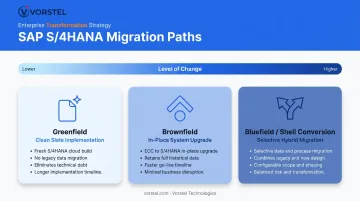
When to choose which:
| Factor | Greenfield | Brownfield |
|---|---|---|
| Legacy technical debt | High — want to eliminate | Low — manageable |
| Historical data retention | Not required | Required |
| Process redesign appetite | High | Low to moderate |
| Go-live timeline | Longer | Shorter |
| Disruption tolerance | Higher | Lower |
Retiring and Retaining
A complete migration strategy accounts for workloads that shouldn't move at all. Some applications are candidates for retirement — decommissioned as part of the modernisation process because they're redundant or no longer serve a business purpose. Others are better retained on-premises, at least temporarily, due to regulatory requirements, cost-benefit considerations, or integration complexity that makes cloud migration impractical in the near term.
Explicitly mapping which workloads fall into these categories prevents scope creep and keeps migration timelines realistic. It also surfaces decommissioning savings that often offset migration costs.
Key Benefits of a Thoughtful SAP Cloud Migration Strategy
Cost Model Shift: CapEx to OpEx
On-premises SAP environments carry significant fixed costs: hardware, data centre space, power, cooling, and ongoing maintenance. Cloud shifts this to a consumption-based model: you pay for what you use, when you use it.
A Forrester Total Economic Impact study for SAP Cloud ERP Private on AWS reported a 45% ROI, $5.2M net present value, and $6.1M in reduced costs from phasing out on-premises data centres for a composite organization, with a 20-month payback period. These figures apply to a specific composite profile, but they illustrate the financial trajectory that well-executed migrations can achieve.
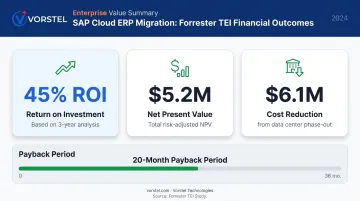
The OpEx model also improves budget predictability — consumption patterns become more visible, and over-provisioned hardware stops sitting idle between peak cycles.
Scalability and Performance
Cloud environments let SAP workloads scale dynamically. Resources scale up for high-demand periods, then back down once the workload normalizes. Common scenarios where this matters:
- Month-end financial closes that spike processing demand
- Inventory reconciliation runs across large datasets
- Seasonal peak periods requiring temporary compute bursts
This elasticity is particularly valuable for SAP environments running complex analytics alongside transactional processing — use cases where SAP HANA's architecture delivers its most meaningful advantages.
Security, Compliance, and Resilience
Major cloud platforms (AWS, Azure, Google Cloud) maintain compliance frameworks aligned with GDPR, SOC 2, ISO 27001, and SOX — and all three are SAP-certified infrastructure providers. This gives organizations a strong compliance foundation to build on.
That said, hyperscaler certification doesn't make SAP workloads automatically compliant. Configuration, identity and access management, data controls, and audit evidence remain customer responsibilities — the infrastructure is compliant; how you configure it determines your actual security posture.
Disaster recovery also improves significantly. Cloud-native backup, replication, and failover capabilities provide resilience that most organizations couldn't cost-effectively replicate in an on-premises setup.
How to Plan and Execute Your SAP Cloud Migration: A Step-by-Step Approach
Step 1 — Assess Your Current SAP Landscape
Before deciding how to migrate, you need to know what you're migrating. This means a thorough inventory of:
- Existing applications, databases, and SAP modules in use
- Custom code, ABAP developments, and modifications
- Integration points — both SAP-to-SAP and connections to third-party systems like Salesforce, Coupa, or Microsoft Dynamics
- Data quality issues: duplicate records, missing ownership, inconsistent formatting
Data quality problems discovered post-migration are far more expensive to fix than pre-migration. A proper landscape assessment surfaces these early, while you still have time to address them without pressure.
Step 2 — Define Goals and Align Stakeholders
Vague objectives produce vague outcomes. Define measurable business goals for the migration — reducing IT infrastructure spend by a specific percentage, improving period-end close cycle time, enabling real-time analytics — and document them in SMART format (Specific, Measurable, Achievable, Relevant, Time-bound).
Stakeholder alignment matters as much as technical planning. Bring in IT, finance, operations, and business unit leads early by:
- Surfacing competing priorities before they become mid-project conflicts
- Securing visible leadership sponsorship before execution begins
- Documenting agreed-upon goals that all teams can reference throughout the engagement
Step 3 — Choose Your Migration Approach and Cloud Platform
Using the 6Rs assessment from your landscape review, assign the appropriate migration strategy to each workload. Then evaluate and select your cloud platform.
According to Synergy Research Group, AWS, Microsoft Azure, and Google Cloud collectively held 63% of enterprise cloud infrastructure spending in 2025 (28%, 21%, and 14% respectively). All three are SAP-certified infrastructure providers.
Key platform selection criteria to evaluate:
- SAP certification status for your specific workload types
- Geographic availability and data residency requirements
- Compatibility with your existing technology stack
- Compliance reporting capabilities relevant to your regulatory environment
- Commercial model and long-term cost structure
Step 4 — Execute Migration in Phases
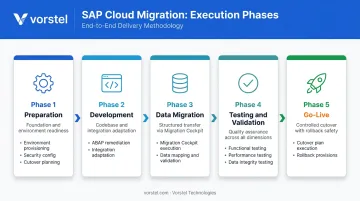
A phased migration approach reduces business disruption compared to a "big bang" cutover. The core execution sequence:
- Preparation — Environment provisioning, security configuration, budget finalization, and cutover planning
- Development — Custom ABAP code remediation, integration adaptation, and environment validation
- Data Migration — Using tools like the SAP S/4HANA Migration Cockpit for structured data transfer from source systems or staging tables
- Testing and Validation — Functional testing, performance testing, and data integrity validation across all migrated workloads
- Go-Live — Defined cutover plan with rollback provisions and hypercare support in place from day one
Step 5 — Post-Migration Stabilization and Optimization
Migration doesn't end at go-live. The first 60–90 days post-cutover are often where the real operational challenges surface. Plan for:
- Performance monitoring to catch bottlenecks that didn't appear in testing
- User support structures including help desks and knowledge bases
- Standard Operating Procedures for newly changed processes
- Feedback loops to capture issues early and resolve them before they escalate
- Continuous optimization cycles to capture cloud cost efficiencies over time
Organizations with 200+ SAP project engagements — like Vorstel Technologies — bring structured post-go-live frameworks that cover each of these phases directly. They can also step into an engagement mid-stream, including stabilization recovery if an earlier phase has gone off-track.
SAP Cloud Migration Best Practices
Prioritise Data Quality Before Migration
Poor data — duplicates, unknown ownership, inconsistent formatting — doesn't get better when you move it to the cloud. It creates downstream problems in reporting, compliance, and operational processes that are harder to fix post-migration.
Conduct a data cleansing and governance review before executing any migration. Establish data ownership, resolve duplicates, and validate formatting standards. Most organisations skip this step entirely — and pay for it in data integrity failures after go-live.
Build a Realistic, Risk-Aware Migration Roadmap
A credible implementation roadmap defines:
- Milestones and deliverables for each phase
- Cross-functional ownership (not just IT)
- Total Cost of Ownership (TCO) inclusive of hidden costs
Hidden costs that often go unbudgeted include staff reskilling, productivity dips during transition, third-party integration adjustments, maintaining hybrid infrastructure during the migration window, and legacy system decommissioning. Build all of these into your TCO model from the start, before budget is locked.
Security and Compliance Must Be Built In, Not Added On
Security configuration is a foundational migration activity, not a post-go-live cleanup task. Core controls to establish before go-live:
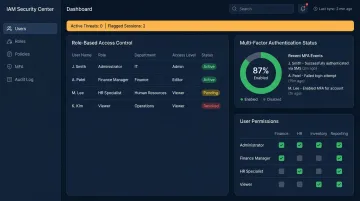
- Role-based access controls (RBAC) with least-privilege principles
- Multi-factor authentication across all SAP access points
- Data encryption at rest and in transit
- Network isolation between SAP and non-SAP systems
- Compliance validation aligned with applicable regulations (GDPR, SOX, SOC 2)
IBM Security's 2024 report found that stolen or compromised credentials were the most common initial attack vector, accounting for 16% of breaches. Identity and access management is not a checkbox — it's an active risk control that requires intentional design during migration.
Invest in Change Management and User Adoption
A technically successful migration can still fail operationally if users resist or misuse the new system. Change management is not a training programme delivered two weeks before go-live. It's an ongoing programme that runs parallel to the technical migration.
Practical change management for SAP migrations includes:
- Communicating the business case to all impacted users early in the process
- Structured training tailored to role-specific workflows, not generic system demos
- Support structures (help desks, SOPs, peer champions) active from day one of go-live
For organisations still in the planning stage, Vorstel Technologies offers a Zero-Fee Solution Evaluation: a no-cost expert consultation covering SAP cloud readiness, migration strategy, and IT planning — useful for teams that need expert input before committing budget.
Common SAP Cloud Migration Challenges and How to Overcome Them
Most SAP migrations run into predictable obstacles — the difference is whether your team spots them before cutover or after.
Hidden and Underestimated Costs
Most organisations budget for the visible line items: licences, cloud infrastructure, professional services. The indirect costs are where projects go over budget. Reskilling teams, role adjustments, productivity dips, parallel environment maintenance, and legacy system decommissioning all add up.
To stay on track:
- Build a comprehensive TCO model before the project kicks off
- Account explicitly for indirect cost categories, not just infrastructure
- Revisit cost assumptions at each migration phase gate
Compatibility and Interoperability Issues
A migration plan that doesn't account for your existing SAP version or non-SAP integrations will surface problems post-cutover — the most expensive point to fix them. Systems like Salesforce, Coupa, or Microsoft Dynamics that connect to your SAP environment need individual validation, not just a blanket assumption of compatibility.
Recommended steps:
- Run SAP Readiness Check tools during the assessment phase
- Map every integration point — SAP and non-SAP — before execution begins
- Test critical integrations in a staging environment prior to go-live
Vendor Lock-In Risk
Committing to a single cloud provider without evaluating long-term flexibility can narrow future options considerably. The HashiCorp 2024 State of Cloud Strategy Survey found 79% of respondents have or are planning multi-cloud deployments — a clear sign that most organisations are actively managing provider dependency.
When evaluating providers:
- Prioritise portability and open standards support over short-term pricing advantages
- Review contract flexibility and exit terms before signing
- Consider a multi-cloud architecture for workloads where single-provider dependency carries real operational risk
Frequently Asked Questions
What are the main cloud migration strategies (the 'R's) for SAP?
The 6Rs are Rehost, Re-platform, Refactor/Re-architect, Repurchase, Retire, and Retain. For SAP specifically, the three most commonly applied strategies are Rehosting (lift-and-shift to cloud), Re-platforming (migrating to SAP HANA), and Refactoring via Greenfield or Brownfield S/4HANA implementation.
What are the typical steps in an SAP cloud migration?
Core phases run from landscape assessment and platform selection through environment preparation, phased migration, testing, go-live cutover, and post-migration optimization. Each phase builds on the previous one — skipping assessment or testing is where most projects run into serious trouble.
What is the difference between Greenfield and Brownfield SAP migration?
Greenfield involves a clean-slate S/4HANA implementation in the cloud with no legacy data or processes carried forward — ideal for eliminating technical debt and redesigning processes. Brownfield upgrades an existing SAP ECC system to S/4HANA while retaining historical data, configurations, and familiar workflows, with a typically faster go-live timeline.
How long does an SAP cloud migration typically take?
Timelines vary significantly based on system complexity, custom code volume, integration count, and organisational size. SAP PRESS guidance indicates 6–9 months for smaller organisations and 12–18 months or longer for large enterprises. Phased approaches tend to reduce risk but can extend overall timelines compared to single-cutover strategies.
What is RISE with SAP and how does it relate to cloud migration?
RISE with SAP is a bundled offering that combines SAP S/4HANA Cloud, SAP BTP, migration tooling, and business process support in a single package. It simplifies the move to cloud ERP with built-in support for AWS, Azure, and Google Cloud, plus AI-assisted transformation tools.
How can organisations minimise downtime during SAP cloud migration?
Phased execution, thorough integration testing, and a clearly defined cutover plan with documented rollback procedures are the most effective safeguards. A tested rollback plan must be in place before go-live, not assembled under pressure after something goes wrong.