Introduction
Cloud migration strategy gets misunderstood constantly. Organizations treat it as a technical project — move the servers, tick the box, done. But the companies that struggle most with cloud adoption aren't failing because of technical complexity. They're failing because they started migrating before they had a plan.
A cloud migration strategy is a documented roadmap that determines what moves to the cloud, when, how, and why — covering data, applications, and infrastructure across public, private, or hybrid environments. The technical and business decisions are inseparable — which is exactly where most migrations go wrong.
Gartner forecasts worldwide public cloud end-user spending to reach $723.4 billion in 2025, up 21.5% from 2024. Yet Accenture found that 68% of organizations consider their cloud journeys incomplete, with heavy adopters achieving expected outcomes at only 47%.
That gap is where strategy matters most. This guide covers the 6 Rs framework, phased execution, common failure points, and how to choose the right partners.
Key Takeaways
- Cloud migration strategy is a structured roadmap aligned to business goals — cost reduction, scalability, and resilience — not a one-time technical lift
- The 6 Rs (Rehost, Replatform, Refactor, Rearchitect, Retire, Retain) provide a workload-level decision framework
- Execution follows five phases: Assess → Plan → Migrate → Govern → Optimize
- Top failure points: skipping upfront assessment, poor cost governance, and underestimating the skills gap
- Working with a cloud consulting partner compresses timelines, fills skills gaps, and reduces migration risk
What Is a Cloud Migration Strategy?
A cloud migration strategy is a documented plan that defines how an organization will move specific workloads — applications, data, and infrastructure — to cloud environments, whether public, private, or hybrid, while managing risk, cost, and business continuity.
The goal is a scalable and cost-efficient IT infrastructure that supports innovation and reduces dependence on legacy on-premises systems.
Reaching that goal requires more than execution — it requires a roadmap. Migration is the act of moving workloads; strategy is the plan that determines what moves, when, and why. Without it, teams migrate reactively, moving whatever is easiest rather than what delivers the most business value. The result is cloud environments that cost more than expected and perform worse than hoped.
A well-defined strategy answers four questions before any workload moves:
- What should migrate, and what should stay or be retired?
- When should each workload move, in what sequence?
- How should each workload be treated — lifted as-is, modified, or redesigned?
- Why — what specific business outcome does this migration serve?
Why Organisations Migrate to the Cloud
The business case for cloud migration has strengthened considerably. Foundry surveyed 670 global IT decision-makers and found that 70% of organisations accelerated cloud migration in the past year, up from 63% the year prior. The reasons span cost, resilience, speed — and the mounting cost of doing nothing.
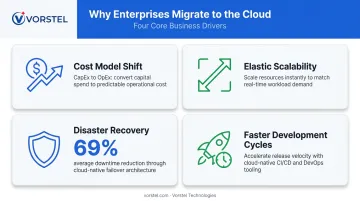
The Core Business Drivers
- Cost model shift: Moving from capital expenditure (buying hardware) to operational expenditure (paying for what you use) gives organisations financial flexibility and aligns IT costs directly to utilisation.
- Elastic scalability: Cloud environments scale up and down on demand — eliminating both over-provisioning and capacity failures for retailers managing peak traffic or platforms handling live events.
- Disaster recovery: AWS-cited Hackett Group research found organisations migrating to AWS achieved a 69% reduction in unplanned downtime hours (from 40 to 12.5 hours annually) and a 54% drop in unplanned outages. For Fortune 1000 companies, where infrastructure failures average $100,000 per hour, that reduction is material.
- Faster development cycles: Cloud-native platforms — containerisation, Kubernetes, managed databases — compress development and deployment timelines significantly.
The Cost of Staying Put
Deloitte reports that technical debt accounts for 21% to 40% of an organisation's IT spending — a significant drag before a single line of new code is written. Legacy infrastructure compounds this: it slows software delivery, introduces security vulnerabilities that cloud providers address natively, and caps an organisation's ability to scale when market conditions shift.
Cloud Migration Strategies: The 6 Rs Explained
The 6 Rs — originally formalized by AWS — are the industry-standard framework for deciding how each workload should be treated during migration. Real-world migrations use a mix of these approaches. Applying one strategy uniformly across an entire portfolio is a common and costly mistake.
Rehosting (Lift and Shift)
Rehosting moves applications to the cloud with minimal or no modification. It's the fastest approach with the lowest upfront effort, making it well-suited for:
- Speed-driven migrations with tight timelines
- Applications that aren't candidates for modernization yet
- Building early migration momentum before tackling complex workloads
The trade-off: rehosting doesn't optimise for cloud-native capabilities. You get the same application running in a different location — potentially without the cost savings or performance gains that come from cloud-native design. AWS Prescriptive Guidance notes that roughly 70% of workloads in large-scale migrations are handled via rehosting, relocating, or replatforming.
Replatforming and Refactoring
Replatforming makes targeted modifications to take advantage of cloud services without changing core architecture. A practical example: replacing a self-managed database with a fully managed cloud database service. You gain operational efficiency — no patching, automatic backups, built-in scaling — without redesigning the application. It's the middle ground between lift-and-shift and full rearchitecting.
Refactoring and rearchitecting go further, rewriting or redesigning applications to fully leverage microservices, serverless computing, and containerization. This is the highest-effort approach. It's also the highest-return — but only for mission-critical applications where long-term scalability and performance justify the investment.
AWS generally doesn't recommend refactoring as the starting point for large migrations. Directional business cases are better built around rehost, relocate, or replatform strategies first.
Retiring and Retaining
Before any workload moves, two other decisions matter: what to cut and what to leave alone.
Retiring means decommissioning applications identified during assessment as unused, redundant, or duplicated. AWS estimates 10% to 20% of an enterprise IT portfolio can typically be retired. Fewer workloads migrated means:
- Lower migration and ongoing cloud costs
- Reduced operational complexity
- A smaller security surface area to manage
Not every workload should move, either. Some belong on-premises — and that's a deliberate strategy, not a failure. Workloads with strict data sovereignty requirements, recently upgraded legacy systems with no cloud-compatible path, or applications where migration costs outweigh the benefits should be retained as-is. Not every workload belongs in the cloud.
How to Execute a Cloud Migration Strategy
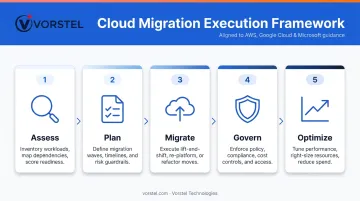
Execution succeeds when migration runs as a phased program with clear gates between each stage. The framework below aligns with AWS, Google Cloud, and Microsoft's own guidance: Assess → Plan → Migrate → Govern → Optimize.
Step 1: Assess Your Current IT Landscape
Before anything moves, catalogue everything:
- All applications, databases, and infrastructure components
- Interdependencies between systems (which applications talk to which?)
- Utilisation data — what's actively used versus running idle
- Compliance and data sovereignty requirements per workload
Without this baseline, teams can't prioritise workloads, anticipate migration bottlenecks, or measure post-migration outcomes. Google Cloud's assessment guidance specifically calls for inventorying source code locations, deployment methods, and licensing requirements before planning begins.
Step 2: Define Goals and Select a Strategy Per Workload
Clear, measurable objectives come before provider selection or migration scheduling. Define targets such as:
- Specific cost reduction percentages within 12 months
- Deployment speed improvements (e.g., release cycle frequency)
- Uptime SLAs for critical systems
- Compliance milestones for regulated workloads
Then apply the appropriate R per workload based on assessment findings. A payroll system may warrant a straightforward rehost; an e-commerce platform experiencing scale limitations may need rearchitecting; a redundant internal tool gets retired.
Step 3: Choose the Right Cloud Provider and Build Your Team
Evaluate providers across these dimensions:
| Criteria | What to Evaluate |
|---|---|
| Data centre locations | Proximity to users; data residency requirements |
| Compliance certifications | SOC 2, ISO 27001, GDPR, industry-specific |
| Pricing models | Reserved vs. on-demand; egress costs |
| Integration capabilities | Compatibility with existing systems and tools |
| Vendor lock-in risk | Portability of data and workloads |
As of Q1 2025, AWS holds 32% global cloud infrastructure market share, Azure 23%, and Google Cloud 10%, collectively accounting for 65% of global spending.
Each provider has distinct strengths depending on workload type, existing Microsoft or Google investments, and enterprise agreements.
For organisations without in-house cloud expertise — which HashiCorp found applies to 64% of organisations — engaging a consulting partner is a practical next step. Vorstel Technologies, for instance, offers Cloud Migration & Optimisation services with documented Microsoft Azure expertise and a Zero-Fee Solution Evaluation for organisations at any stage of their migration planning.
Step 4: Implement in Stages with Governance Controls
Start with lower-risk workloads as pilots, validate results before scaling, and define rollback thresholds at each stage before workloads go live.
Governance controls to establish from day one:
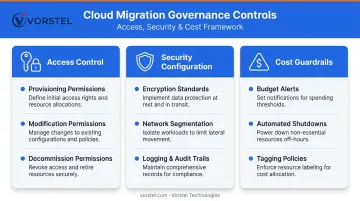
- Access control policies — who can provision, modify, or decommission resources
- Security configurations — encryption standards, network segmentation, logging
- Cost guardrails — budget alerts, automated shutdowns for idle resources, tagging policies
Phased migration allows teams to learn from each wave and apply those lessons to more complex workloads.
Step 5: Monitor, Optimise, and Iterate
Go-live marks the beginning of an ongoing optimisation cycle. Use real-time monitoring and analytics to track:
- Performance against baseline (latency, availability, throughput)
- Cost efficiency — are you right-sized, or paying for unused capacity?
- Security posture — are access controls and compliance configurations holding?
Review outcomes against the business objectives defined in Step 2 on a regular cadence. Cloud environments require ongoing optimisation; the organisations that treat migration as done on go-live day are the ones that end up with 21% of cloud workloads eventually repatriated on-premises, per Flexera's 2025 State of the Cloud Report.
Common Cloud Migration Challenges and How to Overcome Them
Security and Compliance Gaps
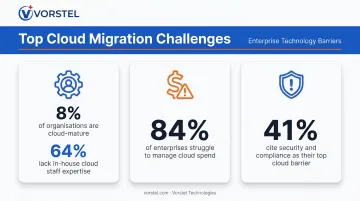
In multicloud and hybrid environments, security is a shared responsibility — and many organizations overestimate how much the provider covers. Accenture found that 41% of respondents cited security and compliance risks among their top barriers to cloud value.
Key steps:
- Define your security baseline before migration begins, not after
- Implement access controls, encryption at rest and in transit, and audit logging from day one
- Map each workload's compliance requirements to specific cloud configuration policies
Vorstel Technologies' Cloud & Security Consulting practice builds security and compliance into migration architecture from the start, rather than adding controls after the fact.
Cost Overruns from Poor Planning
Flexera reports 84% of organizations struggle to manage cloud spend. The causes are predictable: workloads migrated without right-sizing, resources left running during low-demand periods, and scope that expands mid-project.
Steps to control costs:
- Build a detailed cost model before migration begins
- Use cloud provider cost calculators to estimate workload-specific spend
- Implement automated cost governance tools post-migration
- Establish tagging policies so every resource is attributable to a team or project
Skills Gap and Organisational Resistance
HashiCorp found only 8% of organizations qualify as highly cloud-mature, with 64% lacking the staff expertise to support cloud infrastructure strategy. Cloud environments require different skills than on-premises management — DevOps practices, Infrastructure-as-Code, containerization.
Options for bridging this gap:
- Invest in targeted upskilling for existing IT staff on cloud-specific tooling
- Embed experienced cloud practitioners via a consulting engagement during the migration programme
- Structure internal knowledge transfer as part of any consulting partnership
Cultural resistance from teams protective of existing workflows can be just as significant a barrier as technical complexity. Early stakeholder involvement and structured change management are essential to any successful migration.
Data Integrity and Application Compatibility
KPMG's Cloud Transformation Survey found organizations averaged 8 incidents of data loss over a 12-month period. High-volume data transfers are prone to errors; legacy applications may not be compatible with cloud environments without modification.
Mitigation approach:
- Test and validate data integrity at every migration stage, not just at completion
- Identify applications requiring refactoring early in the assessment phase
- Run parallel environments during cutover for critical systems to enable rollback
Frequently Asked Questions
What is migration in cloud computing?
Cloud migration is the process of moving digital assets — applications, data, and IT infrastructure — from on-premises or legacy environments to the cloud, to gain access to scalability, cost efficiency, and modern services that on-premises infrastructure can't match economically.
What are the main types of cloud migration?
The primary types are: full data center migration (moving all infrastructure to the cloud), application or database migration, hybrid cloud migration (keeping some workloads on-premises while moving others), and cloud-to-cloud migration (moving between cloud providers). Most enterprise programs involve a combination.
What are the 6 Rs of cloud migration?
The 6 Rs — Rehost, Replatform, Refactor/Rearchitect, Repurchase, Retire, and Retain — represent different approaches to handling each workload during migration. The right R depends on a workload's complexity, strategic value, and how much it benefits from cloud-native capabilities.
How long does a cloud migration typically take?
Timelines vary widely — a single application lift-and-shift can take days to weeks, while a full enterprise data center migration can span a year or more. Phased execution is critical; most teams complete their first workload migrations within weeks of finishing the assessment stage.
What are the biggest risks in cloud migration?
The top risks are: inadequate upfront assessment, security and compliance gaps in the new environment, unexpected cost escalation, data loss or corruption during transfer, and business disruption from downtime. All are manageable with proper planning, governance controls, and phased execution.
When should an organization NOT migrate a workload to the cloud?
Some workloads belong on-premises: those with strict regulatory or data sovereignty requirements, recently upgraded legacy systems with no viable migration path, or applications where migration costs clearly outweigh the benefits. Retaining a workload is a deliberate strategic decision, not a fallback.