Introduction
Unplanned downtime is expensive — far more than most organizations anticipate before a migration begins. According to ITIC's 2024 Hourly Cost of Downtime Report, hourly downtime costs exceed $300,000 for 90% of enterprises, with 41% of firms reporting costs between $1M and over $5M per hour.
Those numbers don't exist in isolation. Behind each outage hour sits delayed product launches, broken SLAs, disrupted customer transactions, and employees unable to work. For regulated industries, add compliance exposure and potential fines.
The difference between a costly migration and a smooth one comes down to preparation. Organizations that assess workload risk upfront, match each application to the right migration strategy, and execute with tested cutover controls can move to the cloud without disrupting operations. This guide covers exactly how — from pre-migration assessment through post-go-live monitoring.
Key Takeaways
- Downtime during cloud migration is a business risk, not just a technical inconvenience — plan for it accordingly
- Choosing the right migration strategy per workload (Rehost vs. Refactor vs. Retain) directly controls how much disruption you'll experience
- Phased, incremental migrations consistently outperform big-bang cutovers on critical systems
- Post-migration monitoring for the first 30–90 days catches issues that only surface under real production load
- Skipping dependency mapping and change management planning are the most preventable causes of extended outages
Pre-Migration Planning: The Foundation for Zero Downtime
Most migration downtime traces back to decisions made — or skipped — before a single workload moves. Poor scoping and undiscovered dependencies are common culprits, but the most damaging gaps are the ones no one thought to look for — missing rollback procedures, untracked integrations, and tolerance thresholds that only surface mid-cutover.
Build a Complete Infrastructure Inventory
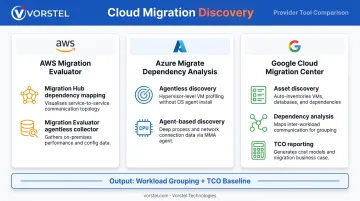
Every workload, database, and integration needs to be documented before wave planning begins. All three major cloud providers offer purpose-built tools for this:
- AWS Migration Evaluator — builds a business case using on-premises utilization data and dependency mapping via Migration Hub
- Azure Migrate Dependency Analysis — visualizes dependencies between servers, supporting agentless and agent-based discovery
- Google Cloud Migration Center — combines asset discovery, dependency analysis, and TCO reporting in a single workflow
The output of this exercise is the foundation for grouping workloads that must move together, identifying what breaks if one system migrates ahead of its dependencies, and computing a TCO baseline to measure cloud value against.
Define Downtime Tolerances Per Workload
Not every system carries the same risk profile. A customer-facing e-commerce checkout system may tolerate zero unplanned downtime, while an internal monthly reporting tool can accept a scheduled 2-hour maintenance window.
Documenting these thresholds per workload drives two downstream decisions: when to schedule each migration wave and which migration strategy to apply. Organizations that skip this step often discover their tolerances mid-cutover — the worst possible time.
Build the Rollback Plan Before You Start
A rollback plan written during an incident is not a rollback plan. Before any wave begins, define:
- The specific conditions that trigger a rollback (error rate thresholds, replication lag, service failure)
- Who is authorized to call it — one named decision-maker, not a committee
- The tested restoration procedure for each workload
- A data recovery checkpoint taken immediately before cutover begins
Align Stakeholders Early
Rollback procedures protect against technical failure — but organizational blind spots are just as disruptive. IT, finance, compliance, and end-user teams each surface issues the others miss:
- Compliance may flag regulatory constraints that block migrating a database on a particular schedule
- Finance may identify cost commitments tied to on-premises contracts that affect wave timing
- End-user teams often catch integration dependencies that don't appear in automated discovery
Bringing these groups in late creates mid-migration surprises that force unplanned pauses.
Choosing the Right Migration Strategy
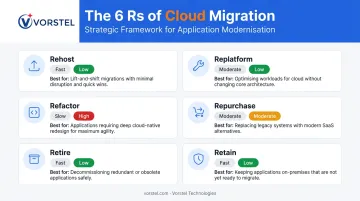
Applying the wrong strategy to a workload is one of the most reliable ways to extend a migration window unnecessarily. The 6 Rs framework — Rehost, Replatform, Refactor, Repurchase, Retire, and Retain — provides the lens for evaluating each workload based on its risk profile and modernization requirements.
Strategy Selection by Risk and Speed
| Strategy | Speed | Risk | Best for |
|---|---|---|---|
| Rehost (Lift & Shift) | Fastest | Lowest change scope | Legacy apps needing quick movement without re-architecture |
| Replatform | Moderate | Moderate | Limited optimizations without core changes |
| Refactor | Slowest | Highest complexity | Applications where cloud-native redesign eliminates chronic failure points |
| Retire / Retain | N/A | Reduces overall scope | Decommissioning unneeded systems or holding complex workloads back |
AWS guidance explicitly notes that refactor is not recommended for large migrations because it involves modernizing during migration, stacking schedule delays on top of technical complexity. Google confirms refactor migrations take longer than rehost. The general principle: start with the simplest viable strategy, then modernize once the workload is stable in the cloud. That sequencing decision flows directly into how you structure migration phases.
Phased vs. Big-Bang Migration
Phased migration moves workloads in defined waves, validating outcomes at each stage before advancing. Big-bang migrates everything at once. For mission-critical systems, phased migration is the practical default — it preserves rollback options and catches dependency issues before they cascade.
A phased approach lets teams:
- Validate tooling and processes on low-risk workloads first
- Uncover hidden dependency issues before they affect critical systems
- Build team confidence through repeated success before high-stakes cutovers
AWS large-migration guidance benchmarks each wave at 1–2 weeks for portfolio workstream tasks and 3–4 weeks for the migration workstream itself, giving organizations a realistic per-phase planning unit rather than a misleading whole-program estimate.
Platform Compatibility and Provider Selection
For organizations running SAP, the right cloud provider matters. SAP certifies specific IaaS configurations across AWS, Azure, and Google Cloud, so SAP workloads need to be validated against SAP-certified infrastructure before provider selection is finalized. Microsoft positions Azure Migrate specifically for Windows Server and SQL Server estates, offering native compatibility that reduces integration effort.
Salesforce environments migrating to its Hyperforce architecture have purpose-built tooling in Hyperforce Assistant for production and sandbox org moves. Each platform has its own compatibility requirements — and matching workloads to the right provider reduces the integration complexity that accumulates at cutover.
Executing the Migration with Minimal Disruption
Schedule During Low-Traffic Windows
Analyze workload traffic patterns and user activity logs to identify genuine low-traffic periods — not assumed ones. Regional time zone differences matter significantly for global systems. A European ERP system may have overnight lows that align with peak usage for an Asia-Pacific team on the same infrastructure.
Use Blue/Green or Canary Deployment for Cutovers
AWS defines blue/green deployment as shifting traffic between two identical environments running different versions. Canary deployment takes a more cautious approach — routing a small percentage of traffic to the new environment first, then shifting the remainder if no issues emerge.
Both approaches allow issues to be detected before the legacy environment is decommissioned, which is the fundamental control that prevents a cutover problem from becoming a full outage.
Maintain Data Synchronization Through Cutover
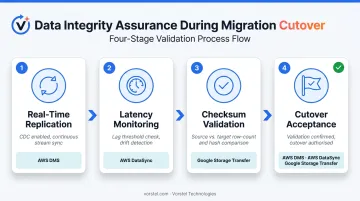
Real-time or near-real-time replication between on-premises and cloud environments prevents data loss and ensures consistency at the moment of cutover. AWS DMS supports ongoing change data capture during migration, but AWS explicitly warns that DMS CDC is not appropriate for sub-second or guaranteed low-latency replication. Latency must be monitored and reconciled before cutover is declared complete.
Checksum validation is non-negotiable. AWS DataSync uses checksum verification during transfer; AWS DMS includes source-to-target data validation; Google Storage Transfer Service compares computed checksums against Cloud Storage checksums. Build these validation steps into cutover acceptance criteria, not post-cutover cleanup.
Maintain Security and Compliance Through the Transition
Data synchronization keeps your records consistent — but the migration window also opens compliance exposure that needs direct controls. Regulated environments face specific legal obligations during active migration:
- GDPR Article 32 requires risk-appropriate technical measures, including encryption
- HIPAA 45 CFR 164.312(e) mandates technical security controls for ePHI in transit, with encryption as an addressable implementation specification
- IAM enforcement and compliance validation checkpoints must be active throughout the cutover, not treated as post-migration cleanup
These aren't optional safeguards. For affected organizations, they're enforceable requirements.
When to Bring in External Expertise
Complex migrations — particularly those involving SAP landscapes, multi-system ERP environments, or zero-downtime requirements — benefit from partners who have run similar cutovers before. Vorstel Technologies, a digital transformation and cloud consulting firm operating across Germany, Singapore, India, Hungary, and Finland, has delivered up to 45% reduction in system downtime for enterprise clients. With 200+ SAP projects and deep DevOps capabilities, they're a credible option when execution timelines are tight and failure is not an option.
Post-Migration Monitoring and Continuous Optimization
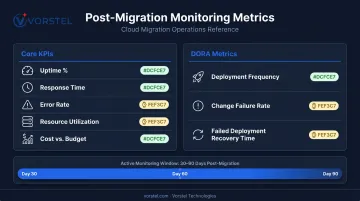
Go-live is not the finish line — hidden performance issues, misconfigured resources, and unresolved dependencies routinely surface only after real production traffic hits the new environment. The first 30–90 days require active monitoring, not passive observation.
KPIs to Track After Cutover
Set these before go-live so you have a baseline for comparison:
- System uptime percentage — against your defined SLA threshold
- Application response times — compared to pre-migration baseline
- Error rates — any increase signals unresolved dependency or configuration issues
- Resource utilization — over- or under-provisioned resources show up quickly under real load
- Cost vs. budget — cloud cost surprises are common in the first 60 days
Configure automated alerts for anomalies rather than relying on manual review. For teams running frequent releases, DORA metrics provide additional signals for application stability post-migration:
- Deployment frequency — how often changes reach production
- Change failure rate — percentage of deployments causing incidents
- Failed deployment recovery time — how quickly the team restores service
These monitoring signals feed directly into your optimization decisions — which brings us to resource sizing.
Right-Size After Utilization Stabilizes
Pre-migration sizing estimates are educated guesses. After 30–60 days of production utilization data, right-sizing decisions become data-driven. AWS Cost Optimization Hub and AWS Cost Explorer surface rightsizing recommendations based on actual usage. Azure Advisor recommends VM resizing when current load fits a less expensive SKU.
Don't right-size in the first week — wait for traffic patterns to normalize before adjusting compute allocation.
Common Cloud Migration Mistakes That Cause Downtime
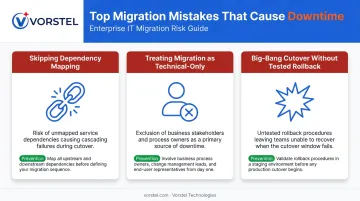
Three mistakes account for a disproportionate share of migration-related outages. Each is avoidable — and each tends to show up when teams prioritize speed over preparation.
Skipping Dependency Mapping
When systems are migrated without fully documenting which services depend on which, moving one workload can cascade into failures across connected systems that weren't expected to be affected. Azure Migrate and Google Migration Center both treat dependency analysis as a core planning activity because migrations that skip it regularly encounter outages a completed dependency map would have prevented.
Key signs your dependency mapping is incomplete:
- Services that share databases or APIs with the workload being migrated
- Authentication or identity services called by multiple applications
- Logging or monitoring tools that pull data across environments
- Third-party integrations without documented connection points
Treating Migration as a Purely Technical Project
Employees encountering new interfaces, changed workflows, or different access patterns without preparation generate support ticket spikes that extend disruption well beyond the technical cutover window. Gartner identifies failure to transform IT operations for cloud-optimized models as a major migration cost trap.
Vorstel Technologies' digital transformation methodology addresses this directly — cultural change management runs alongside technical migration work. Adoption gaps cause as much operational disruption as technical failures, and treating them as secondary often extends recovery timelines.
Big-Bang Cutover Without a Tested Rollback Plan
When a full-system migration encounters unexpected failures and there's no validated path back to the previous state, organizations face prolonged outages with compounding data integrity risks. "Tested" is the operative word here. A rollback procedure that exists on paper but has never been rehearsed is not a reliable safety net.
Each migration phase should include a dry run of the rollback procedure — not just documentation of it.
Frequently Asked Questions
What causes the most downtime during cloud migration?
The most common root causes are incomplete dependency mapping (moving systems whose dependencies weren't documented), untested rollback procedures, and big-bang cutovers on critical systems without parallel-run environments. Most extended outages during migration trace to one of these three gaps.
How long does a typical cloud migration take?
It varies considerably based on workload complexity and chosen strategy. AWS benchmarks individual migration waves at 3–4 weeks for the migration workstream. Phased approaches extend overall program duration but reduce per-phase risk. For most enterprises, that trade-off is worth it.
What is the difference between a phased migration and a big-bang migration?
Phased migration moves workloads incrementally, validating outcomes at each stage before advancing. Big-bang migrates everything simultaneously. Phased approaches are strongly preferred for production environments because failures are contained to individual waves rather than affecting the entire estate at once.
How do you ensure data integrity during cloud migration?
Use real-time or near-real-time replication between source and target environments. Apply checksum validation at each migration phase and run parallel systems before completing full cutover. Confirm replication lag is within acceptable thresholds before switching traffic.
How can legacy systems be migrated without disrupting operations?
Rehost or replatform strategies work best for legacy systems. Both minimize architectural change and shorten cutover windows. Start with non-critical legacy workloads to validate the process, then apply the same approach to production systems using parallel environments to avoid hard cutovers.
What should a cloud migration rollback plan include?
At minimum, your rollback plan should cover:
- Defined rollback triggers with measurable thresholds
- A tested restoration procedure for each workload
- A single named decision-maker authorized to initiate rollback
- A data recovery checkpoint completed before each migration phase