Introduction
ERP projects fail more often than most organizations expect. According to Prosci, about 1 in 5 ERP implementations falls short of expectations — and the root cause is rarely the software itself.
Most failures trace back to the same upstream problems:
- Scope that was never fully defined before work began
- Stakeholders who weren't aligned until configuration was already underway
- Data migration treated as a last-minute checkbox rather than a standalone workstream
The stakes make these mistakes costly. The 2024 ERP Report from Panorama Consulting puts the median ERP project cost at $450,000 with a 15.5-month median timeline, and that's before accounting for the productivity loss when go-live gets delayed.
This article covers 7 concrete project planning tips to help your team avoid the most costly pre-implementation mistakes, whether you're running SAP S/4HANA, a mid-market ERP, or anything in between.
Key Takeaways
- Pre-implementation planning determines whether SAP/ERP projects succeed; a rushed start compounds into costly delays down the line
- Stakeholder alignment and scope definition must happen before technical work begins, not alongside it
- Data migration and change management are independent workstreams, not IT tasks to schedule at the end
- Budget and timeline contingency built in from day one prevents late-stage surprises
- The right implementation partner — one able to join at any project stage — significantly improves go-live outcomes
Why Project Planning Is Critical Before SAP & ERP Implementation
SAP implementations, particularly S/4HANA, span multiple business functions simultaneously — finance, supply chain, procurement, and HR. When even one of those functions hasn't aligned on requirements before the Realise phase begins, the ripple effects get costly fast. Teams end up absorbing rework costs, fielding scope change requests mid-build, and pushing back UAT cycles — each one compressing the timeline further downstream.
The SAP Activate Methodology structures this risk through six phases:
- Discover — Establish business case and solution fit
- Prepare — Define scope, team, and project standards
- Explore — Validate requirements against the standard solution
- Realise — Build, configure, and test
- Deploy — Cut over and go live
- Run — Operate and optimise post-go-live
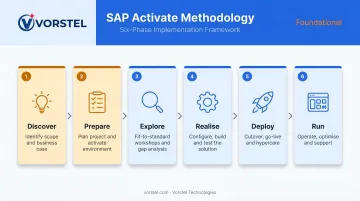
The first two phases — Discover and Prepare — are where the foundational planning decisions get made. Miss them, and every phase that follows carries more risk.
A key planning benchmark worth noting: Panorama's 2023 ERP Report found that 83% of organisations that performed an ROI analysis before their project and had been live for at least a year actually met their ROI expectations. The upfront planning work translates directly into post-go-live results.
7 Project Planning Tips for SAP & ERP Implementation
Tip 1: Define Clear Business Goals and Success Metrics
The most common planning mistake isn't choosing the wrong module — it's starting a project without a clear answer to "what problem are we solving?"
Implementation decisions made without business goals as a reference point tend to drift toward technical preferences rather than outcomes. Before any configuration begins, define what success actually looks like.
Practical steps:
- Identify 3–5 measurable success metrics tied to business outcomes (e.g., reduce financial close cycle from 10 days to 5, improve inventory accuracy to 98%, reduce manual procurement steps by 40%)
- Map each implementation decision back to at least one success metric
- Establish a definition of "done" that extends beyond go-live — what does the business look like 6 months post-launch?
Gartner's guidance reinforces this: the executive team must set and communicate strategic goals clearly so the ERP implementation aligns with the organization, not just with IT preferences.
Tip 2: Align Stakeholders Across All Business Units Early
Late stakeholder involvement is one of the most reliable predictors of scope creep. When finance, supply chain, and HR aren't in the room during Prepare, their requirements show up as change requests during Realise — the most expensive place to discover them.
Who needs to be aligned before configuration begins:
- Executive sponsor: holds decision authority and defines value drivers for the project
- Business process owners: cover each functional area (SAP Learning recommends 2–4 per business process)
- IT leads: manage technical dependencies and infrastructure readiness
- End-user representatives: surface ground-level process realities before configuration locks in
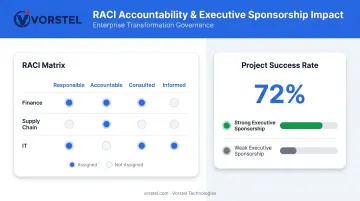
A RACI chart is the simplest way to document who is Responsible, Accountable, Consulted, and Informed for each workstream. Build it in the Prepare phase and review it at every governance checkpoint.
Projects with strong executive sponsorship are far more likely to succeed. Prosci reports a 72% success rate for projects with good or excellent sponsor access — more than enough reason to secure active C-suite commitment before any technical work begins.
A project kickoff and value discovery workshop — one structured session where all stakeholders confirm goals, roles, and expectations — prevents more rework than almost any other single investment in the planning phase.
Tip 3: Conduct a Thorough Scope Definition and Fit-Gap Analysis
A fit-gap analysis (or SAP's equivalent "Fit-to-Standard" workshop) compares standard out-of-the-box ERP functionality against your organization's actual business processes. The output is a clear map of where the standard solution fits, where configuration is needed, and where genuine gaps require custom extensions.
Why this matters:
- Under-scoping leaves gaps that surface as emergency customizations during Realise, blowing timelines
- Over-scoping adds unnecessary complexity, budget bloat, and a longer go-live runway
According to SAP Learning, Fit-to-Standard workshops validate solution scope and capture configuration and extensibility requirements directly in SAP Cloud ALM during the Explore phase — and those items are closed as verified during Realise. Any scope that skips this process tends to surface as emergency rework.
One caveat worth flagging: SAP notes that every customization, even a small one, creates ongoing maintenance burden through future release upgrades. The fit-gap output should always include a sign-off authority matrix — a documented record of who approved each customization decision and why.
Tip 4: Build a Realistic Timeline and Budget with Contingency
The 15.5-month median ERP timeline from Panorama's data applies to broad enterprise software implementations. Actual durations vary considerably, and most initial estimates are optimistic.
Common reasons timelines slip:
- Resource conflicts (key business users can't commit full-time alongside their day jobs)
- Data readiness delays discovered late
- Extended UAT cycles when test scenarios weren't pre-planned
- Infrastructure procurement timelines not accounted for
- Unexpected need for additional technology (Panorama 2024's top budget-overrun driver)
Build contingency in from day one:
- Add 15–20% time buffer to each phase milestone
- Reserve a 10–15% budget contingency for unforeseen scope and technical needs
- Establish milestone-based governance checkpoints so timeline erosion is caught early, not at go-live
Fixed-price, fixed-timeline plans that haven't validated business requirements set up painful mid-project renegotiations. Contingency is a structured reserve, not an apology for uncertain planning.
Tip 5: Plan Your Data Migration Strategy Before Configuration Begins
Data migration is consistently one of the highest-risk workstreams in any SAP project — and the most commonly delayed. Data quality issues discovered during Realise can push go-live back by weeks or months.
The strategic decisions about data migration — what to migrate, what to archive, what to convert — need to happen in the Prepare phase. Leaving these decisions until configuration is underway creates compounding bottlenecks.
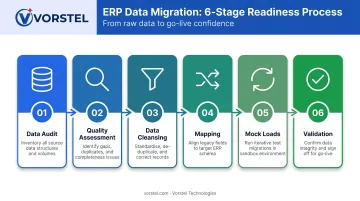
Core steps of a data migration plan:
- Data audit — catalog all source systems and data objects to be migrated
- Quality assessment — identify gaps, inconsistencies, and outdated records (Deloitte recommends starting here for any ERP transformation)
- Data cleansing — resolve quality issues before migration begins, not during
- Mapping — document how legacy fields map to SAP target structures
- Mock loads — run test migrations to catch mapping errors and volume issues
- Validation — confirm data integrity in the target system before go-live sign-off
SAP's Migration Cockpit supports this process across SAP and non-SAP source systems, providing file, staging table, and direct transfer approaches with guided workflow validation. Knowing which approach applies to your data landscape is a Prepare-phase decision, not a Realise-phase discovery.
Tip 6: Prioritise Change Management and End-User Training
Technology adoption failure, not technical failure, is the most consistent reason ERP implementations don't deliver expected ROI. Yet Panorama's 2024 ERP Report found that **less than half of organizations had an intense focus on change management**, and 8.5% of organizations under 3,000 employees reported little to no focus at all.
A change impact analysis document is the foundation. It should cover:
- Which processes are changing, and for which roles
- What the magnitude of change is per user group (minor adjustment vs. complete role redesign)
- Training needs by persona, not by module
- Communication milestones at each project phase
Training should be a structured workstream, not a crash course:
- Identify key users early and train them to become internal champions
- Build role-based training materials, not generic system walkthroughs
- Embed learning documentation into daily workflows post-go-live
- Plan a hypercare period where support is immediately accessible after cutover
A one-week training sprint before go-live is never sufficient. Organizations that skip structured change management pay for it in low adoption rates, workaround proliferation, and support tickets that outlast the implementation itself.
Tip 7: Select the Right Implementation Partner and Methodology
Your implementation partner choice shapes every phase that follows. Methodology alignment, industry experience, and flexibility at different project stages all matter, and they're not always evaluated carefully during selection.
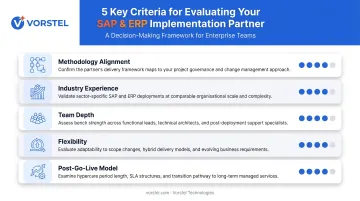
What to assess when evaluating an SAP or ERP implementation partner:
- Methodology alignment: confirm they follow SAP Activate or a comparable structured framework
- Industry experience: verify they've delivered similar scope in your sector, not just adjacent ones
- Team depth: check whether your project is staffed consistently or subject to frequent rotation
- Flexibility: ask directly whether they can join mid-project or take over a rescue scenario
- Post-go-live model: confirm hypercare and managed services are available, not just an afterthought
For organizations in early planning stages, Vorstel Technologies offers a Zero-Fee Solution Evaluation — a free expert consultation covering IT strategy, automation, and cloud solutions to help assess implementation readiness before committing to a full engagement.
With 200+ SAP project experiences and the ability to join implementations at any stage of a client's transformation journey, it's a practical starting point for teams weighing their options before selecting a partner.
Common SAP & ERP Planning Mistakes to Avoid
Most planning failures follow predictable patterns. Here are four worth auditing against your own approach:
1. Skipping the fit-gap analysis to save time Defects and scope gaps found late in development cost dramatically more to fix than those caught during requirements and design. Fit-to-Standard workshops aren't optional overhead — they're what prevents chaos in the Realize phase.
2. Treating data migration as an IT-only task Business teams own the data — they know what's accurate, what's obsolete, and what target-state records should look like. Without joint ownership, cleansing decisions get made by people who don't understand the business implications, which shows up as validation failures after go-live.
3. Budgeting for training only at the end Change management and training planned as afterthoughts produce adoption rates that reflect exactly that level of investment. Build the change management workstream into the project plan during Prepare, not during Deploy.
4. Locking in fixed scope and timelines before requirements are validated Fixed plans without validated requirements are just optimism documented. When the Explore phase reveals the locked scope doesn't reflect actual business processes, either the budget breaks or the scope breaks — and recovering from either mid-project is far more expensive than validating upfront.
Conclusion
A successful SAP or ERP go-live is built in the planning phase. The seven tips covered here — from defining measurable business goals to selecting a partner who can engage at any stage — provide a practical framework regardless of company size or industry.
Organizations that invest time upfront in planning consistently experience fewer costly mid-project pivots. Those that don't typically spend more time and budget correcting avoidable gaps after go-live.
If you're in early planning stages and want an expert view on your readiness before committing to a full implementation, Vorstel Technologies offers a Zero-Fee Solution Evaluation — a structured, expert assessment with no strings attached. With 200+ SAP projects completed, the Vorstel team can engage wherever you are in the journey.
Frequently Asked Questions
What are the 7 parts of a project plan?
The seven components are: objectives, scope, schedule, budget, resources, risk management, and communication plan. In SAP/ERP implementations, each maps directly to the Discover and Prepare phases of SAP Activate and should be defined and agreed before configuration begins.
What are the stages of an SAP implementation project?
SAP Activate defines six official phases: Discover, Prepare, Explore, Realise, Deploy, and Run — not seven. Thorough pre-work in Discover and Prepare, particularly scope validation and stakeholder alignment, is the single biggest determinant of go-live success across all subsequent phases.
What is the difference between SAP PPM and EPPM?
SAP PPM (Portfolio and Project Management) was the legacy project management tool within the SAP ecosystem. SAP EPPM (Enterprise Portfolio and Project Management) is the current solution, offering broader capabilities including integrated portfolio prioritization, resource management, and financial planning across project lifecycles.
How long does an SAP or ERP implementation typically take?
Panorama's 2024 data puts the median ERP implementation at 15.5 months, though scope and company size significantly affect this. Small to mid-market projects may complete in 6–12 months, while large enterprise rollouts can span 18–36 months. Stronger planning in the Prepare phase consistently compresses timelines at the lower end of those ranges.
What is the biggest risk in an SAP implementation project?
Inadequate change management and low end-user adoption are consistently cited as the top risks, with data quality issues discovered late in the project cycle running a close second. Both are preventable with structured planning in the Prepare phase.
Do I need a dedicated project manager for an SAP implementation?
Yes. A dedicated project manager (or PMO function) is essential for coordinating cross-functional teams, maintaining governance checkpoints, and keeping all parties accountable. Assigning this role to someone with competing full-time responsibilities is one of the most reliable ways to lose control of a project timeline.