Introduction
Few IT investments touch as many parts of a business at once as an ERP — finance, supply chain, HR, and operations all change at the same time. The stakes are high, and the numbers confirm it: according to Gartner, more than 70% of recently implemented ERP initiatives will fail to fully meet their original business-case goals by 2027, with as many as 25% failing catastrophically.
For business leaders, project managers, and IT teams planning a first-time rollout or migrating from legacy systems, those failure rates are not a foregone conclusion. They reflect what consistently happens when teams skip structured planning, underestimate change management, or treat go-live as the finish line.
This guide walks through each implementation phase with specific checklist items, identifies where projects most commonly break down, and gives you a practical roadmap from pre-planning through post-go-live optimization.
Key Takeaways
- ERP implementation follows distinct phases — planning through optimization — and skipping any phase raises failure risk
- Common failure causes — weak sponsorship, poor change management, scope creep — are preventable with upfront planning
- A phased go-live strategy reduces operational disruption compared to a "big bang" cutover
- Post-go-live KPI tracking against defined success criteria is how you measure and realize ROI
Why ERP Implementations Fail
A 2023 peer-reviewed systematic review of 55 ERP research articles identified 35 critical failure factors. The top five:
- Lack of top management support
- Inadequate education and training
- Mismatch between system and business strategy
- Lack of project management capability
- User unwillingness to adopt the system
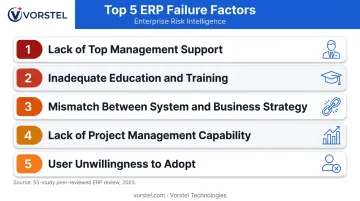
Notice what's absent from that list: technical bugs, software limitations, or infrastructure problems. ERP projects fail because of people and process decisions, not technology.
Panorama Consulting's 2026 ERP Report reinforces this — more than a quarter of surveyed organizations reported going over budget, and nearly a quarter ran over schedule. The primary drivers weren't technical: unexpected technology needs, organizational resistance, and vendor misalignment led the list.
The cost of failure extends beyond budget overruns. Disrupted operations, eroded employee trust, and delayed competitive advantage compound the financial damage.
Organizations that follow a structured, phase-by-phase checklist and invest seriously in change management consistently report higher user adoption and faster ROI realization.
Phase 1: Pre-Implementation Planning and Scope Definition
This phase determines whether your project succeeds before a single line of code is configured.
Define Measurable Objectives
The first checklist item is documenting specific, measurable goals. Not "improve efficiency" — that's unmeasurable and unaccountable. Instead:
- Reduce order processing time from X hours to Y hours
- Eliminate duplicate data entry across finance and operations
- Automate compliance reporting for [specific regulation]
- Cut monthly financial close cycle from 10 days to 6
Without concrete benchmarks at this stage, there's no basis for evaluating success at go-live or beyond.
Assemble the Core Project Team
Four roles are non-negotiable on every ERP implementation:
| Role | Responsibility |
|---|---|
| Executive Sponsor | Decision-making authority, organizational alignment, budget control |
| Project Manager | Timeline, resource coordination, vendor management |
| Functional Experts | Department-level SMEs who validate system requirements |
| End Users | Real-world workflow insight, early adoption advocates |
Missing any of these creates gaps that surface as crises later. The executive sponsor role is especially critical — without visible leadership commitment, change resistance goes unchecked.
Conduct a Needs Assessment and Define Scope
With your team in place, the next step is mapping what the system actually needs to do. Start by:
- Documenting current workflows and identifying inefficiencies
- Recording compliance requirements by department
- Separating "must-have" capabilities from "nice-to-have" ones
Scope definition at this stage is what prevents costly change orders later.
ERP selection criteria to evaluate:
- Scalability for projected growth
- Industry fit and native functionality
- Integration capability with existing CRM, WMS, or e-commerce platforms
- Deployment model (cloud vs. on-premise vs. hybrid)
- Total cost of ownership over 3–5 years
Working with an experienced ERP consulting partner during discovery can significantly compress the time from requirements gathering to vendor selection. Vorstel Technologies, for example, offers zero-fee solution evaluations backed by 200+ SAP project engagements, helping organizations clarify requirements and select the right platform before committing budget.
Build the Project Charter and Budget
The project charter must define:
- In-scope and out-of-scope boundaries (deviation triggers expensive change orders)
- Resource allocation by phase
- Milestone-based timeline
- Risk register with ownership assigned
- Stakeholder communication plan
On budget: Beyond software licensing and implementation services, plan for costs that routinely catch teams off guard: productivity loss during transition, staff overtime, data migration effort, and post-go-live support. These hidden categories are among the most common drivers of budget overruns for organizations that don't account for them upfront.
Phase 2: System Configuration and Data Migration
Configuration vs. Customization
Understanding this distinction shapes your entire project economics:
- Configuration uses built-in system parameters to align with your processes — faster, cheaper, and easier to maintain during future upgrades
- Customization modifies underlying code for highly specific requirements — higher cost, longer timelines, and ongoing maintenance risk
The checklist item: minimize customization and adopt ERP-embedded best practices wherever possible. Heavy customization is a well-documented driver of ERP budget overruns, and it creates compounding costs every time the vendor releases updates.
Map Business Processes to System Capabilities
Document current-state workflows and identify which processes the ERP handles natively, which need configuration, and which are candidates for redesign. This exercise is an opportunity — use it to eliminate legacy inefficiencies rather than replicate them in the new system.
Execute Data Migration
Data migration is where many go-lives fail quietly. Follow this four-step sequence:
- Data Assessment — Audit existing records for duplicates, errors, and format inconsistencies
- Data Cleansing — Standardize formats, remove obsolete records, assign data ownership by department
- Data Mapping — Create a blueprint showing how legacy fields translate to the new ERP structure
- Data Validation — Run test migrations and verify accuracy before full cutover
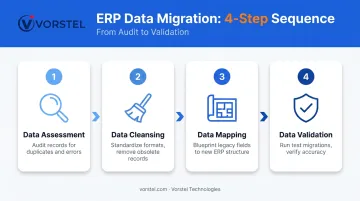
This sequence — assess, cleanse, map, validate — is the standard that SAP and most enterprise migration frameworks follow. Skipping validation, or treating it as a formality, is a direct path to go-live disruption.
Plan System Integrations
The ERP doesn't operate in isolation. For each connected system, document the integration scope, data ownership, and failure behavior before a single line of configuration is written. Common integration points to map include:
- CRM and customer data platforms
- Financial reporting and consolidation tools
- Supply chain and procurement systems
- E-commerce and order management platforms
Test all data flows in a sandboxed environment before go-live. Validate that no information is lost or duplicated during system handoffs.
Phase 3: Testing, Training, and Change Management
The Four-Layer Testing Framework
Every ERP implementation checklist should include these four testing stages in sequence:
- Unit Testing — Individual modules and features tested in isolation
- Integration Testing — Data flow between the ERP and connected systems validated
- System Testing — End-to-end performance, security, and load handling under realistic conditions
- User Acceptance Testing (UAT) — End users confirm the system meets actual operational needs
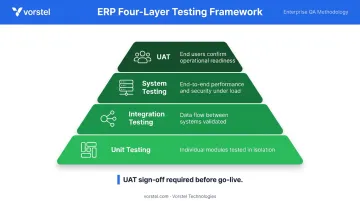
UAT sign-off should be a formal milestone with documented approval. Microsoft's implementation guidance is explicit: UAT is always a manual process and the final test before production deployment. No UAT approval, no go-live.
Build a Role-Based Training Strategy
Generic system training fails because a finance analyst and a warehouse operator need completely different skills. Role-based training is more effective and more efficient.
The training checklist:
- Identify training needs by role, not by department
- Select delivery method — in-person, e-learning, or blended
- Create step-by-step reference documentation for post-go-live use
- Designate ERP "super users" in each department to handle low-level questions and reduce support burden
Inadequate training is one of the five most cited ERP failure factors in peer-reviewed research. It's also one of the most controllable variables — fundamentally a planning decision, not a technical constraint.
Implement Change Management
Even a technically sound ERP will underperform if employees resist or misuse it. Prosci's 2026 research across 2,600+ change practitioners found that 88% of projects with excellent change management met or exceeded objectives, versus just 13% with poor change management — roughly 7x more likely to succeed.
The change management checklist:
- Secure visible leadership commitment (not just a kickoff email)
- Run a clear communication campaign explaining exactly how workflows will change
- Create channels for employees to ask questions and raise concerns
- Appoint departmental change champions who build peer buy-in
User resistance is one risk — but the full risk landscape is broader. Document the top 5–7 project risks, assign an owner to each, and build contingency plans before go-live. Common risks to track include:
- Data migration errors
- Integration failures
- Scope creep
- User resistance
- Vendor delays
Review the risk register at every phase milestone, not just at project start.
Phase 4: Go-Live and Post-Implementation Optimization
Go-Live Readiness Checklist
Don't cut over until every item is confirmed:
- Final UAT sign-off obtained from all departments
- Data migration accuracy verified through test runs
- All integrations confirmed and tested
- User training completed with documented sign-off by role
- Help desk resources in place with extended coverage for the first 2–4 weeks
- Communication plan sent to all affected staff
On go-live approach: A phased rollout — department-by-department or module-by-module — reduces operational risk compared to a full "big bang" cutover. Panorama's 2026 data shows more than a quarter of organizations now use a hybrid approach, blending phased and simultaneous elements based on their specific risk tolerance and operational complexity.
Post-Go-Live: Where ROI Actually Gets Realized
Most ERP value is captured after go-live, not at it. Organizations that close the gap between deployment and ROI treat post-go-live as an ongoing optimization program — not a support queue they wind down after stabilization.
Track these KPIs to measure implementation success against Phase 1 objectives:
| KPI | What It Measures |
|---|---|
| Order processing cycle time | Operational efficiency improvement |
| Finance close cycle time | Finance team productivity |
| User adoption rate by module | Change management effectiveness |
| Data error rates | Data quality and migration success |
| System downtime frequency | Technical stability |
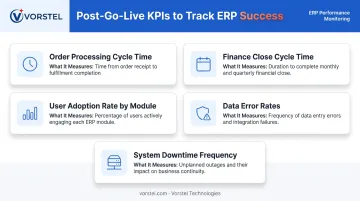
Calculate ROI by comparing pre- and post-implementation performance against the success criteria defined in Phase 1. Measurable baselines set in Phase 1 are what make this comparison possible.
Sustaining those gains over time is where many organizations struggle without a knowledgeable partner. Vorstel Technologies brings over 200 SAP projects of experience across SAP, Microsoft, and Salesforce ecosystems, with a 97% client satisfaction rate across global deployments. Their post-go-live support is structured around keeping systems aligned to the business outcomes defined at the start — not just stable at cutover.
Frequently Asked Questions
What are the 5 stages of ERP implementation?
The five standard stages are: planning and discovery, system design and configuration, data migration, testing and training, and go-live with post-implementation support. Microsoft's Success by Design framework maps these as Discover, Initiate, Implement, Prepare, and Operate.
How do you prepare for an ERP implementation?
Start by defining measurable objectives, assembling a cross-functional project team, and conducting a thorough needs assessment. Cleanse legacy data early — before vendor selection if possible — and secure executive sponsorship before committing to any platform.
What are the 4 pillars of ERP?
The four foundational pillars are: people (training and change management), process (business process alignment), technology (system configuration and integration), and data (quality, governance, and migration accuracy).
How long does ERP implementation typically take?
Panorama's 2026 survey of 170 organizations reported a 9-month median timeline. Smaller, cloud-based implementations can be faster — Forrester's Business Central composite ran 4 months — while large enterprise deployments often run 12–18 months depending on complexity.
What are the most common reasons ERP implementations fail?
The top causes: insufficient executive sponsorship, poor change management, underinvestment in training, scope creep after project initiation, and inadequate data preparation before migration. Each failure point traces back to planning and governance — not the technology itself.
Should you extensively customize your ERP system?
Minimize customization wherever possible. It increases cost, extends timelines, and creates compounding maintenance risk with every future upgrade. Configure native system capabilities to fit your processes — that approach reduces long-term maintenance burden and keeps future upgrades clean.