Introduction
The ERP implementation life cycle is the end-to-end process of planning, deploying, and sustaining an ERP system to unify and automate core business operations — a cross-functional program that spans months of planning, change management, and technical execution.
For IT leaders, operations heads, and digital transformation teams, getting this process right carries real consequences. Panorama's 2026 ERP Report found that more than a quarter of ERP projects run over budget and almost a quarter exceed their planned schedule — with poor governance and resistance to change as the primary culprits.
Those failure patterns are avoidable — but only when teams understand what each phase actually demands. What follows covers the key phases of the ERP implementation life cycle, what separates successful rollouts from costly overruns, and the practices experienced teams rely on to stay on track.
Key Takeaways
- The ERP life cycle covers every phase from discovery and planning through post-go-live optimization, not deployment alone
- Timelines vary; Panorama's 2026 report cites a 9-month median, though complex projects run significantly longer
- Skipping early phases like planning and gap analysis is the most common cause of delays and budget overruns
- Data migration and change management are consistently underestimated, with direct impact on adoption rates and data quality
- Post-go-live support determines whether the system delivers real ROI — technical go-live is only half the work
What Is the ERP Implementation Life Cycle?
The ERP implementation life cycle is the structured, multi-phase process an organization follows to select, configure, deploy, and continuously maintain an ERP system. That distinction — continuously maintain — is what separates a lifecycle from a simple project.
An implementation project has a go-live date. The lifecycle doesn't end there.
SAP frames ERP as a journey from preliminary preparation through post-migration operations. Microsoft describes Dynamics 365 as a continuous service that must remain current. Oracle ties implementation success to user adoption, process alignment, and data quality — none of which are one-time checkboxes.
What a Completed Lifecycle Actually Delivers
When executed well, the full lifecycle produces:
- Unified data across finance, operations, HR, and supply chain
- Automated workflows that replace manual, error-prone processes
- Real-time visibility into business performance across departments
- Scalable infrastructure that supports growth without requiring a full system replacement
Organizations that treat ERP as a one-time IT project routinely under-invest in planning, change management, and post-go-live support. Understanding the full lifecycle — from discovery through continuous improvement — is the first step to avoiding that trap.
Key Phases of the ERP Implementation Life Cycle
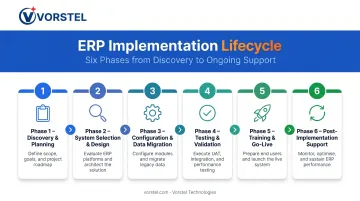
The lifecycle typically divides into six sequential phases, though some overlap in practice. Each has specific objectives and deliverables that feed directly into the next.
Phase 1: Discovery and Planning
This phase establishes the entire foundation: forming the project team (executive sponsor, project manager, departmental leads, IT), documenting current workflow inefficiencies, defining business objectives, and setting scope, budget, and timeline.
Rushing it is expensive. Panorama notes that without a detailed plan, organizations are bound to experience ERP failure largely due to scope creep. The 2026 data reinforces this — organizational issues including governance and process redesign were among the primary drivers of schedule delays.
What solid planning produces:
- A documented scope baseline that prevents creep
- Clear success metrics tied to business outcomes
- Realistic budget and timeline with identified risk buffers
- Cross-functional team alignment before technical work begins
Phase 2: System Selection and Design
Requirements gathered in Phase 1 drive the ERP selection process. Evaluation criteria typically include:
- Scalability and functional fit for your industry
- Deployment model (cloud vs. on-premises vs. hybrid)
- Total cost of ownership over 3–5 years
- Vendor support quality and release cadence
Cloud and SaaS adoption continues to trend upward. Panorama 2026 reports a strong preference for SaaS deployment, noting that it shifts maintenance and upgrade responsibilities to vendors.
Gap analysis is the critical design step here. It compares existing business processes against what the ERP natively supports, identifying areas that need configuration, customization, or process redesign before build work begins. Skipping gap analysis means discovering misalignments during testing — or worse, after go-live.
Phase 3: Configuration, Customization, and Data Migration
Two terms that often get confused, but shouldn't:
- Configuration — adjusting ERP settings and parameters to match your processes. Low-risk, upgrade-safe.
- Customization — code-level changes that modify core system behavior. Higher risk, harder to maintain, and a common source of upgrade complexity.
Panorama's 2026 data identifies degree of customization as a direct factor influencing project duration. The guidance: adapt your processes to the system first. Customize only when there's a genuine business case that configuration can't address.
Data migration deserves equal attention. The goal isn't to transfer everything — it's to migrate only current, relevant, and clean records. Panorama's data quality guidance treats unmigrated or unreliable legacy data as a risk that can compromise the new system from day one. Deduplicate, validate, and map data to the new structure before a single record moves.
Phase 4: Testing and Validation
Testing covers more than "does it work." According to Microsoft's testing guidance for Dynamics 365, a complete ERP test strategy includes:
- Functional testing of end-to-end business processes
- Data migration validation
- Regulatory compliance testing
- Performance testing under realistic load
- Usability testing
- Disaster recovery testing
- Mock cutover and business stakeholder sign-off
User Acceptance Testing (UAT) in particular must involve actual end users — not just the IT team. Panorama notes that UAT uses real-life scenarios to validate suitability for intended users. IT can confirm the system works; only end users can confirm it works for them.
Phase 5: Training, Change Management, and Go-Live
Go-live strategy selection comes first. The three options:
| Strategy | How It Works | Best For |
|---|---|---|
| Big Bang | Full cutover in one event | Simple environments, high risk tolerance |
| Phased | Module-by-module rollout | Complex organizations, lower disruption tolerance |
| Parallel | Old and new systems run simultaneously | Highest safety, highest resource cost |
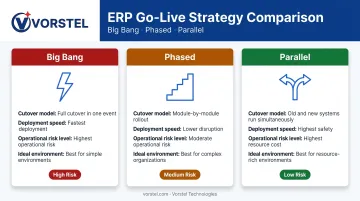
Panorama's 2024 data found fewer than 25% of organizations used a Big Bang approach. By 2026, over a quarter were using hybrid strategies combining elements of both — a direct response to the risk complexity of modern deployments.
Change management is where most teams underinvest. Prosci's ERP research found that ERP projects typically allocate 92% of budget to technology and only 8% to change management — despite human factors being 6x more influential than technical factors in improving ERP outcomes. Role-specific training must be completed before go-live, not scheduled afterward.
Phase 6: Post-Implementation Support and Optimization
Most ERP value is realized — or lost — in the months after go-live. The post-implementation phase includes ongoing system monitoring, user feedback collection, issue resolution, and support for new business requirements as they emerge.
Update management is a continuous responsibility. Major vendors release on predictable schedules:
- Microsoft Dynamics 365: Two annual release waves plus ongoing service updates
- Salesforce: Three releases per year (Spring, Summer, Winter)
- SAP S/4HANA Cloud: Semiannual release-upgrade cycles
Each release requires regression testing, release readiness review, and potentially user retraining. Organizations that treat post-go-live as passive maintenance fall behind on compliance, security patches, and feature relevance. That gap compounds over time and directly reduces the return the implementation was built to deliver.
Best Practices for a Successful ERP Implementation
An experienced partner accelerates delivery and reduces risk — particularly one that can join at any stage, not just at project inception. Vorstel Technologies, for example, has accumulated 200+ SAP project engagements and a 95% success rate in Salesforce CRM implementations, operating across India, Germany, Singapore, Finland, and Hungary. What distinguishes a strong partner is the ability to course-correct an in-progress implementation as effectively as starting a fresh one.
Common Mistakes to Avoid
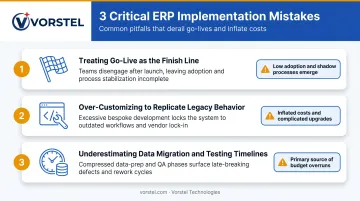
Most ERP failures don't happen during implementation — they happen because of decisions made before, during, and just after go-live. Three patterns show up repeatedly:
Go-live is not the finish line. Users are just beginning their journey with the system at that point. Inadequate post-go-live support leads to shadow processes, low adoption, and unrealized ROI — the system technically works, but the business doesn't use it effectively.
Over-customizing to replicate legacy behavior inflates project costs and makes future upgrades costly and complex. Teams often try to rebuild every quirk of their old system in the new ERP, which defeats the purpose of standardized workflows. The right sequence: adapt processes to the system first, then customize only where genuinely necessary.
Data migration and testing take longer than any team expects. These phases consistently slip. Panorama Consulting's ERP report identifies unexpected technology needs — including tooling for data pipelines and governance — as the most common source of budget overruns. Build explicit buffer time into the project schedule and treat both as core workstreams, not afterthoughts.
Conclusion
A successful ERP implementation comes down to disciplined execution across the full lifecycle: rigorous planning upfront, deliberate gap analysis, thorough testing, structured change management, and sustained support well after go-live. The technology itself only delivers value when the people and processes around it are equally prepared.
Organizations that realize the full ROI of their ERP investment treat it as an ongoing capability, one that requires the right internal team and a consulting partner with hands-on implementation experience.
Vorstel Technologies provides strategic ERP consulting across SAP, Microsoft, and Salesforce platforms. Whether you're starting fresh or inheriting a stalled rollout, the team brings the expertise to move fast and deliver results:
- 200+ SAP project engagements across global enterprises and growing businesses
- 95% success rate in Salesforce CRM implementations
- Mid-project course corrections when prior implementations have gone off track
Frequently Asked Questions
What is the full cycle of ERP implementation?
The full ERP implementation cycle includes discovery and planning, system design and selection, configuration and data migration, testing and validation, training and go-live, and post-implementation support and optimization. Most implementations span several months to over a year depending on scope and complexity.
How long does ERP implementation typically take?
Timelines vary significantly. Panorama's 2026 report cites a 9-month median; their 2024 data showed a 15.5-month median. Cloud deployments typically finish faster than on-premises rollouts, and scope, customization depth, and team readiness all shift that timeline.
What is the most critical phase in the ERP implementation lifecycle?
Discovery and planning is foundational. Rushing or skipping it produces unclear scope, misaligned configurations, and budget overruns that compound through every subsequent phase. Most mid-project failures trace back to decisions made — or not made — during this phase.
What are the main reasons ERP implementations fail?
The most common failure drivers include poor change management, low user adoption, inadequate executive sponsorship, rushed data migration, and weak post-go-live support. Panorama's data consistently identifies governance and organizational issues as the primary schedule and budget risk — not technical ones.
How do you choose between Big Bang, Phased, and Parallel go-live strategies?
Big Bang is faster but carries the highest operational risk. Phased reduces disruption by rolling out module by module. Parallel is the safest but most resource-intensive option. The right choice depends on operational complexity, risk tolerance, and available budget and staffing.
What happens after ERP go-live?
Post-go-live involves ongoing system monitoring, user feedback collection, issue resolution, and managing vendor updates. How well this phase is executed determines whether the organization realizes its expected ROI. Nucleus Research found average ERP payback of 16 months with over 200% ROI when post-launch support is maintained consistently.