Yet the track record for ERP programs, SAP included, is sobering. Gartner projects that by 2027, more than 70% of recently implemented ERP initiatives will fail to fully meet their original business-case goals, with up to 25% failing catastrophically. Budget overruns, missed deadlines, and poor user adoption are not edge cases — they are the norm for organizations that treat implementation as a software installation rather than a business transformation.
This guide covers what SAP implementation actually involves, the phases that matter most, the best practices that separate successful programs from troubled ones, the pitfalls that derail even well-resourced teams, and what to look for in an implementation partner.
Key Takeaways
- SAP implementation deploys, configures, and integrates SAP ERP (S/4HANA, ECC, BTP) across business operations — a structured multi-phase program, not a single project
- The standard lifecycle follows SAP Activate: Discover, Prepare, Explore, Realize, Deploy, and Run
- High-impact best practices: lock scope early, cleanse data before migration, adopt fit-to-standard, and invest in change management
- Costliest pitfalls: scope creep, excessive customization, poor data governance, and no post-go-live support plan
- Vorstel Technologies brings 200+ SAP engagements and can step in at any stage — including troubled programs — to reduce delivery risk
What Is SAP Implementation?
SAP implementation is the structured process of deploying, configuring, and integrating SAP enterprise software — most commonly SAP S/4HANA — across an organization's core business processes. It covers modules spanning Finance, Supply Chain, HR, and Procurement, with the goal of replacing fragmented legacy systems with a single source of truth that enables real-time decision-making. Done right, it touches people, processes, and technology simultaneously — far more than a software installation.
Why Organizations Undertake It
The motivations are consistent across industries:
- Eliminate data silos caused by disconnected legacy systems
- Automate manual workflows across Finance, Procurement, and Operations
- Build a scalable platform for AI, analytics, and cloud capabilities
- Satisfy regulatory and reporting requirements that older systems cannot meet
SAP's commercial trajectory reflects how central this platform has become: the company reported Cloud ERP Suite revenue of €18,119M in 2025, up 28% year-on-year, representing 86% of total cloud revenue. Organizations are not just implementing SAP — they are building long-term digital infrastructure on it.
Key Phases of an SAP Implementation
SAP's current methodology is SAP Activate, which structures implementation into six phases:
| Phase | What Happens |
|---|---|
| Discover | Research SAP offerings; determine which capabilities fit the strategy |
| Prepare | Define scope, governance, team roles, and project structure |
| Explore | Fit-to-standard workshops identify gaps between SAP best practices and current processes |
| Realize | Agile build and test phase — configuration, development, unit testing, UAT |
| Deploy | Production setup, readiness confirmation, go-live, and hypercare |
| Run | Ongoing support and continuous optimization |
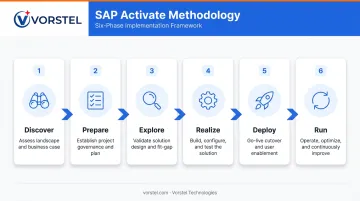
These phases form a dependency chain. Compressing or skipping any phase pushes unresolved complexity downstream, where it costs significantly more to address.
The Explore Phase: Most Frequently Underestimated
The Explore phase (equivalent to the Business Blueprint in the legacy ASAP methodology) is where business requirements are documented, process flows are mapped, and stakeholders agree on how SAP will reflect real-world operations. Teams routinely underinvest here, treating workshops as formalities rather than the design foundation for everything that follows.
Common signs a team has underinvested in Explore:
- Process owners are absent from workshops, leaving IT to document business requirements alone
- Gaps between SAP standard processes and current workflows go unresolved until Realize
- Sign-off happens before stakeholders fully understand what they approved
The Deploy Phase: Highest-Risk Moment
At Deploy, all data migrations, user access configurations, and integrations must be validated before cutover. A structured hypercare period — with dedicated support and rapid response to critical issues — is not optional. Projects that skip it or treat it as a formality almost always pay for that decision in the first weeks of production.
Best Practices for a Successful SAP Implementation
Align Stakeholders and Lock Down Scope Before Work Begins
Loosely defined scope is the most reliable predictor of a troubled implementation. Before the Explore phase begins, the project needs documented agreement on:
- Modules in scope (and explicitly out of scope)
- Geographic rollout sequence
- Integration boundaries with third-party systems
- Change control process for any post-Explore scope requests
Executive sponsorship matters as much as scope definition. PMI research found that 1 in 3 unsuccessful projects fail because sponsors are poorly engaged, and that actively engaged executive sponsors are the single strongest driver of program success. IT cannot carry this program alone — C-suite visibility signals to the organization that adoption is mandatory.
Prioritize Data Cleansing Before Migration
Migrating poor-quality data into SAP is one of the most common and expensive mistakes teams make. Gartner's research puts the average annual cost of poor data quality at USD 12.9 million per organization — and that is before the compounding effect of discovering problems post-go-live, when correction requires system downtime and manual remediation.
Effective data preparation involves:
- Deduplicate vendor, customer, and material master records
- Standardize formats and coding structures across business units
- Validate all records against agreed business rules before any data moves
- Obtain sign-off from data owners in each department, not just IT
Adopt Standard SAP Processes Before Customizing
SAP's clean core principle has one rule: adapt your workflows to SAP's built-in best practices rather than rebuilding SAP to mirror legacy processes. SAP's own guidance on extending S/4HANA Cloud positions clean core as the mechanism for keeping systems stable, agile, and innovation-ready.
Customization is sometimes necessary — when a business process is a genuine competitive differentiator with no SAP equivalent. But the default position should always be fit-to-standard. Each custom object you add carries a cost:
- Higher upgrade complexity and longer release cycles
- Hidden dependencies that surface during future enhancements
- Specialist knowledge requirements that create key-person risk
Build a Dedicated Cross-Functional Project Team
SAP implementation requires sustained input from Finance, Operations, HR, IT, and end users. Core roles needed:
- Project Manager — owns timeline, governance, and escalation
- Functional Leads — one per module, responsible for configuration decisions
- Technical Architects — manage integrations, custom development, and infrastructure
- Data Migration Specialists — own extraction, cleansing, and load
- Change Management Lead — drives communication, training, and adoption
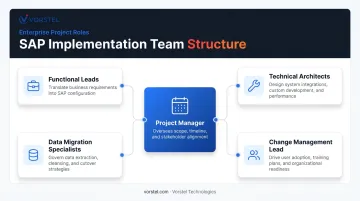
Team members need protected time. Running an SAP implementation alongside full-time operational roles guarantees delays.
Invest in Change Management and End-User Training Early
Technology alone does not guarantee adoption. If users do not trust the new system, workarounds proliferate and the implementation's business case deteriorates over months.
Effective change management includes:
- Stakeholder communication plans that start at project kickoff, not go-live
- Role-based training programs tailored to how each function uses SAP
- Super-user networks embedded in each department to provide peer-level support
- Feedback loops during UAT so users can surface issues before they become operational problems
Training that begins two weeks before go-live leaves users underprepared — and unprepared users are the fastest route to a failed adoption.
Common SAP Implementation Pitfalls to Avoid
Underestimating Scope, Timeline, and Total Cost
Organizations consistently underestimate SAP project cost by focusing on software licensing and IT consulting hours while ignoring:
- Change management and training programs
- Data cleansing and migration effort
- Integration development and testing
- Hypercare and post-go-live support
Gartner research indicates that more than 70% of ERP initiatives fail to meet their original business-case goals. Build contingency into both budget and timeline before committing to a go-live date. Conduct a thorough baseline assessment of system complexity and data quality before that date is set.
Rushing or Skipping the Business Blueprint Phase
Cutting blueprint workshops short triggers a cascade of downstream damage. Vague requirements lead to misconfigured modules, rework piles up during Realize, testing time shrinks, and the final system fails to reflect how the business actually operates.
Cross-department validation sessions during blueprinting are not optional overhead. They are the primary mechanism for catching conflicting requirements before they become expensive configuration mistakes.
Over-Customizing the SAP Environment
Unchecked customization is how organizations end up with systems that are technically SAP but functionally unrecognizable. Individual teams request small modifications — each seemingly reasonable in isolation — but collectively the system drifts far from SAP's standard upgrade path.
The fix is governance: a formal approval process for any custom development, requiring a documented business case and an assessment of upgrade impact before approval.
Neglecting Data Quality and Data Governance
Organizations that skip a thorough data audit before migration routinely discover duplicate vendor records, missing master data fields, and inconsistent coding structures after go-live — when correction is disruptive, expensive, and visible to users.
A data governance framework should assign ownership of each data domain and establish validation rules before migration begins. Without it, cleansing becomes a coordination problem with no accountable party.
Failing to Plan for Post-Go-Live Support
Go-live is not the finish line. Treating it as one leaves users without support precisely when they need it most: the first weeks of operating in an unfamiliar system.
Define and staff a structured support model before cutover — not assembled reactively when the first critical issue surfaces.
Post-Go-Live: Ensuring Long-Term SAP Success
Hypercare and Ongoing Optimization
SAP Activate's Deploy phase formally includes hypercare: a dedicated stabilization period immediately after go-live, with focused support resources, daily issue triage, and rapid response for critical business processes. Unlike ongoing support, its purpose is to stabilize the environment — not handle routine queries indefinitely.
After hypercare, the Run phase shifts focus to continuous optimization:
- Performance monitoring and health checks
- Module utilization reviews to identify underused capabilities
- Activating SAP features deferred from the original scope as the organization's confidence grows
- Periodic assessments of whether the system still reflects current business processes
Sustaining these optimization efforts depends on having the right support structure in place. That's where a tiered model becomes essential.
The L1–L4 SAP Support Tier Model
Structuring post-go-live support across four tiers ensures coverage without over-investing specialized resources in routine queries:
| Tier | Scope |
|---|---|
| L1 | End-user queries, password resets, access requests, basic navigation |
| L2 | Functional configuration issues, workflow problems, report corrections |
| L3 | Technical troubleshooting, custom code investigation, integration debugging |
| L4 | Escalation to SAP directly for product defects or critical patches |
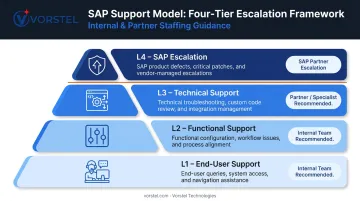
Organizations should define which tiers are staffed internally versus contracted externally before go-live. L1 can typically be handled by trained internal super-users; L3 and L4 usually require specialist partner support.
How the Right SAP Implementation Partner Transforms Outcomes
What Experienced Partners Actually Provide
An experienced SAP implementation partner brings something an internal team encounters for the first time on every project — pattern recognition from prior deployments. That means anticipating configuration decisions before they become blockers, knowing which workarounds create long-term problems versus which ones genuinely compress timelines, and arriving with pre-built approaches to the integration challenges that derail most programs.
The distinction that matters is between a partner who installs software and a consulting partner who aligns the implementation to strategic business outcomes. The former delivers a working system; the latter delivers measurable operational improvement.
What to Evaluate When Selecting a Partner
- SAP-specific project volume, not generic ERP or broad technology experience
- Industry vertical knowledge that reduces blueprint time through process familiarity
- SAP certifications held by the actual consulting team (not just the firm)
- Change management capability alongside technical delivery
- Willingness to engage mid-program — including troubled or in-flight implementations
Many implementations that stall or derail are not abandoned — they need a capable team to step in, stabilize, and redirect. A partner who only takes greenfield deployments cannot help an organization whose program is already in motion.
What a Strong Partner Engagement Looks Like in Practice
- Clear SLAs tied to business outcomes, not just go-live dates
- A dedicated project team — not rotating consultants who lose context between engagements
- Transparent project governance with escalation paths defined upfront
- Measurable KPIs that reflect operational improvement, not just system availability
The criteria above describe what organizations should demand — and what Vorstel Technologies is built to deliver. With 200+ SAP project engagements across global markets — spanning S/4HANA, SAP BTP, SAP Fiori, SAP MDG, and SAP Ariba — Vorstel can step into any stage of an SAP program: a greenfield deployment, a stalled initiative that needs stabilization, or a post-go-live environment requiring optimization.

For organizations still assessing their options, Vorstel offers a Zero-Fee Solution Evaluation — a no-commitment expert consultation covering strategy, scope, and solution design.
Frequently Asked Questions
What is an SAP implementation?
SAP implementation is the process of deploying and configuring SAP enterprise software — such as S/4HANA — across an organization's operations. It covers modules for Finance, Supply Chain, HR, Procurement, and more, centralizing data and automating business processes end to end.
What is L1, L2, L3, and L4 support in SAP?
The four tiers divide support by complexity: L1 handles end-user queries and access issues; L2 addresses functional configuration problems; L3 covers technical troubleshooting and custom development; L4 escalates directly to SAP for product defects or critical patches requiring vendor intervention.
How long does an SAP implementation typically take?
Smaller SAP S/4HANA Cloud Public Edition deployments can go live in weeks — SAP has documented a four-week rollout at Ahlstrom. Large enterprise implementations typically span 12–24 months or more depending on scope, complexity, and organizational readiness. Structured governance and an experienced implementation partner are the most reliable factors in keeping timelines on track.
What are the most common reasons SAP implementations fail?
The top causes are poorly defined scope, rushed blueprinting, excessive customization, inadequate data preparation, and absent executive sponsorship. Most failures trace back to governance and people issues rather than technical ones.
What is a business blueprint in SAP implementation?
A business blueprint is the documentation phase where the team maps existing processes to SAP's capabilities, identifies gaps, and agrees on how operations will be configured. It serves as the design foundation for everything built in the Realize phase.
How do I choose the right SAP implementation partner?
Evaluate partners on SAP-specific project experience, industry knowledge, certified consultants, change management capability, and their ability to engage at any project stage — not just greenfield implementations. A partner who can step into a stalled or recovering program is far more versatile than one who only works from inception.