This matters now more than ever. SAP mainstream maintenance for Business Suite 7 core applications, including ECC 6.0, ends in 2027, with optional extended maintenance running until 2030. Organizations that haven't started planning an S/4HANA transition are already working against a deadline.
This article is written for IT leaders, SAP project managers, and enterprise teams navigating an S/4HANA transition, ECC upgrade, or cloud move. It covers what SAP data migration is, how it differs from related processes, the phases involved, best practices that reduce risk, the key tools available, and the pitfalls that derail even well-resourced projects.
Key Takeaways
- SAP data migration moves data from legacy or non-SAP systems into an SAP environment through extraction, cleansing, transformation, and loading
- Data migration differs from data conversion (reformatting structures) and data integration (combining sources for unified reporting) — each requires a distinct approach
- A structured 7-phase process, from data analysis through productive load, reduces risk and preserves data integrity
- Poor planning, weak data quality, and insufficient testing are the leading causes of failed migrations
- Gartner projects that by 2027, more than 70% of ERP initiatives will fall short of their original business case goals — disciplined migration execution is what separates the successes from the statistics
What Is SAP Data Migration?
SAP data migration is the controlled process of transferring business-critical data from a source system — SAP ECC, Oracle, IBM, or another legacy platform — into a target SAP environment such as SAP S/4HANA. The goal is to preserve accuracy, completeness, and consistency at every step of the move.
Three terms get confused constantly in this space:
| Term | What It Means |
|---|---|
| Data Migration | Moving data from one system or storage location to another |
| Data Conversion | Transforming data formats/structures to match the target SAP data model (the "T" in ETL) |
| Data Integration | Combining data from multiple separate sources into a single, unified view for real-time analytics |
Put simply: migration moves the data, conversion reshapes it to fit the new system's structure, and integration connects it to everything else that needs to read it.
When Does SAP Data Migration Become Necessary?
- System upgrades — SAP ECC to S/4HANA transitions, driven in part by the 2027 mainstream maintenance deadline; organizations that delay face extended support costs and compounding technical debt
- Hardware renovations — moving from aging on-premise infrastructure
- Cloud adoption — shifting SAP workloads to S/4HANA Cloud via RISE with SAP or GROW with SAP
- Post-merger consolidation — combining data from multiple ERP instances into a single target
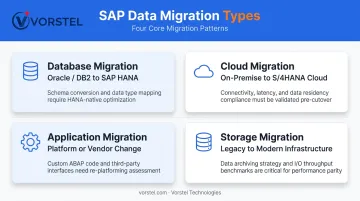
Types of SAP Data Migration
- Database migration — relocating data between database systems (for example, Oracle or IBM DB2 to SAP HANA), required when ECC runs on a non-HANA database
- Cloud migration — moving SAP workloads to S/4HANA Cloud Private or Public Edition, supported by SAP BTP cloud migration tooling
- Application migration — switching application platforms or vendors, requiring careful data model and API transformation
- Storage migration — shifting from legacy to modern or cloud storage for performance and cost improvements
Each type carries distinct technical requirements. Database migration demands schema compatibility assessment upfront; cloud migration hinges on network throughput and cutover planning. Knowing which type you're executing — or whether you're combining several — shapes every decision that follows.
How SAP Data Migration Works: The 7 Phases
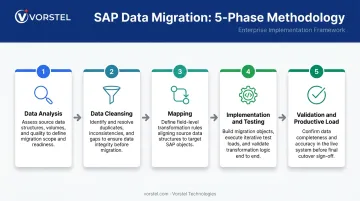
How SAP Data Migration Works: The 5 Core Phases
SAP data migration follows a structured lifecycle that moves from understanding what data exists to loading validated records into the live production system. Each phase builds on the last — skipping or rushing any one of them multiplies risk in every phase that follows.
Phase 1 – Data Analysis
This phase identifies all business objects (materials, customers, purchase orders), migration objects, and source systems. A business object and a migration object are not the same thing — a single business object may split into multiple migration objects because of different data sources or migration interfaces. This phase aligns with the Prepare stage of SAP Activate methodology.
Phase 2 – Data Cleansing
Cleansing targets duplicate records, incomplete fields, invalid values, obsolete entries, and systematic errors. Cleansing is best performed in the source system using conversion rules, before any data moves. Initial test loads often reveal the true state of source data quality — use that information to guide the cleansing process, not to react to failures after the fact.
Phase 3 – Mapping
Mapping involves two distinct tasks:
- Field mapping — aligning source fields to their corresponding SAP target fields
- Structure mapping — aligning hierarchical data structures and nested records
This phase is sometimes completed on paper before any technical work begins. Getting it right here prevents costly corrections during implementation.
Phase 4 – Implementation & Testing
This phase covers three interconnected activities:
- Developing ETL extraction and migration programs
- Running functional tests early to catch logic errors before they compound
- Executing load tests to evaluate system performance under real data volumes
Start testing as early as possible. The complexity of migration objects determines how much testing is needed — there is no standard shortcut.
Phase 5 – Validation & Productive Load
Two distinct steps happen here:
- Pre-migration validation — confirm source data is accurate and complete before any data moves to production
- Post-migration validation — verify that migrated data meets functional and business requirements inside S/4HANA
The productive load — loading validated data into the live production environment — is the final step. It requires a clear, rehearsed cutover plan.
For migrations where downtime must be minimized, SAP Landscape Transformation Replication Server (SLT) is worth considering. It supports real-time replication from SAP and third-party systems to SAP HANA, enabling near-zero downtime in supported scenarios.
SAP Data Migration Best Practices
Plan Thoroughly Before Starting
Define the full scope of data to migrate, set clear goals, establish governance policies, and identify all data sources and destinations before a single record moves. SAPinsider's 2024 benchmark found that implementation complexity blocked 39% of organizations and project length blocked 37% — both problems that thorough upfront scoping directly addresses.
In practice, poor scoping is the single biggest driver of migration delays and scope creep.
Prioritize Data Quality Early
Data quality problems in the source translate directly into operational failures in the target. ASUG reported in 2024 that 58% of CEOs were concerned their data quality was insufficient for advanced SAP S/4HANA automation — a sobering stat for any team heading into migration without a data cleansing plan.
Continuous data profiling, duplicate detection, and cleansing should begin well before migration — not as an afterthought during the migration run itself.
Run Test Migrations and Minimize Downtime
Multiple rehearsals in a non-production environment let teams catch logic errors, measure load performance, and fine-tune cutover procedures. SAP's Zero Downtime Option (ZDO) for S/4HANA 2020 or higher supports upgrades without technical downtime in qualifying scenarios. Selective Data Transition (SDT) restricts technical downtime to fewer hours for supported Private Cloud and on-premise transitions.
Neither approach eliminates the need for rehearsal — ZDO specifically requires additional test runs and a sandbox test cycle before production cutover.
Involve Stakeholders and Govern Access
Business users who participate in migration activities catch domain-specific data issues earlier than any automated check will. SAPinsider's 2024 data shows decision involvement from IT at 87%, finance at 68%, supply chain at 40%, and analytics at 34% — a gap worth closing before cutover day arrives.
On the security side:
- Enforce role-based access controls throughout the project lifecycle
- Restrict migration tool and environment access to authorized personnel only
- Apply segregation of duties across extraction, transformation, and load functions
- Revoke elevated migration-user permissions immediately after go-live
Validate Thoroughly and Monitor Post-Migration
Post-migration is not the finish line. Continuous monitoring after go-live catches late-surfacing anomalies — mismatched records, missing open items, incorrect account assignments — that only appear once business processes start running against real data.
Teams that have run these cycles before recognize the patterns early. That recognition — built across dozens of migrations rather than just one — is what separates a smooth hypercare period from a prolonged incident response.
Key SAP Data Migration Tools
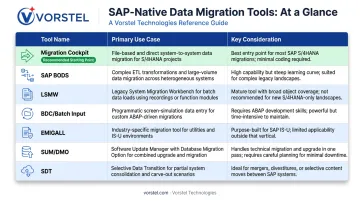
Tool selection depends on migration scenario, data complexity, security requirements, and whether the target is on-premise or cloud. Generic ETL tools that don't natively support SAP-specific data structures — Business Partner, ACDOCA, MATDOC — create mapping problems that surface late and cost significantly more to fix.
SAP-Native Tools
| Tool | Primary Use Case | Key Consideration |
|---|---|---|
| SAP S/4HANA Migration Cockpit | Initial business data loads to S/4HANA; predefined migration objects, automated mapping | Recommended starting point for S/4HANA transitions |
| SAP Data Services (BODS) | Complex ETL, data profiling, quality management, cleansing at scale | Best for organizations with significant data quality challenges |
| LSMW | Non-SAP to SAP legacy migrations; rule-based data import | Legacy tool; lacks monitoring capabilities; use cautiously for S/4HANA |
| BDC / Batch Input | Mass data entry via screen simulation | Classic SAP automation; not a strategic S/4HANA migration platform |
| EMIGALL | SAP IS-U utility-specific migrations | Utilities environments only |
| SUM / DMO | Technical system conversion and database migration | Combines software update with database migration in a single run |
| SDT | Selective S/4HANA transitions with near-zero downtime | On-premise and Private Cloud only; not for Public Cloud |
Deployment Categories
Beyond tool selection, deployment model shapes your architecture and vendor choices:
- On-premises tools — appropriate for security-sensitive environments or data warehouse consolidation
- Open-source tools — lower cost but require coding expertise and often lack native SAP data model support
- Cloud-based tools — scalable and cost-efficient for cloud-first migration strategies
Whichever deployment model you choose, SAP-native or SAP-certified tools reduce integration risk — the mapping gaps introduced by generic alternatives rarely surface until late in the project, when they're most expensive to resolve.
Common Challenges in SAP Data Migration
Poor Knowledge of Legacy Data
Teams consistently underestimate the state of their source data. Duplicates, missing fields, misspellings, and inconsistent records are common — but invisible until migration begins. Invest in a dedicated data profiling and assessment phase before any migration work starts. Discovering data quality problems during a cutover window is exponentially more expensive than finding them six months earlier.
Data Quality and Volume at Scale
Large enterprises with years of accumulated, poorly structured data face a compounding problem: cleanse at scale while keeping system performance stable. Approaches that help include:
- Phased migration — critical master data first, transactional data in controlled batches
- SAP ETL tooling (BODS) to accelerate processing and apply transformation rules consistently
- Incremental synchronization techniques to reduce the final migration window
Integration Failures and Missing Contingency Plans
Migrating from diverse legacy systems with different data formats frequently causes integration failures — especially across modules (FI, MM, SD, PP) and when dealing with custom Z-tables that have no direct S/4HANA equivalent.
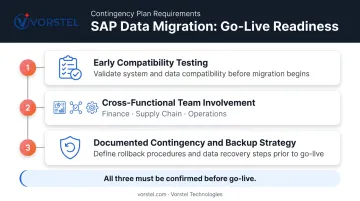
Teams without a documented rollback plan turn a recoverable failure into a full crisis. Every migration plan needs these three components in place before go-live:
- Early compatibility testing across all affected modules and data sources
- Cross-functional team involvement from finance, supply chain, and operations — not just IT
- A formally documented contingency and backup strategy, tested before go-live
Addressing these challenges early — before cutover pressure sets in — is what separates migrations that go smoothly from ones that stall.
Conclusion
SAP data migration is a structured, multi-phase process. Its success depends on early planning, disciplined data quality management, the right tooling for the specific scenario, and thorough testing before production goes live. Organizations that treat it as a one-time data copy encounter problems that are predictable, documented, and avoidable.
Those avoidable failures are exactly what Vorstel Technologies is built to prevent. With 200+ SAP project engagements across global enterprises and fast-growing businesses, Vorstel brings the depth to plan, execute, and validate migrations before problems reach production. Their Zero-Fee Solution Evaluation means you can pressure-test your current approach — or build a new one — without upfront commitment.
Frequently Asked Questions
What are the different types of migration in SAP?
The four main types are database migration (moving data between database systems, such as Oracle to SAP HANA), cloud migration (moving SAP workloads to S/4HANA Cloud environments), application migration (changing platforms or vendors with corresponding data model transformation), and storage migration (shifting data to new storage infrastructure). Each type carries distinct technical demands, so identifying your migration type early shapes every subsequent decision.
What is the database migration process in SAP?
Database migration in SAP moves data from one database system to another — such as Oracle or IBM DB2 to SAP HANA — without altering the core data structure. It is mandatory when transitioning from SAP ECC on a third-party database to S/4HANA. SAP's Software Update Manager (SUM) with the Database Migration Option (DMO) executes both steps in a single combined run.
What is the difference between SAP data migration and data conversion?
Data migration refers to moving data from one system or location to another. Data conversion — the "T" in ETL — refers to transforming data formats or structures so they are compatible with the target SAP data model. Conversion is a sub-step within the broader migration process, not a standalone activity, though the two terms are frequently (and incorrectly) used interchangeably.
What are the most important SAP data migration best practices?
The top practices are:
- Thorough pre-migration planning and scope definition
- Early and continuous data quality cleansing
- Multiple test migration rehearsals before cutover
- Cross-functional stakeholder involvement
- Role-based access controls enforced throughout the project
- Post-go-live monitoring to catch late-surfacing anomalies
Skipping any of these raises the risk of data loss, compliance exposure, and costly rework.
Which tool is best for SAP S/4HANA data migration?
The SAP S/4HANA Migration Cockpit is the recommended starting point for S/4HANA transitions due to its predefined migration objects and automated mapping capabilities. For more complex transformation or data quality requirements, SAP BODS or LSMW may be required alongside it. Tool selection should align with data complexity, security requirements, and whether the source system is SAP or non-SAP.
What happens if SAP data migration fails?
Failure can trigger data loss, operational disruptions, inaccurate reporting, and compliance exposure under GDPR or SOX — with significant financial and reputational remediation costs. A documented contingency plan and a backup strategy validated before go-live are the non-negotiable safeguards.