When it goes wrong, the consequences are real. Revlon reported $64 million in lost net sales and $53.6 million in incremental charges tied directly to SAP implementation disruptions in 2018. That is not an outlier — McKinsey research on large IT projects found average overruns of 45% over budget and 56% less value delivered than predicted.
This guide covers the complete SAP implementation journey — from prerequisites and phase planning to the most common failure points and what actually prevents them. It is written for IT leaders, project managers, and digital transformation decision-makers who need to get this right.
Key Takeaways
- SAP implementation is a multi-phase process: planning, blueprint, configuration, testing, and go-live support
- Success requires the right team, clear business objectives, and a structured methodology from day one
- Data migration and change management are the two most consistently underestimated risks
- Choosing a partner with deep industry experience who can step in at any project stage materially improves outcomes
- Post-go-live hypercare is not optional — skipping it is the fastest path to poor adoption and system underperformance
What Is SAP Implementation?
SAP implementation is the end-to-end process of deploying SAP enterprise software to unify core business functions — finance, supply chain, procurement, HR, and manufacturing — into a single integrated system. Unlike a standard software rollout, it restructures how an organization operates at its foundation.
The Methodology Behind It
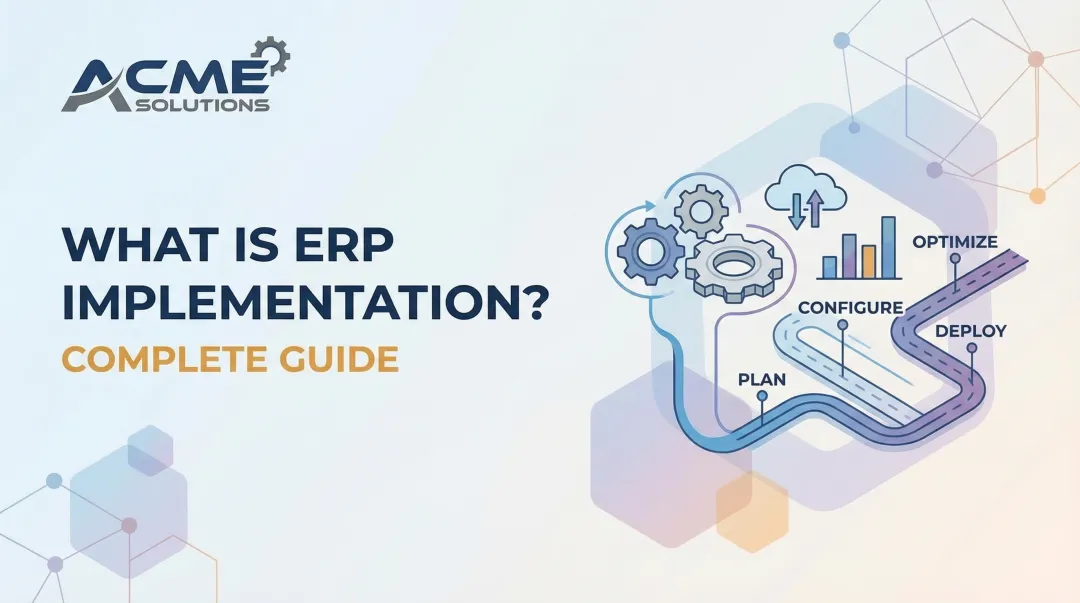
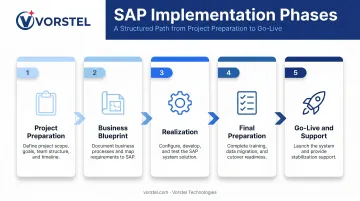
The original structured approach was ASAP (Accelerated SAP), a five-phase roadmap covering Project Preparation, Business Blueprint, Realization, Final Preparation, and Go-Live and Support. For modern S/4HANA and cloud deployments, SAP has replaced ASAP with SAP Activate — a six-phase framework (Discover, Prepare, Explore, Realize, Deploy, Run) that integrates agile methods, guided configuration, and built-in best practices.
SAP Activate adds flexibility through iterative sprints, while ASAP prioritized linear progression — but both enforce clear phase gates to manage scope and risk.
Why Organizations Do It Anyway
When executed well, the returns are substantial:
- Breaks down operational silos with integrated, real-time data shared across all functions
- Replaces fragmented legacy workflows with standardized, auditable processes
- Builds a scalable platform for future initiatives — AI, analytics, and beyond
- Delivers real-time visibility into financial, operational, and supply chain performance
Panorama's 2023 ERP Report found that over 83% of organizations live for at least a year reported the project met ROI expectations — but that outcome requires getting the fundamentals right from the start.
Before You Begin: Key Prerequisites for SAP Implementation
Most SAP projects that struggle do so because the groundwork was insufficient. Three areas require honest assessment before any implementation work begins.
Organizational Readiness
Structural readiness matters more than organizational enthusiasm. Before kickoff, confirm:
- Executive sponsorship is named, committed, and empowered to make binding decisions
- Project scope is tied to specific business objectives, not just a technology wish list
- Key personnel are allocated — subject-matter experts from Finance, Supply Chain, HR, and Procurement, with dedicated time carved out for the project
- Legacy system dependencies are mapped and documented, not left as open questions
Choosing Your Implementation Strategy
Four primary approaches exist, and the right choice depends on company size, risk tolerance, and timeline:
| Strategy | How It Works | Best For |
|---|---|---|
| Big Bang | Full cutover in a single event | Smaller organizations with simpler landscapes |
| Phased Rollout | Deploy by department or geography over time | Large enterprises with multiple business units |
| Parallel Adoption | New system runs alongside legacy during transition | High-risk environments needing a safety net |
| Hybrid | Big bang for some modules, phased for others | Complex organizations with mixed risk profiles |
Panorama's 2023 data shows fewer than a quarter of organizations choose big bang — most prefer phased approaches because the risk is more manageable. That choice of approach, however, only matters if the foundational conditions for a successful project are actually in place.
When to Not Proceed
Some conditions should pause or halt an SAP project entirely:
- No defined business case or ROI framework in writing
- No dedicated cross-functional team with allocated time
- Legacy system integrations that are undocumented or actively contested between teams
- Executive sponsorship that is nominal rather than active
The 5 Key Phases of SAP Implementation
Skipping or shortcutting any phase means the next one inherits the problems left behind. These five phases reflect the ASAP roadmap and align closely with the SAP Activate methodology used for S/4HANA implementations today.
Phase 1: Project Preparation
This phase defines the entire direction of the project. Deliverables include:
- Defined project scope and governance structure
- Assembled implementation team with roles confirmed
- KPIs and measurable milestones established
- Implementation strategy selected (big bang, phased, etc.)
- Tooling, environments, and access provisioned
Most SAP project failures trace back to inadequate preparation here. Teams that shortcut this phase spend the rest of the project recovering from the gaps it created.
Phase 2: Business Blueprint
Blueprint documents the gap between current (as-is) and future (to-be) business processes. It answers: what does the business actually need the system to do?
End-user involvement at this stage is non-negotiable. When blueprint sessions are attended only by IT teams and project managers, the resulting documentation reflects IT assumptions, not operational reality.
Departmental stakeholders from Finance, Procurement, HR, and Supply Chain must be active participants. The gaps they surface here are far cheaper to address now than during testing or after go-live.
Phase 3: Realization (Configuration and Customization)
Realization is where the SAP system is configured (and, where necessary, customized) to close the gaps identified in the blueprint.
Over-customization is one of the most common and costly mistakes at this stage. Custom code increases project complexity, raises maintenance costs, and can create significant obstacles during future upgrades. The discipline here is distinguishing between what the business genuinely needs custom-built versus what standard SAP functionality can handle with minor process adjustment.
The guiding principle: exhaust standard configuration options before committing to custom development.
Phase 4: Final Preparation
Final Preparation covers everything required before the system can go live:
- Data migration and cleansing — data quality is a make-or-break factor here
- End-user training — role-specific, not generic
- System and integration testing — including regression and performance testing
- Cutover planning — the detailed sequence for switching from legacy to production
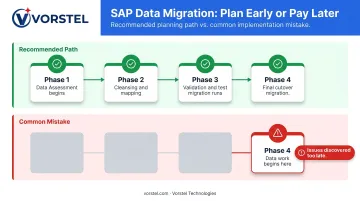
Data migration deserves special attention. SAP's own guidance places migration strategy in the Prepare phase and validation/simulation in Realize, meaning data assessment should begin well before Final Preparation, not during it.
Teams that start data cleansing in Phase 4 routinely discover issues too late to fix without delaying go-live.
Phase 5: Go-Live and Post-Go-Live Support
Go-live is the full cutover from legacy systems to the production SAP environment. The weeks immediately following are the hypercare period — a critical stabilization window where:
- System performance is monitored continuously
- Issues are triaged and resolved rapidly
- Users get hands-on support navigating the new environment
- Legacy system decommissioning is completed in sequence
Hypercare determines whether the system performs as designed and whether users actually adopt it. Pulling support resources too early is one of the most consistent reasons implementations that met technical benchmarks still failed to deliver expected business value.
Common SAP Implementation Challenges and How to Fix Them
Even well-planned projects run into obstacles. Understanding these failure patterns in advance allows teams to address them in the project plan — not react mid-execution.
Challenge 1: Scope Creep
Requirements expand beyond original boundaries, causing schedule delays and budget overruns. This typically stems from insufficient initial scoping, no formal change control process, or stakeholders surfacing new requirements once work is already underway.
Fix: Establish a change governance process at project kickoff. Every scope change — no matter how small — must be formally reviewed, assessed for time and cost impact, and approved before being accepted.
Challenge 2: Poor Data Migration Strategy
Data quality issues, corrupted records, or data loss discovered at or after go-live can cause operational disruptions that take months to resolve. The root cause: data cleansing starts too late, and legacy data gets migrated without adequate validation, mapping, or transformation protocols.
Fix: Begin data assessment in Phase 1, not Phase 4. According to SAPinsider, data migration consistently ranks among the top three risks in SAP transformation programs. Assign dedicated ownership to data migration as its own workstream, establish rigorous validation rules, and run multiple test migration rounds before cutover.
Challenge 3: Low User Adoption and Change Resistance
Employees resist the new system, revert to legacy workarounds, or use SAP ineffectively post-go-live — directly undermining the ROI of the entire implementation. The cause is usually the same: end-users were excluded from blueprint sessions and received training too late or without role-specific context.
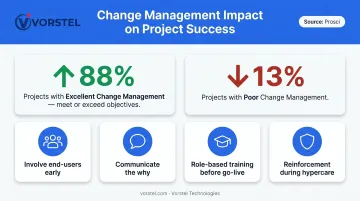
Fix: Treat change management as a formal project workstream, not a checklist item. Prosci research shows that projects with excellent change management meet or exceed objectives 88% of the time, versus just 13% with poor change management. Practical steps include:
- Involve end-users in blueprint sessions early
- Communicate clearly why the change is happening, not just what is changing
- Deliver structured, role-based training well before go-live
- Build reinforcement activities into the hypercare plan
Best Practices for SAP Implementation Success
Choose the Right Implementation Partner
The implementation partner is one of the highest-leverage decisions an organization makes. Look for:
- Deep SAP project experience across the relevant modules and deployment type
- Industry-specific knowledge in your sector
- Flexibility to engage at any stage — not just from project inception
- Demonstrated ability to course-correct struggling implementations
Vorstel Technologies brings 200+ SAP project experiences and the specific capability to step into client engagements at any phase of the project lifecycle — whether that means leading from inception or accelerating a deployment that has stalled. For enterprise clients, that flexibility translates directly into faster deployment cycles and measurable ROI.
Keep Executive Sponsors Actively Involved
Executive sponsorship is not a kickoff speech. The decisions that derail SAP projects — resource trade-offs, scope changes, go/no-go calls — require executive authority throughout the project. When leadership disengages after the first few weeks, projects consistently underperform on timeline, budget, and adoption metrics. Active sponsors also signal organizational commitment — which directly shapes how end users embrace the new system.
Key responsibilities that must stay on the executive agenda:
- Resolving resource conflicts and scope trade-offs
- Reviewing milestone progress and making go/no-go decisions
- Maintaining alignment between IT deliverables and business objectives
Treat Post-Go-Live as the Beginning, Not the End
An SAP implementation is not complete at go-live. The real work of realizing value starts after the system is live. Three things need to happen consistently:
- Track the KPIs established in Phase 1 against actual system performance
- Gather user feedback and act on it — not just log it
- Convert optimization opportunities identified during hypercare into structured follow-through
Gartner notes that 75% of ERP strategies are not strongly aligned with overall business strategy — contributing to confusion and underperformance long after go-live. Continuous post-implementation monitoring closes that gap.
Enforce Documentation Discipline Throughout
Every configuration decision, customization, test result, and process change should be documented at the time it occurs — not reconstructed afterward. This discipline protects the organization during team transitions, external audits, and future upgrades.
Maintaining living documentation throughout the project is far easier than rebuilding institutional knowledge after key team members move on.
Frequently Asked Questions
What is meant by SAP implementation?
SAP implementation is the end-to-end process of deploying SAP enterprise software to integrate core business functions — finance, supply chain, HR, and procurement — into a unified system. The process is a full business transformation, extending well beyond a technical installation.
What are the 5 phases of SAP implementation?
The five phases are Project Preparation, Business Blueprint, Realization, Final Preparation, and Go-Live and Support. Each builds on the previous, creating a structured, risk-managed path from project kickoff to a live production system.
What does SAP stand for?
SAP stands for Systems, Applications, and Products in Data Processing. It is a German multinational software corporation and the name of its flagship enterprise resource planning platform used by organizations worldwide.
What are L1, L2, L3, and L4 processes in SAP?
These represent a hierarchical process framework: L1 is the top-level value chain, L2 is the functional area (such as Finance or HR), L3 is a specific end-to-end process within that area, and L4 covers the detailed sub-process steps beneath it.
How long does an SAP implementation typically take?
Timelines vary by deployment type. S/4HANA Cloud Public Edition can go live in weeks to a few months, while on-premise deployments typically take several months to over a year. Cross-platform ERP benchmarks from Panorama cite a median timeline of 15.5 months.
What is the most common reason SAP implementations fail?
Inadequate project preparation and underestimated change management are the leading causes — typically showing up as unclear scope, poor team composition, late data migration planning, and insufficient end-user buy-in before go-live.