A certified SAP implementation partner leads the technical work, but the internal team carries equal responsibility. An executive sponsor, department leads, and a dedicated project manager must be active participants throughout. Delegating the entire project to a vendor is one of the most reliable ways to end up with a system that doesn't reflect how your business actually operates.
When implementation is handled poorly, the consequences are predictable: scope overruns, dirty data carried into the new system, low user adoption, delayed go-lives, and budget blowouts that consume the ROI the system was meant to deliver.
This guide covers the complete SAP B1 implementation process — from pre-project planning through go-live and stabilization — following best-practice standards that apply regardless of company size or industry.
Key Takeaways
- Implementation typically spans 12 to 24 weeks depending on complexity; both a certified partner and active internal team are non-negotiable
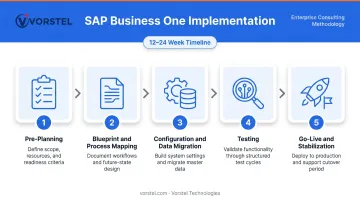
- Five phases drive every rollout: pre-planning, blueprint, configuration and data migration, testing, and go-live
- Data quality is the most underestimated factor — bad data in means unreliable reporting out
- Stay close to standard SAP B1 functionality — over-customization raises costs and complicates future upgrades
- Post-go-live stabilisation takes 30 to 60 days — teams that disengage after launch struggle most with adoption
Pre-Implementation Planning: The Foundation That Determines Success
Most implementation problems are planted before a single screen is configured. Getting the foundation right is the only way to prevent them.
Define Measurable Business Objectives
Vague goals like "we need a better system" cannot guide budget, design, or decision-making. Replace them with targets like "reduce month-end close from 10 days to 3" or "achieve 95% inventory accuracy." Specific goals prevent scope drift and give every configuration decision a clear reference point.
Run a Requirements and Gap-Fit Analysis
Map your current workflows against what SAP B1 supports out of the box. Gaps fall into three categories:
- Standard configuration — addressed within SAP B1's existing functionality
- Certified add-ons — third-party extensions for specialized needs
- Custom development — justified only when a genuine operational advantage exists
The temptation to replicate every quirk of the old system through custom code is expensive and creates maintenance debt that compounds with every upgrade. Most processes should adapt to SAP's proven structure, not the other way around.
Build the Right Internal Project Team
Assign clear ownership before kickoff:
- Executive sponsor — resolves cross-functional conflicts and protects the project from organizational politics
- Project lead — manages day-to-day coordination and keeps workstreams on schedule
- Department representatives — finance, operations, and warehouse each need a named owner
According to research on ERP implementation failures, the majority of ERP delays trace back to internal decision bottlenecks rather than technical issues. Clear ownership is not optional.
Assess Data Readiness
Every record entering SAP B1 — customers, vendors, item master data, inventory balances, GL figures — needs to be reviewed before migration begins. Check for:
- Duplicate records and inconsistent naming conventions
- Outdated vendor and customer data
- Missing required fields
- Inventory discrepancies from the legacy system
Teams that invest in upfront data cleanup arrive at testing with fewer surprises — and go-live with reporting users actually trust.
Set a Realistic Budget
Licensing is rarely the largest cost in an SAP B1 project. The bigger investment covers configuration, data migration, testing cycles, training, add-ons, and internal team time. Panorama Consulting's ERP research shows that budget overruns stem from under-scoped projects at the start. Build in a 10–20% contingency buffer as standard practice.
For organizations still scoping the investment, Vorstel Technologies offers a Zero-Fee Solution Evaluation — an expert readiness assessment covering your SAP fit, integration requirements, and project economics before any budget commitment is made.
How to Implement SAP Business One — Step by Step
SAP B1 implementation follows a defined five-phase sequence. Shortcuts between phases rarely save time — they shift effort later, when fixing issues is more disruptive and more expensive.
Step 1: Blueprint and Business Process Mapping
Conduct structured workshops with internal subject matter experts to document current workflows across order-to-cash and procure-to-pay processes. The output is a formal Blueprint Document that captures:
- All configuration requirements
- Master data structures
- Reporting needs and output formats
- Scope boundaries and exclusions
This document becomes the decision baseline for every configuration choice that follows. Without it, requirements drift — and costs follow.
Step 2: System Configuration
Configure the production environment based on the approved blueprint:
- Financial posting rules and chart of accounts
- Inventory movement logic and valuation methods
- Approval workflows and authorization levels
- User roles, permissions, and access controls
- Reporting structures and custom layouts
Configuration should follow SAP's standard functionality as the default. Deviating from it requires a clear operational justification — not just a preference for how things worked in the old system.
Step 3: Data Migration
Define what migrates versus what gets archived. Active customers, vendors, open transactions, current inventory balances, and GL opening balances should migrate. Legacy history that won't be actively used can be archived externally.
Critical steps:
- Run multiple test migration cycles — not a single cutover — to validate data accuracy and system behaviour
- Validate reporting outputs after each cycle before proceeding
- Confirm ending balances from legacy systems match opening balances in SAP B1 before approving go-live
A single test migration is never enough. Issues that appear minor in isolation compound when the full dataset is loaded.
Step 4: Testing — Unit, Process, and UAT
Migration accuracy feeds directly into testing quality — gaps in data validation surface as process failures. Run testing in sequential rounds:
| Testing Round | Focus | Who Runs It |
|---|---|---|
| Unit Testing | Individual functions and transactions | Implementation team |
| End-to-End Process Testing | Cross-department workflows | Department leads |
| User Acceptance Testing (UAT) | Real-world scenarios with actual data | End users |
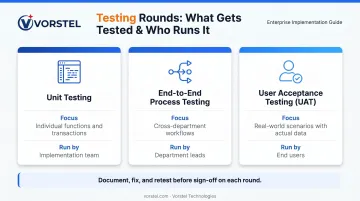
Document all issues, apply fixes, and retest before sign-off on each round.
Note: Testing compressed to meet a deadline is the single most common cause of post-go-live disruption. Bugs found after launch cost significantly more to resolve than those caught in UAT.
Step 5: Training, Final Preparation, and Go-Live
Use a train-the-trainer model to build internal superusers who can train end users and serve as first-line support after launch. Role-based training matters more than generic feature walkthroughs — each function needs to know how to do their specific job in the system.
Before go-live:
- Conduct a mock cutover to stress-test the transition plan
- Confirm all data balances, user access, and workflows are validated
- Brief all stakeholders on the support process and who to contact for issues
Plan for a productivity dip in the first two to three weeks. Keep hypercare support visible, avoid introducing system changes during this window, and ensure superusers are reachable during core business hours.
Post-Go-Live Validation and Stabilisation
Post-Go-Live Stabilization
Go-live marks the start of the most critical phase. The 30 to 60 days that follow determine whether the implementation actually delivers value.
What to Verify Immediately After Go-Live
- Financial balances reconcile without manual workarounds
- Inventory reflects real-time activity accurately
- Open transactions process correctly through the system
- User roles and permissions function exactly as designed
The first two weeks carry the highest risk of entrenched workarounds taking hold — which is why structured department check-ins matter most at this stage.
Success Signals vs. Warning Signs
Positive indicators:
- Teams using SAP B1 as the primary source of information
- Reduction in spreadsheet-based reporting and manual tracking
- Users asking how to do more in the system, not less
Warning signs:
- Departments reverting to manual processes and shadow systems
- Inconsistent data between SAP B1 and external records
- Resistance to system use beyond minimum required tasks
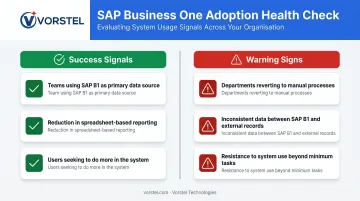
Warning signs in the first 30 days point to training gaps, configuration issues, or both. Each one needs a named owner and a resolution timeline — the responsibilities below provide that structure.
Ongoing Post-Go-Live Responsibilities
- Structured daily check-ins with key departments for the first two weeks
- Documented issue tracking with clear ownership and resolution timelines
- Quarterly system reviews to assess performance and address evolving needs
- Refresher training for existing users and structured onboarding for new staff
- Monitoring SAP B1 update releases for compliance requirements and new capabilities
Common SAP B1 Implementation Pitfalls and How to Fix Them
Most SAP B1 implementations don't fail because of the software. They fail because of gaps in planning, data ownership, and internal discipline that compound over time.
The three patterns below account for the majority of troubled go-lives — and each one is preventable.
Scope Creep from Undefined Requirements
When requirements are kept too high-level at project start — or stakeholders begin defining process needs during configuration — the result is constant additions, conflicting priorities, and budget variance.
The fix:
- Establish a formal change request process from day one
- Any scope addition must be evaluated for budget, timeline, and configuration impact before acceptance
- Document every decision made during the blueprint phase so additions can be measured against the original baseline
Poor Data Quality in Migration
Duplicate records, inconsistent naming conventions, outdated vendor and customer data, and inventory discrepancies from the legacy system don't disappear at migration — they carry over and create downstream problems that are far more expensive to fix post-go-live.
The fix:
- Assign data ownership to department leads — migration is not purely a technical task
- Run a formal data audit before migration begins
- Prioritize active and open records first
- Conduct at least two test migration cycles before final cutover
Even a technically clean go-live can unravel if users don't adopt the system. Clean data and solid configuration still fail when the human side isn't handled.
Low User Adoption After Go-Live
Users revert to spreadsheets when training was a one-time event, process changes weren't explained in advance, and no internal champions were designated to support the transition.
The fix:
- Deliver role-based training that mirrors each user's actual daily tasks
- Schedule follow-up training in the first 30 days based on real usage gaps
- Assign trained superusers as the first line of support
- Address resistance by showing users how the new workflows solve the specific problems they faced before
Pro Tips for a Successful SAP B1 Rollout
Three principles separate implementations that deliver lasting value from those that stall:
- Minimize customization deliberately. Use SAP B1's standard functionality as the default. Commission custom development only when it addresses a genuine competitive or operational need — over-customization increases costs, complicates upgrades, and creates long-term maintenance burdens.
- Budget for stabilization, not just go-live. Plan structured post-launch support, monitor operations actively for the first two weeks, and allocate resources for the stabilization period. Organizations that disengage immediately after go-live consistently report slower adoption and lower confidence in system data.
- Choose your partner on track record, not price. Look for industry-relevant SAP deployments, a structured methodology, and transparency about scope and risks. Vorstel Technologies has delivered 200+ SAP projects with deployment cycles that run 92% faster than industry averages — a track record built on keeping implementations on schedule and within budget.
The organizations that see the strongest long-term results treat SAP B1 as a business transformation project, not a software procurement. Disciplined requirements, clean data, consistent ownership, and rigorous testing determine whether the system delivers on its promise — or becomes another expensive shelf tool.
Frequently Asked Questions
Frequently Asked Questions
How do you implement SAP Business One?
Implementation follows five phases: pre-planning, blueprint and process mapping, system configuration and data migration, testing, and go-live with stabilization. Success depends as much on internal team ownership and clear requirements as it does on the software itself.
How long does SAP Business One implementation take?
Standard implementations typically run 12 to 16 weeks. Complex multi-site or integration-heavy projects extend to 16 to 24 weeks or more. The key timeline drivers are data readiness, scope clarity, and the availability of internal team members for decisions and testing.
What are the biggest risks in an SAP B1 implementation?
The three most common risks are scope creep from unclear requirements, poor data quality carried into migration, and inadequate change management resulting in low user adoption after go-live. All three are preventable with structured planning.
Can SAP Business One be customised for my industry?
SAP B1 supports standard configuration, certified add-ons, and custom development. Standard functionality should be the starting point, with customization reserved for genuine operational needs, as excessive customization raises costs and creates upgrade complexity.
How do I choose the right SAP B1 implementation partner?
Evaluate beyond price: look for industry-relevant SAP experience, a documented methodology, clear communication about scope and risks, and a willingness to challenge decisions that add unnecessary complexity.
What happens after SAP Business One goes live?
The first 30 to 60 days is an active stabilization phase — not a wind-down. Structured issue tracking, daily check-ins, and follow-up training are essential. Quarterly performance reviews and keeping current with SAP B1 updates sustain that value long-term.