Introduction
Cloud migration projects fail more often than most organizations expect. According to McKinsey, cost overruns across cloud migrations add up to well more than $100 billion in wasted spend over three years. CIO Dive, reporting on HFS/EY research, found that half of cloud transformations are "abject failures" — despite nearly two-thirds of organizations making strategic cloud investments.
The causes are consistent across organizations:
- Unexpected cost spikes from underestimated cloud resource consumption
- Skills gaps that stall execution mid-migration
- Fragmented systems that weren't mapped before cutover
- New security vulnerabilities introduced by rushed or poorly planned transitions
None of these are inevitable. They're almost always the product of insufficient planning before the first workload moves.
This guide covers how to build a solid Azure migration strategy: from pre-migration readiness assessment through workload sequencing, the Rs framework, migration tooling, and post-migration optimization. Whether you're planning your first wave or course-correcting a migration already in progress, the structure here applies.
Key Takeaways
- Complete workload inventory and dependency mapping before touching any workload in Azure
- Microsoft's Cloud Adoption Framework defines 8 Rs — not 5 — for assigning the right strategy to each workload
- Migrate in waves: start with non-critical workloads to validate the process before moving mission-critical systems
- Azure Migrate, Site Recovery, Database Migration Service, and Data Box together cover the full migration execution stack
- Post-migration optimization (right-sizing, autoscaling, cost governance) requires continuous attention, not a one-time review
Pre-Migration: Building Your Azure Readiness Foundation
Rushing the pre-migration phase is the single most common reason Azure migrations go over budget or miss their timeline. What happens here — inventory, readiness, cost modeling — determines the scope and sequencing of everything that follows.
Inventory Your Digital Assets
Before any workload is categorized or moved, you need a complete picture of what you're migrating. Microsoft's Cloud Adoption Framework defines a workload as a collection of IT components that support business processes.
Your inventory should capture:
- Every application: name, purpose, tech stack, hosting location
- Databases: type, size, version, and connection dependencies
- Servers and VMs: OS, CPU, memory, storage, and utilization baselines
- Network configurations: subnets, firewalls, and routing rules
- User counts and peak concurrency per application
- Inter-application dependencies — what talks to what, and in what sequence
Missing a dependency at this stage means mid-migration surprises. Azure Migrate's dependency analysis can automate this process, identifying relationships between servers so workloads can be grouped correctly before assessment begins.
With inventory complete, the next step is evaluating whether your workloads — and your team — are actually ready for the move.
Assess Cloud Readiness and Skills
Cloud readiness has two separate dimensions that need to be evaluated independently.
Workload readiness covers:
- Application compatibility with Azure services
- Compliance and regulatory constraints (data residency, industry-specific requirements)
- Licensing implications of moving to Azure
Team readiness covers:
- Azure skill gaps across platform, security, governance, and operations roles
- Familiarity with migration tooling and cutover procedures
- Clear ownership of workload, platform, and governance responsibilities
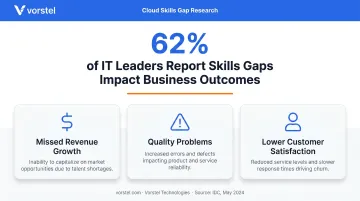
IDC reported in May 2024 that 62% of IT leaders said a lack of skills resulted in missed revenue growth, quality problems, or lower customer satisfaction. Skills risk belongs on your migration risk register — not just in HR planning.
Address gaps early through targeted training, hiring, or an experienced Microsoft consulting partner. Vorstel Technologies, for example, offers a Zero-Fee Solution Evaluation — a practical starting point for teams unsure where their skills gaps lie before committing to a migration plan.
Estimate Workload Costs in Azure
Cost modeling must happen before migration scope is finalized. Two Microsoft tools handle this:
- Azure Pricing Calculator — configure and estimate costs for specific Azure products and service tiers per workload
- Azure TCO Calculator — estimate total cost of ownership compared to your current on-premises environment
When modeling costs, factor in VM sizing, storage type and capacity, network egress charges, database service tiers, and operational labor. Modeling per workload — rather than as a single aggregate — gives you accurate inputs for sequencing decisions and surfaces which workloads are most cost-sensitive before you commit to a migration approach.
Azure Migration Strategies: Understanding the Rs Framework
The Rs framework is Microsoft's structured approach to deciding what to do with each workload when planning an Azure migration. While "5 Rs" is a common shorthand, Microsoft's Cloud Adoption Framework defines 8 Rs: Retire, Retain, Rehost, Replatform, Refactor, Rearchitect, Rebuild, and Replace.
The 8 Migration Strategies Explained
The four most commonly used strategies cover the majority of real-world migrations:
| Strategy | What It Means | Best For |
|---|---|---|
| Rehost | Lift-and-shift to Azure IaaS with minimal changes | Stable workloads where speed matters more than optimization |
| Replatform | Move to PaaS with minor code changes | Reducing operational overhead without full rearchitecture |
| Refactor | Code-level changes to reduce technical debt and better use Azure capabilities | Workloads with performance bottlenecks or legacy debt |
| Rearchitect | Redesign the architecture for cloud-native capabilities | Workloads needing microservices, autoscaling, or high availability |
The remaining four handle edge cases and deferred decisions:
- Retire — Decommission workloads with no remaining business value
- Replace — Swap for a SaaS alternative such as Dynamics 365 or Salesforce
- Rebuild — Full cloud-native redevelopment when existing code is no longer viable
- Retain — Keep on-premises, managed via Azure Arc until migration conditions are met
How to Choose the Right Strategy Per Workload
Knowing what each strategy does is only half the work — the harder question is which one fits each workload. Start with the primary business driver, then validate against the workload's stability, any compliance constraints, your team's current skill set, and how soon modernization is planned.
| Business Driver | Recommended Strategy | Key Indicator |
|---|---|---|
| Reduce infrastructure overhead fast | Rehost | Stable workload, minimal custom dependencies |
| Lower operational management burden | Replatform | Minor code changes acceptable, PaaS-compatible |
| High technical debt blocking performance | Refactor | Code changes justified by ROI |
| Need microservices or targeted scaling | Rearchitect | Architectural redesign is planned regardless |
| No measurable business value | Retire | Usage data confirms the workload is unused |
| SaaS equivalent exists | Replace | Functional overlap is sufficient |
| Modernization planned within two years | Rebuild | Rehosting would require rework too soon |
| Compliance or readiness barriers | Retain | Move deferred, managed via Arc |
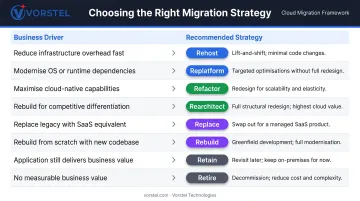
A rule that saves significant cost: don't rehost a workload you expect to modernize within two years. You'll pay for the migration twice.
The Azure Migration Process Step by Step
Migration execution follows five phases: Discover, Assess, Target, Migrate, and Optimize. These phases are iterative — each migration wave repeats the full cycle, not just the program at launch.
Before diving in, here's the sequence at a glance:
- Discover — Catalog all IT assets and validate dependency maps
- Assess — Evaluate each workload across criticality, complexity, and compliance
- Target and Sequence — Assign Azure service tiers and group workloads by dependency
- Migrate and Validate — Execute replication, cutover, and post-migration testing
- Optimize — Right-size, govern, and tune continuously after cutover
Phase 1 – Discover
Discovery means cataloging all IT assets using automated tools, validating that inventory against your digital estate assessment, and confirming dependency maps are complete. No workload moves to assessment until the dependency picture is accurate — gaps here create sequencing failures downstream. Azure Migrate handles server and application discovery automatically, surfacing dependency relationships across your environment so you start assessment with a reliable baseline.
Phase 2 – Assess
Each workload is evaluated across four dimensions:
- Criticality — What's the business impact if this workload fails?
- Complexity — What are the technical migration challenges?
- Dependencies — What does it rely on, and what relies on it?
- Compliance and security requirements — Are there data residency, regulatory, or access constraints?
This assessment drives prioritization. Workloads that are both high-criticality and high-complexity belong in later waves, once the team has validated migration procedures on lower-risk systems first.
Phase 3 – Target and Sequence
Assign each workload to the appropriate Azure service tier (IaaS, PaaS, or SaaS) based on the Rs decision from earlier. Then group workloads by dependency — dependent systems must migrate together or in a controlled sequence.
Wave sequencing principle: Start with non-production environments and lower-risk workloads. Microsoft's CAF wave planning guidance is explicit here — early waves should build team confidence and validate migration procedures before business-critical systems are touched.
Phase 4 – Migrate and Validate
Execution involves three stages:
- Pre-flight checks — Confirm network connectivity, security configurations, and compliance controls are in place in Azure
- Migration cutover — Execute replication and cutover using the appropriate tool (Azure Migrate, Site Recovery, or Database Migration Service)
- Validation — Performance testing, security validation, and user acceptance testing before decommissioning the source environment
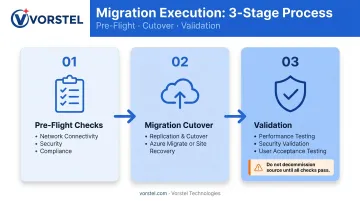
Decommissioning the source environment before validation is complete leaves no fallback — treat sign-off on all three validation checks as a hard gate, not a formality.
Phase 5 – Optimize Post-Migration
Post-migration optimization is a continuous process, not a checklist item at cutover. Key actions:
- Right-size VMs using Azure Advisor recommendations
- Enable autoscaling for workloads with variable demand
- Apply Azure Reservations for predictable workloads with sustained usage
- Activate Azure Cost Management from day one — not after the first invoice arrives
- Implement governance policies to prevent configuration drift
Key Azure Migration Tools and Services
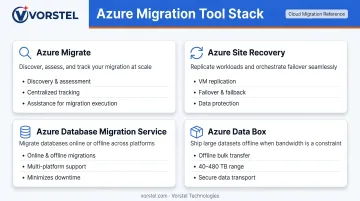
Microsoft provides four primary tools for migration execution — each covering a distinct phase or workload type. They're complementary, not interchangeable, so selecting the right combination depends on what you're moving and how.
Azure Migrate: The central hub for discovery, assessment, and migration tracking. Covers servers, databases, web apps, and virtual desktops, with native support for third-party partner tools.
Azure Site Recovery: Automates VM replication for both migration and disaster recovery. Handles replication, failover, and failback for VMs and physical servers — the go-to option for minimal-downtime cutover on critical workloads.
Azure Database Migration Service: Handles both online (minimal downtime) and offline database migrations. Supports SQL Server, MySQL, PostgreSQL, and other sources moving to Azure data platforms.
Azure Data Box: Microsoft's physical device option for offline data transfer. Data Box 120 handles 40–480 TB transfers; Data Box Disk covers under 40 TB. Use either when network bandwidth makes online transfer impractical.
Best Practices for Azure Migration Success
Define Your Rollback Plan Before You Migrate
Every migration needs a defined exit if things go wrong. Before any cutover:
- Set explicit failure thresholds: error rate limits, response time degradation, failed health checks
- Document rollback steps per workload type
- Use Azure's deployment history rollback for ARM template deployments
- Configure point-in-time restore for supported database services
- Test rollback procedures in a staging environment before production cutover
Microsoft's Well-Architected Framework supports staged and canary deployment strategies — both of which reduce risk when rolling out workloads progressively rather than all at once.
Align Migration Windows With Business Reality
Even a technically perfect migration creates problems if it runs during the wrong window.
Avoid scheduling migrations during:
- Financial close periods
- Product launches or major releases
- Peak seasonal demand windows
Get formal stakeholder sign-off on migration windows, acceptable downtime tolerances, and success criteria before execution begins. Not after. A cutover plan with documented business approval is far easier to defend — or reschedule — when it carries formal sign-off rather than existing only on the technical team's calendar.
Implement Monitoring From Day One
Configure monitoring before cutover, not after an incident forces your hand:
- Azure Monitor — Umbrella service for collecting, analyzing, and acting on telemetry across your Azure environment
- Log Analytics — Query and analyze log data for troubleshooting and operational analysis
- Application Insights — Application-level observability including performance, usage, and error telemetry
Build custom dashboards for real-time visibility, configure alerts for anomalies before they escalate, and schedule regular post-migration reviews to continuously optimize performance and cost.
Organizations managing complex environments often benefit from an external assessment at this stage. Vorstel Technologies offers a Zero-Fee Solution Evaluation covering cloud solutions and migration strategy, helping teams assess their current environment and define the right monitoring and governance approach from the outset.
Frequently Asked Questions
What are the 5 Rs of Azure migration?
The 5 Rs — Rehost, Replatform, Refactor, Rearchitect, and Retire — are a simplified shorthand used broadly in cloud migration planning. Microsoft's Cloud Adoption Framework actually defines 8 Rs, adding Replace, Rebuild, and Retain to give a more complete decision framework for Azure workloads.
How long does an Azure migration typically take?
Timelines vary widely by scope. A straightforward lift-and-shift for a small environment can be completed in weeks, while a complex enterprise migration involving multiple waves, database migrations, and compliance validation can span several months to over a year.
What is the difference between rehost and replatform in Azure migration?
Rehost moves a workload to Azure IaaS as-is, with no code changes — the fastest path, but it preserves existing operational overhead. Replatform moves the workload to Azure PaaS with minor code changes, reducing infrastructure management and improving scalability without requiring a full rearchitecture.
What Azure tools does Microsoft provide for migration?
Microsoft provides four primary migration tools:
- Azure Migrate — discovery, assessment, and centralized tracking hub
- Azure Site Recovery — VM replication and cutover orchestration
- Azure Database Migration Service — database migrations with online and offline options
- Azure Data Box — large-volume offline data transfer
How do I estimate the cost of migrating to Azure?
Use the Azure Pricing Calculator to estimate per-workload costs based on VM sizing, storage, service tiers, and network egress. Use the Azure TCO Calculator to compare current on-premises costs against projected Azure spend — run both before migration scope is finalized.
What is an Azure landing zone and do I need one before migrating?
An Azure landing zone is a pre-configured, governance-ready Azure environment covering networking, identity, security policies, and operations. Microsoft's CAF places landing zone setup in the Ready phase — before workload migration begins — to avoid rebuilding governance structures around workloads that have already moved.