Introduction
Every smartphone, tablet, and laptop your workforce uses is a potential entry point for a breach — and most organizations can't fully see or control all of them. According to Microsoft's Digital Defense Report, 80–90% of all successful ransomware compromises originate from unmanaged devices.
57% of organizations lack visibility or control over a quarter or more of their endpoints, leaving significant gaps in their security posture.
This article breaks down what Mobile Device Management (MDM) is, how it works, its core capabilities, and why it matters for organizations navigating digital transformation and remote work.
Key Takeaways
- MDM secures and manages smartphones, tablets, and laptops across your workforce through centralized policies and over-the-air configuration
- 80-90% of ransomware attacks originate from unmanaged devices — MDM directly reduces this exposure by enforcing endpoint controls
- Core capabilities include remote wipe, app management, AES-256 encryption, and real-time compliance monitoring
- 90% of enterprises are expected to use cloud UEM tools by 2025, making cloud-based MDM the dominant deployment model
- Regulated industries still rely on on-premises MDM to meet strict data residency and compliance requirements
What is Mobile Device Management (MDM)?
When employees access corporate systems from dozens of different devices—personal phones, company laptops, field tablets—IT teams need a way to enforce security policies without being in the same room. That's the problem MDM solves.
Mobile Device Management (MDM) is the methodology, software, and set of processes used by IT teams to provision, secure, monitor, and manage endpoints across an organization's workforce. NIST defines MDM as "the administration of mobile devices such as smartphones, tablets, computers, laptops, and desktop computers...usually implemented through a third-party product that has management features for particular vendors of mobile devices."
Clarifying the MDM Acronym
The acronym "MDM" appears in multiple enterprise contexts, which can create confusion:
- Mobile Device Management (this article's focus) — IT security and endpoint management
- Master Data Management — enterprise data governance discipline that ensures consistency of customer, product, and supplier records
- Medical Decision Making — healthcare billing term referring to clinical reasoning complexity
This article focuses exclusively on Mobile Device Management in the enterprise IT context.
What Devices Fall Under MDM?
MDM manages a broad range of endpoints:
- Corporate-issued smartphones (iOS, Android)
- Tablets and ruggedized field devices
- Laptops and desktop computers (Windows, macOS, Linux)
- Wearables and IoT endpoints (increasingly)
The term "mobile" has expanded beyond just phones—modern MDM platforms now secure the full spectrum of endpoints employees use to access corporate systems.
The Server-Client Architecture
MDM operates on a server-client model:
- MDM server (cloud-hosted or on-premises) sends configuration commands, security policies, and app updates
- Client application installed on each enrolled device receives and enforces those commands
- Over-the-air (OTA) delivery allows IT to manage devices remotely, without physical access
This architecture enables centralized control at scale—IT teams can push a security update to 5,000 devices in minutes.
Platform-Specific Enrollment Mechanisms
Each major operating system provides native APIs for MDM enrollment:
| Platform | Management Framework | Push Channel | Automated Enrollment |
|---|---|---|---|
| Apple iOS/macOS | Apple MDM Protocol | Apple Push Notification service (APNs) | Apple Business Manager |
| Android | Android Enterprise / Device Policy Manager | Firebase Cloud Messaging (FCM) | Zero-touch enrollment |
| Windows | Windows MDM Protocol (CSP) | Windows Notification Services (WNS) | Windows Autopilot |
From Manual Configuration to AI-Driven Platforms
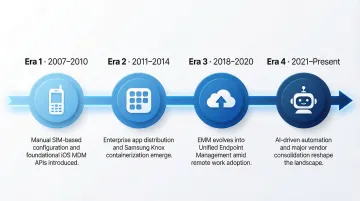
MDM has evolved since the iPhone's enterprise debut in 2007:
- 2007-2010: Manual, SIM-based configuration; Apple introduces iOS 4 MDM APIs in 2010
- 2011-2014: App distribution emerges (Apple VPP); Samsung Knox launches hardware-level containerization
- 2018-2020: Gartner shifts from EMM to Unified Endpoint Management (UEM); remote work accelerates adoption
- 2021-Present: AI-driven automation, autonomous endpoint management, and vendor consolidation dominate
Today's MDM platforms can manage thousands of devices in real time, automatically detect non-compliant endpoints, and trigger remediation—all without human intervention.
Why MDM Matters for Modern Enterprises
The Security Risk: Unmanaged Devices Are Ransomware's Front Door
Mobile devices access critical business data — and a lost, stolen, or compromised device can expose sensitive corporate information, trigger compliance violations, and lead to costly breaches. The global average cost of a data breach reached $4.88 million in 2024, with breaches involving data across multiple environments (including mobile and cloud) costing even more.
Microsoft's research is stark: 80% to 90% of all successful ransomware compromises start with unmanaged devices. These devices lack basic security controls—no encryption, no passcode enforcement, no remote wipe capability—making them easy targets for attackers.
The Scale Challenge: Managing Hundreds of Devices Across Multiple Platforms
Enterprises today manage hundreds or thousands of devices across iOS, Android, Windows, and macOS. Without MDM, IT teams face an unmanageable, inconsistent security landscape where:
- Devices run outdated operating systems with known vulnerabilities
- Security policies vary wildly from device to device
- IT has no visibility into which devices are accessing corporate data
- Responding to a security incident requires physically collecting devices
These gaps add up fast: 57% of organizations lack visibility or control over a quarter or more of their endpoints, creating massive blind spots in their security posture.
The BYOD Factor: Balancing Flexibility and Security
Bring Your Own Device (BYOD) policies are nearly universal: over 95% of organizations allow personal devices in the workplace. Employees want the flexibility to use their own smartphones and tablets for work, and organizations benefit from reduced hardware costs.
The security tradeoffs, though, are significant. 70% of mobile devices impacted by cyberattacks are personal rather than corporate-issued, and 48% of organizations have suffered data breaches linked to unsecured or unmanaged personal devices.
MDM addresses this directly by allowing organizations to apply security policies and separate corporate data from personal data. Employees keep their personal apps and photos private, while IT maintains control over work email, documents, and enterprise applications.
How MDM Works
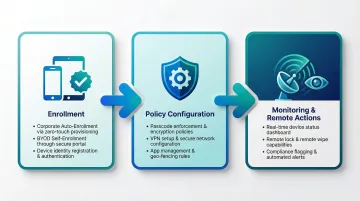
Enrollment: Establishing the Management Relationship
The first step in MDM is enrollment—devices must be registered with the MDM system before IT can manage them. Enrollment establishes the secure communication channel between the device and the MDM server.
Enrollment works differently depending on who owns the device:
- Corporate-issued devices: IT administrators enroll devices before distributing them to employees, often using automated enrollment tools like Apple Business Manager or Windows Autopilot
- BYOD devices: Employees enroll their personal devices by downloading the MDM client app and authenticating with their corporate credentials
Once enrolled, the device receives a unique identity certificate and begins checking in with the MDM server for policy updates.
Policies and Configuration
With enrollment complete, IT administrators have an active channel to push configuration profiles and security policies to devices over the air (OTA). These policies can:
- Enforce passcode requirements (minimum length, complexity, expiration)
- Disable device features (camera, screenshots, app installation from unknown sources)
- Configure VPN connections and pre-approved Wi-Fi networks
- Set up email, calendar, and contact synchronization
- Geo-fence devices to specific locations or restrict access based on location
- Install and update enterprise applications automatically
Policies apply instantly. If an employee's device falls out of compliance — for example, they disable their passcode — IT can automatically block access to corporate email until the issue is resolved.
Monitoring and Remote Actions
MDM provides ongoing visibility and control over the device fleet:
Real-time monitoring:
- Device status (online/offline, battery level, storage capacity)
- Operating system version and patch level
- Installed applications and their versions
- Compliance status (for example, jailbroken or rooted devices)
- GPS location (for lost/stolen device recovery)
Remote actions:
- Lock a lost or stolen device to prevent unauthorized access
- Erase all corporate data — or the entire device — if it's compromised
- Push configuration changes, restart devices, or clear caches without user intervention
- Install, update, or remove applications remotely
For incident response, speed matters. If an employee reports a lost device, IT can remotely wipe it within minutes — well before an unauthorized party can access corporate data.
Core Features and Capabilities of MDM
Device Inventory and Tracking
MDM maintains a real-time inventory of all enrolled devices, recording:
- Device ownership (corporate vs. BYOD)
- Operating system version and security patch level
- Compliance status (compliant, non-compliant, or quarantined)
- Last check-in time and GPS location
- Hardware specifications (model, serial number, storage capacity)
This audit-ready record enables IT teams to identify early devices that need updates, track asset lifecycles, and respond quickly to security incidents.
Application Management
IT can remotely distribute, update, and remove applications on enrolled devices:
- Push approved apps from a curated enterprise catalog to any enrolled device
- Wrap individual apps with security layers — encryption, authentication, and DLP controls
- Pre-configure app settings (server URLs, authentication methods) before deployment
- Restrict copy/paste between managed apps and personal apps to prevent data leakage
Employees get the tools they need. Unauthorized or risky apps stay out of the corporate data environment.
Data Security Through Containerization
Corporate data—emails, documents, enterprise apps—is isolated in an encrypted container separate from the user's personal data. This container typically uses AES-256 encryption (the NIST FIPS 197 standard) to protect data at rest.
How containerization works:
- Corporate data lives in a secure, encrypted workspace on the device
- Personal apps cannot access corporate data (and vice versa)
- If the device is compromised or the employee leaves, IT can wipe only the corporate container—personal photos, messages, and apps remain untouched
AES-256 is an industry baseline, not a differentiator. What matters is how each platform implements and validates it. All major MDM platforms meet this standard:
- Microsoft Intune: Uses 256-bit AES encryption with the Android Keystore system (FIPS 140-2 validated)
- IBM MaaS360: Encrypts all corporate data with 256-bit AES encryption
- VMware Workspace ONE: Encrypts all user data at rest with AES-256 symmetric encryption
- Jamf: Uses AES-256 bit encryption for data at rest and in transit
Encryption protects data on the device, but it doesn't control who can reach corporate systems in the first place. That's where IAM integration comes in.
Identity and Access Management (IAM) Integration
MDM works alongside IAM tools to enforce:
- Role-based access: Limit which corporate resources each user can access based on their role
- Single sign-on (SSO): Allow users to authenticate once and access all approved apps
- Multi-factor authentication (MFA): Require additional verification (biometrics, one-time codes) before granting access
Even if a device is compromised, these controls ensure that access to corporate systems depends on verified identity — not just physical possession of a device.
Compliance Enforcement and Remote Remediation
MDM continuously checks devices against security policies. Non-compliant devices can be:
- Flagged automatically for IT review
- Blocked from accessing corporate resources until compliance is restored
- Wiped remotely if the device is jailbroken, rooted, or poses a severe risk
These controls satisfy compliance mandates in healthcare (HIPAA), finance (PCI-DSS), and manufacturing (ISO 27001) — reducing audit risk without requiring manual IT intervention at every step.
MDM vs. EMM vs. UEM: What's the Difference?
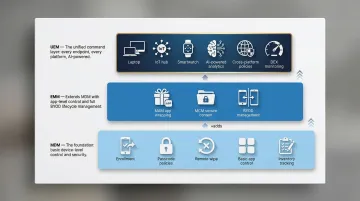
The endpoint management landscape has evolved through three distinct tiers, each expanding on the previous:
MDM (Mobile Device Management)
The foundational, device-centric layer—focuses on managing and securing the device itself (smartphones, tablets, laptops), its configurations, and its data. MDM controls:
- Device enrollment and provisioning
- Passcode policies and encryption
- Remote lock and wipe
- Basic app installation and removal
- Device inventory and location tracking
EMM (Enterprise Mobility Management)
EMM extends MDM by layering in app and content controls:
- Mobile Application Management (MAM): App-level security, app wrapping, and managed app configuration
- Mobile Content Management (MCM): Secure document storage, sharing, and collaboration
- Full BYOD management: Separate corporate and personal data on the same device
Where MDM stops at the device, EMM reaches into the apps and content on it, giving IT more precise control over how corporate data is accessed and shared.
UEM (Unified Endpoint Management)
UEM is the broadest of the three: it brings desktops, printers, IoT devices, and wearables under the same management umbrella as mobile devices. UEM platforms are often powered by AI and machine learning for:
- Real-time analytics and automated security decisions
- Cross-platform policy management (iOS, Android, Windows, macOS, Linux)
- Digital employee experience (DEX) monitoring
- Autonomous endpoint management (reducing manual IT effort by up to 40%)
Gartner predicts that by 2025, more than 90% of clients will use cloud-based UEM tools to manage their estates. That migration is part of a wider push toward consolidation — 75% of organizations are actively reducing the number of security vendors they use to close coverage gaps and cut operational complexity.
MDM Deployment Models: Cloud vs. On-Premises
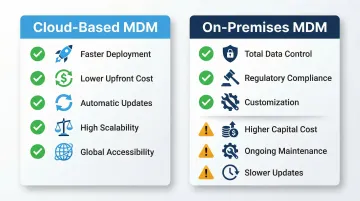
Cloud-Based (SaaS) MDM: The Dominant Model
Cloud-based MDM captured 64.2% of the BYOD market in 2024, and VMware, citing Gartner data, projects that by 2025, over 90% of enterprises will use cloud-based UEM tools.
Key advantages:
- Faster deployment: No infrastructure to build or maintain—enroll devices in hours, not weeks
- Lower upfront costs: Subscription-based pricing eliminates capital expenditure on servers and storage
- Automatic updates: New features, security patches, and OS compatibility arrive automatically
- Highly scalable: Easily scale from 100 to 10,000 devices without infrastructure changes
- Global accessibility: Manage devices anywhere in the world from a single console
For most organizations, these tradeoffs make cloud MDM the practical default — unless regulatory requirements demand tighter data control.
On-Premises MDM: Control for Regulated Industries
Organizations in highly regulated sectors—government, healthcare, finance—often require on-premises MDM to maintain control over data residency and meet strict compliance frameworks (GDPR, HIPAA, FedRAMP).
Key advantages:
- Total data control: Corporate data never leaves the organization's data center
- Regulatory compliance: Easier to demonstrate compliance with data residency and sovereignty requirements
- Customization: Greater flexibility to customize the MDM platform for unique security requirements
Trade-offs:
- Higher capital costs: Requires investment in servers, storage, networking, and data center infrastructure
- Ongoing maintenance: IT teams must manage updates, patches, and infrastructure maintenance
- Slower update cycles: New features and OS compatibility arrive more slowly than cloud platforms
Hybrid solutions: To bridge the gap, modern UEM providers like VMware Workspace ONE offer Bring Your Own Key (BYOK) encryption, allowing organizations to manage their own encryption keys while using a cloud-hosted platform—satisfying strict compliance requirements without sacrificing cloud benefits.
Frequently Asked Questions
What does MDM stand for?
MDM most commonly stands for Mobile Device Management in the enterprise IT context—the tools and processes used to secure and manage employee smartphones, tablets, and laptops. However, the acronym is also used for Master Data Management (a data governance discipline) and Medical Decision Making (used in healthcare billing).
What is MDM used for?
MDM helps organizations remotely provision, secure, and manage employee devices. It enforces security policies, distributes applications, protects corporate data through containerization, and allows IT to remotely lock or wipe lost or stolen devices.
What does MDM do to your phone?
MDM can enforce passcodes, configure email and VPN settings, restrict device features (camera, screenshots), install or remove apps, and remotely lock or wipe a lost device. It typically separates corporate data from personal data rather than controlling your entire phone.
Can MDM see my text messages?
No. Standard MDM solutions do not read personal text messages or personal app data. MDM visibility is limited to device compliance status, installed applications, location, and corporate data within managed apps—personal communications remain private.
What are the 4 types of MDM?
The four common MDM deployment types are:
- Cloud-based (SaaS) MDM — fastest deployment, lowest upfront cost
- On-premises MDM — greater control, suits stricter compliance requirements
- BYOD-focused MDM — manages personal devices that access corporate data
- Corporate-owned device MDM — full control over company-issued devices
Many modern platforms also layer these into broader categories: MDM, EMM, and UEM.
What is MDM in healthcare?
In healthcare, MDM stands for Medical Decision Making—a term referring to the complexity of clinical reasoning used to evaluate and treat patients during medical visits. It is a key factor in determining billing codes for healthcare providers and is completely unrelated to Mobile Device Management.