Microsoft 365 is the answer many SMBs are reaching for — but not because it's just Word and Outlook in the cloud. Deployed strategically, M365 functions as a complete digital transformation platform: cloud infrastructure, real-time collaboration, intelligent automation, and AI-powered productivity, all in a single ecosystem built to scale with your business.
This guide covers what M365-powered transformation actually looks like for SMBs — the key tools, the business benefits, a clear four-stage journey, the common obstacles, and how to build a roadmap that delivers real results.
Key Takeaways
- Microsoft 365 gives SMBs access to enterprise-grade cloud, collaboration, automation, and AI tools without enterprise complexity or cost.
- Transformation follows four stages: Assessment, Planning, Implementation, and Optimization.
- Teams, SharePoint, OneDrive, and Power Automate form the operational core; Copilot and Power BI extend the value further.
- Common SMB hurdles like limited IT staff, tight budgets, and change resistance are manageable with a phased approach and the right implementation partner.
- Starting with quick wins and clear business outcomes accelerates time to measurable value.
What Digital Transformation with Microsoft 365 Actually Means for SMBs
McKinsey defines digital transformation as "the rewiring of an organization, with the goal of creating value by continuously deploying tech at scale." That framing draws a clear line between digitization and transformation — and for SMBs, the distinction is the whole point.
Digitization vs. Transformation — Why the Distinction Matters
Digitization is converting something analog to digital — scanning paper invoices, moving files to a shared drive. Transformation is different. It's rethinking how work happens, not just where it's stored.
A concrete example: an SMB that moves its filing cabinet to OneDrive has digitized. An SMB that connects OneDrive to an automated approval workflow in Power Automate, accessible by any team member from anywhere, has transformed. That shift — from storing information to acting on it faster — is what makes transformation worth the effort for resource-constrained teams.
Why SMB Transformation Is Fundamentally Different
SMBs aren't scaled-down enterprises — they operate under constraints that large organizations rarely face:
- 47% of SMBs cite cost as the top barrier to technology adoption, per Microsoft's SMB Voice and Attitudes to Technology Study
- No dedicated IT staff in many cases — one person wearing multiple hats
- No six-month buffer to absorb a failed rollout — disruption hits immediately
The advantage SMBs have is agility. They can adopt new tools faster, change processes without board-level politics, and see results from a well-executed deployment in weeks rather than years.
Key Microsoft 365 Tools That Drive SMB Digital Transformation
M365's real value comes from how the tools work together as one integrated ecosystem. A Teams meeting connects to a shared SharePoint document. A Power Automate flow triggers from an Outlook email. Copilot summarizes the whole thing in seconds. Here's what each layer delivers.
Collaboration and Communication
Microsoft Teams is the operational hub for most SMBs. It replaces fragmented email threads with organized channels — one for finance, one for project delivery, one for client communications. For a team of even 5–10 people, structuring Teams channels to mirror actual workflows eliminates the constant context-switching that slows small teams down.
SharePoint and OneDrive serve as the cloud backbone for document management. Each user gets 1 TB of cloud storage on Business Basic, Standard, and Premium plans. Key capabilities include:
- Simultaneous multi-user editing with no version conflicts
- Access from any device or location
- Centralized file management replacing shared drives or email attachments
For SMBs still emailing files back and forth, this single change has immediate, visible impact.
Automation and Workflow
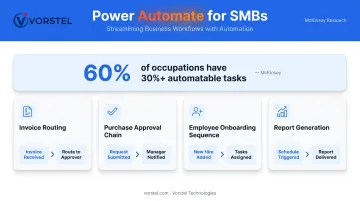
Power Automate is where operational efficiency starts compounding. Non-technical employees can build workflows — invoice routing, purchase approval chains, new employee onboarding sequences — without writing a line of code. McKinsey research found that roughly 60% of occupations have at least 30% of their activities that are technically automatable. For SMBs, recovering even a fraction of that time across a lean team has outsized impact.
Power BI (available as an add-on or through higher-tier plans) consolidates data from across departments into visual dashboards. Instead of manually compiling spreadsheet reports, managers see live performance metrics in one place, enabling faster, data-driven decisions.
That visibility feeds directly into the next layer: AI that acts on the data in real time.
AI-Powered Productivity
Microsoft Copilot is available as an add-on to qualifying M365 plans, including Business Basic, Standard, and Premium. It's not a future roadmap item — it's deployable today. Practical use cases include:
- Summarizing long Teams meetings into action items
- Drafting Outlook responses based on email context
- Generating Excel reports from raw data
- Pulling key insights from lengthy Word documents
For a 10-person team competing against larger organizations with dedicated analysts and content teams, Copilot meaningfully narrows that gap.
Business Benefits SMBs Can Expect from Microsoft 365
Productivity Gains and Cost Consolidation
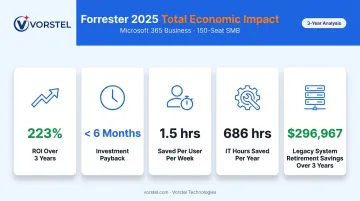
The numbers from Forrester's 2025 Total Economic Impact study on M365 for Business are specific and credible. For a composite SMB with 150 employees:
- 223% ROI over three years
- Payback in under six months
- Business users saved 1.5 hours per week through improved collaboration and cloud file storage
- IT specialists saved 686 hours per year, including 240 hours on device management
- $296,967 saved over three years by retiring legacy systems like on-premises Exchange and standalone tools
Consolidating onto a single platform produces fewer disconnected tools, less manual work, and IT time redirected to higher-value activities.
Security Without a Dedicated Security Team
SMB cybersecurity exposure is serious. According to Verizon's 2025 Data Breach Investigations Report, ransomware was present in 88% of breaches affecting SMBs with fewer than 1,000 employees. Most SMBs can't afford to build enterprise-grade security in-house.
Microsoft 365 Business Premium includes Microsoft Defender for Business, Microsoft Entra ID, Intune, and Microsoft Purview — covering threat protection, identity management, device security, and compliance. Multi-factor authentication and preset security policies can be configured without a security specialist.
For SMBs in regulated industries or handling customer data, this built-in protection isn't a bonus feature. It's the security foundation most organizations in this segment can't afford to build from scratch.
Scalability Built Into the Foundation
M365 Business plans support up to 300 users. Adding team members, expanding storage, or activating new capabilities like Dynamics 365 CRM doesn't require rearchitecting anything. For fast-growing startups or SMBs entering new markets, this removes the ceiling that often forces painful migrations later.
The 4 Stages of SMB Digital Transformation with Microsoft 365
Digital transformation isn't a single deployment event. It's a journey with distinct stages — and SMBs can enter at any point depending on where they currently stand.
Stage 1: Assessment — Know Where You Stand
This stage is about honest inventory. What tools are currently in use? Where are the manual bottlenecks? Which departments carry the most operational friction? The output should be a prioritized list of transformation opportunities ranked by impact and implementation complexity — not a wish list of every possible improvement.
Stage 2: Planning — Strategy Before Technology
Effective planning means mapping M365 capabilities to specific business outcomes, not just deploying tools because they're available. Examples of outcome-focused goals:
- Reduce invoice approval time from 5 days to 24 hours
- Enable fully remote work capability for field teams
- Cut manual reporting hours by 60%
Involving both IT and business stakeholders at this stage ensures the roadmap reflects how work actually happens, not just how technology teams imagine it should.
Stage 3: Implementation — Deploy, Migrate, and Train
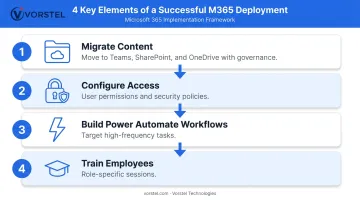
This is where most SMB transformations either gain momentum or stall. Key elements of a successful deployment:
- Migrate content to Teams, SharePoint, and OneDrive with governance policies set before migration begins
- Configure user access and security policies — don't skip this for speed
- Build early Power Automate workflows for high-frequency, high-frustration tasks
- Train employees with role-specific sessions, not just a one-time all-hands
Phased rollouts with visible quick wins — one automated workflow, one team fully on Teams — build internal momentum before tackling more complex initiatives.
Stage 4: Optimization — Measure, Refine, and Scale
Optimization doesn't end at go-live — it compounds. Track progress with KPIs that reflect real business impact:
- User adoption rates across departments
- Time saved through automated workflows
- Reduction in manual errors
- Employee satisfaction with new tools
Power BI dashboards keep this tracking visible and ongoing rather than buried in spreadsheets. As the business grows, M365 scales with it — adding Copilot for AI-assisted work, connecting Dynamics 365 for deeper CRM and ERP integration, and extending Power Automate into new departments without triggering another full migration.
Common Challenges SMBs Face (and How to Overcome Them)
Resistance to Change
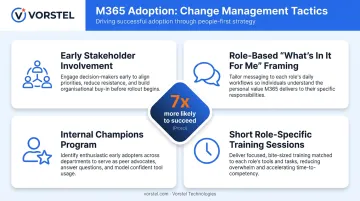
The best tools fail if people don't use them. Prosci's research shows that projects with excellent change management are up to 7x more likely to achieve their goals. The practical levers:
- Involve stakeholders early, before deployment decisions are made
- Frame adoption around "what's in it for me" for each role
- Identify internal champions who model new behaviors within their teams
- Use short, role-specific training sessions rather than generic all-day workshops
Limited IT Capacity
Most SMBs don't have a dedicated IT team to manage migrations, configure security policies, or troubleshoot deployment issues. This gap doesn't have to be a blocker. Three approaches close the gap:
- Run a phased rollout to reduce complexity at each step
- Use Microsoft's built-in learning resources for foundational setup and training
- Bring in an implementation partner for configuration, migration, and adoption support
Vorstel Technologies works in this space directly — entering M365 implementations at any stage, whether a client is starting from scratch or stuck mid-deployment. Their Microsoft O365 Implementation service covers deployment, configuration, and user adoption within a 2–4 week window, with 92% faster deployment cycles compared to industry averages.
Data Migration and Legacy Complexity
Moving from legacy file servers, on-premise email, or disconnected tools into M365 carries real risk if approached without a plan. McKinsey found that cloud migration inefficiencies cost companies an average of 14% more than planned annually. The mitigation strategy:
- Establish governance policies before migration begins
- Run a phased migration rather than a big-bang cutover
- Validate data integrity at each phase before proceeding
Building Your Microsoft 365 Transformation Roadmap
Step 1: Define Business Outcomes First
Start with the problem, not the platform. "We need to reduce customer response time by 40%" is a better starting point than "we should deploy Teams." Every M365 investment should trace back to a measurable business outcome.
Step 2: Start with High-Impact, Low-Disruption Quick Wins
Prioritize deployments that deliver visible value fast:
- Move team communication to Teams channels
- Set up OneDrive for file sharing and co-authoring
- Automate one recurring approval process with Power Automate
Quick wins build internal buy-in and demonstrate ROI before expanding to more complex initiatives.
Step 3: Establish Governance from Day One
Before expanding usage, set up:
- User access controls and permission structures
- Data classification and retention policies
- Multi-factor authentication across all accounts
- Sharing policies that separate internal from external access
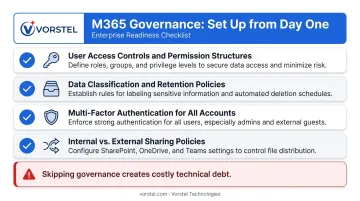
Skipping governance creates technical debt that becomes expensive and disruptive to unwind later.
Step 4: Invest in Training Alongside Deployment
Deployment without training produces low adoption. Budget for role-specific onboarding, short reinforcement sessions, and ongoing enablement — not just a single rollout day. Microsoft's own Adoption Guide emphasizes this champion-and-training model for good reason: sustained usage drives sustained ROI.
Step 5: Partner with a Specialist to Accelerate the Journey
A Microsoft consulting partner who understands SMB constraints compresses timelines, avoids costly deployment mistakes, and delivers faster ROI than a self-managed rollout.
Vorstel Technologies offers a Zero-Fee Solution Evaluation: a free expert consultation covering IT strategy, cloud solutions, business process automation, and digital transformation planning. Whether you're starting from zero or picking up a stalled implementation, Vorstel can step in at any stage. With a 97% client satisfaction rate across multiple countries, the team is built to deliver outcomes — not just deliverables.
Frequently Asked Questions
What is digital transformation in Microsoft?
Microsoft digital transformation refers to using Microsoft's integrated cloud tools — including Microsoft 365, Azure, Dynamics 365, and AI capabilities like Copilot — to modernize how a business operates, collaborates, and serves customers. The goal is operating-model change, not simply moving files to the cloud.
What are the 4 stages of digital transformation?
There are four stages, each building on the last:
- Assessment — audit current tools and identify gaps
- Planning — align M365 capabilities to specific business goals
- Implementation — deploy tools, migrate data, and train users
- Optimization — measure outcomes and continuously expand capabilities
How is digital transformation different for SMBs compared to large enterprises?
SMBs can adopt tools faster with fewer legacy constraints and less organizational politics. The tradeoff is tighter budgets, smaller IT teams, and less tolerance for extended disruptions — making a phased, outcome-focused approach especially critical for SMB success.
What Microsoft 365 tools are most important for SMB digital transformation?
The core toolkit for most SMBs includes:
- Microsoft Teams — communication and collaboration
- SharePoint and OneDrive — document management
- Power Automate — workflow automation
- Power BI (add-on) — data insights and reporting
- Microsoft Copilot (add-on) — AI-powered productivity
How long does Microsoft 365 digital transformation take for a small business?
Initial deployments — Teams and OneDrive up and running — can be completed in 2–4 weeks with the right partner. A full transformation roadmap typically unfolds over 6–18 months in iterative phases, with measurable value appearing well before the roadmap is complete.