Introduction
Moving your IT infrastructure to the cloud sounds straightforward until you're three months in, over budget, and wondering why your cloud bill is higher than your old data center costs.
Cloud migration is the planned, phased process of moving workloads — applications, databases, and infrastructure — from on-premises environments to a cloud-based platform. Get it wrong, and you're locked into higher costs, fragile architecture, and a migration that never quite finishes.
The scale of adoption makes this impossible to ignore. Gartner forecasts worldwide public cloud end-user spending reached $675.4 billion in 2024, up 20.4% from the prior year. Yet most organizations still struggle with the operational complexity of doing it right — choosing the wrong strategy, underestimating application dependencies, or treating the entire effort as a lift-and-shift project when it isn't.
This guide covers what cloud migration actually is, the strategies that determine how each workload moves, the phases of a well-run migration, and the mistakes most likely to derail yours.
Key Takeaways
- Cloud migration moves existing data, applications, and infrastructure from on-premises or legacy systems to a cloud environment.
- The 6Rs framework — Rehost, Replatform, Refactor, Repurchase, Retire, Retain — categorises how each workload should be handled.
- Migration follows four key phases: assess, plan, migrate, and optimise.
- McKinsey data shows 38% of migrations run over a quarter late, and costs run 14% over budget on average.
- Some workloads are better kept on-premises than migrated.
What Is Cloud Migration?
Cloud migration is the process of relocating IT workloads — including applications, databases, storage, and compute infrastructure — from on-premises data centers or legacy systems to a public, private, or hybrid cloud environment.
The term often gets conflated with related but distinct concepts — here's how they differ:
| Term | What It Means |
|---|---|
| Cloud Migration | Moving existing workloads to a cloud environment |
| Cloud-Native Development | Building new systems designed for the cloud from day one |
| Application Modernization | Refactoring or redesigning existing applications to use cloud-native capabilities |
Migration is about relocating what already exists, not rebuilding from scratch. Modernization often follows migration — but they are separate efforts.
Where a workload lands depends on the starting point. There are three scenarios most organizations encounter:
Three Primary Migration Scenarios
- On-premises to public cloud — the most common path; organizations move from their own data centers to AWS, Azure, or Google Cloud
- Cloud-to-cloud migration — switching cloud providers, consolidating multi-cloud environments, or moving workloads between accounts
- Hybrid migration — a partial move where select workloads remain on-premises while others shift to the cloud; for many enterprises, this is a deliberate long-term architecture, not just a transition state
Why Organisations Migrate Their Infrastructure to the Cloud
The Business Case
Three drivers consistently push organisations toward cloud migration across industries:
- Cost structure shift — replacing capital expenditure on hardware with consumption-based operating costs; you pay for what you use, not what you provision
- Elastic scalability — compute capacity scales up or down without procurement lead times or hardware refresh cycles
- Performance and reach — globally distributed cloud infrastructure reduces latency and improves availability for distributed teams and customers
On-premises infrastructure struggles to deliver what cloud environments handle as baseline features. Capabilities that once required significant internal investment — rapid environment provisioning, built-in disaster recovery, and managed services for AI/ML, big data, and databases — come standard in the cloud.
The Competitive Pressure
Those internal drivers don't exist in isolation — external market pressure is accelerating adoption at the same time. The 2024 HashiCorp State of Cloud Strategy Survey found that 79% of organisations have or are planning multi-cloud deployments, with 36% actively expanding their cloud infrastructure. The same survey identified stronger security (73%), better infrastructure visibility (73%), and agile infrastructure provisioning (72%) as the leading drivers of cloud strategy.
Cloud migration has become standard enterprise practice. The challenge now is execution — specifically, how to migrate without the cost overruns and performance gaps that derail so many programmes.
Cloud Migration Strategies: The 6Rs Framework
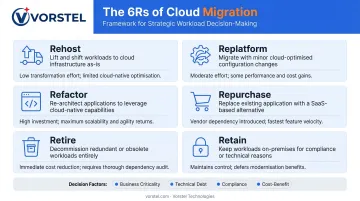
The 6Rs are the industry-standard method for categorizing how each workload should be handled during migration. No migration program applies a single strategy across the board — most involve a combination, applied workload by workload based on business criticality, technical debt, and the cost-benefit calculation for each approach.
Rehost (Lift and Shift)
Move applications to the cloud with no modifications. It's the fastest path and carries the lowest initial risk, making it useful for quick wins or time-constrained programs.
The downside: rehosted workloads don't take advantage of cloud-native efficiency. Compute resources sized for on-premises peak loads often run at cloud prices continuously, which can produce a higher monthly bill than expected. Rehosting gets you into the cloud quickly — but cost and performance gains require additional work afterward.
Replatform (Lift, Tinker, and Shift)
Minor optimizations without changing core application architecture. A common example is replacing a self-managed database with a managed cloud database service — you get automated backups, patching, and scaling without rewriting your application.
Replatforming is a practical middle ground for stable workloads where some cloud benefit is achievable without a full refactoring commitment.
Refactor and Rearchitect
Refactoring restructures applications to use cloud-native capabilities — microservices, containers, serverless functions — without a complete rebuild. Rearchitecting goes further, rebuilding legacy systems as cloud-native applications from the ground up.
For systems where long-term scalability and performance are business-critical, these approaches deliver the strongest return — but they also require the most time and investment. Apply them selectively, not across your entire portfolio.
Repurchase, Retire, and Retain
- Repurchase — replace a legacy on-premises application with a cloud-based SaaS equivalent (for example, replacing an on-premises CRM with Salesforce)
- Retire — decommission applications that are no longer needed; every workload retired is a workload that doesn't need migrating
- Retain — keep applications on-premises where migration is premature, cost-prohibitive, or constrained by compliance requirements
Choosing the right strategy comes down to four variables: business criticality, level of technical debt, compliance requirements, and the cost-benefit ratio of the migration approach. A thorough workload assessment drives these decisions — skipping it typically means rehosting everything by default, then absorbing cloud bills that look little different from on-premises costs.
How Cloud Infrastructure Migration Works: Phase by Phase
Cloud migration is a structured program, not a single event. Skipping phases — especially assessment and governance — is one of the most consistent causes of failed or over-budget migrations.
Organizations with stretched internal teams or limited cloud-native expertise often bring in a consulting partner to accelerate execution. Vorstel Technologies' Cloud Migration & Optimization practice can join at any stage, including mid-program rescues where earlier phases were rushed.
Phase 1: Assess and Discover
This phase produces the foundation everything else depends on:
- Catalogue all applications, databases, and infrastructure dependencies
- Identify which workloads are cloud-ready and which require remediation first
- Estimate total cost of ownership in the cloud versus on-premises
- Define migration objectives and the metrics that will determine success
A thorough discovery prevents mid-migration surprises — uncharted dependencies, unlicensed software, or compliance constraints that surface only after a workload has been moved.
Phase 2: Plan, Design, and Prepare
This phase produces the migration roadmap:
- Prioritize workloads into migration waves — lower-risk workloads migrate first
- Select cloud provider(s) based on data center locations, compliance certifications, service offerings, and pricing
- Design governance model — cost controls, access management, tagging policies, security baseline
- Address skills gaps — upskill internal teams or supplement with external expertise before execution begins
- Define rollback thresholds — contingency plans for each wave, not just the program overall
Phase 3: Migrate, Validate, and Optimize
Actual migration runs in waves. AWS's large-migration guidance describes migrating 1,000 servers in six months: starting at 5 servers per week, then scaling to 50–100 per week as the team builds velocity and confidence.
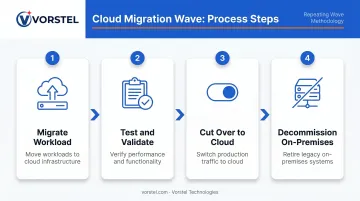
Each wave follows the same pattern:
- Migrate the workload
- Test and validate against pre-defined acceptance criteria
- Cut over to the cloud environment
- Decommission the on-premises equivalent
Post-migration optimization is an ongoing practice, not a project phase with a hard stop. Right-sizing instances, reviewing security posture, and clearing idle resources should continue on a regular cadence — monthly at minimum — to keep costs and performance in line.
Common Challenges and Misconceptions
The Lift-and-Shift Cost Trap
The most expensive misconception in cloud migration is equating "move to the cloud" with "optimize for the cloud." Rehosting without architectural review often produces cloud bills that exceed on-premises costs: workloads sized for owned hardware run continuously at cloud rates.
According to McKinsey, the average organization spends 14% more on migrations than planned, and 38% of cloud migrations are delayed by more than one quarter. The same research projected over $100 billion in wasted migration spend globally over a three-year period.
The Shared Responsibility Misconception
Many teams assume the cloud provider handles security end-to-end. It doesn't. Cloud security operates on a shared responsibility model:
- Provider responsibility — physical infrastructure, hardware, and the hypervisor layer (security of the cloud)
- Customer responsibility — data classification, access controls, encryption, compliance configuration, and endpoint security (security in the cloud)
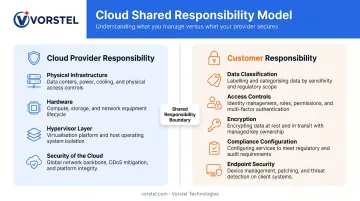
Misunderstanding this boundary during migration — particularly around data encryption in transit and at rest, identity and access management, and compliance configuration — is a significant and preventable risk.
Other Operational Challenges
The Flexera 2024 State of the Cloud Report found that 84% of organizations cite managing cloud spend as their top cloud challenge, followed by security (81%) and lack of cloud expertise (78%). These aren't migration-specific problems — they're the default state for teams that migrate without building the operational model to run what they've moved.
Vendor lock-in is a real risk, though a manageable one. Over-reliance on a single provider's proprietary services complicates future cloud-to-cloud migrations. Evaluating portability at the architecture stage (before committing to provider-specific services for critical workloads) is far easier than retrofitting portability later.
When Cloud Migration May Not Be the Right Move
Not every workload should migrate. The organisations that get the most value from cloud migration are the ones that make deliberate decisions about what to move, what to retain, and what to retire.
Defer or avoid migration when:
- Regulatory or data residency requirements cannot be satisfied by available cloud providers
- Legacy systems carry enough technical debt that migration would require full rearchitecting at a cost that doesn't justify the outcome
- A recent, significant capital investment in on-premises infrastructure makes the business case weak in the near term
- The workload performs correctly, costs are under control, and there is no business driver that migration would address
Warning signs that migration is being pursued by default rather than design:
- The organisation cannot articulate specific business outcomes the migration will deliver
- There is no plan to retire or reduce on-premises costs after workloads move
- Migration is being treated as a purely technical project, with no change management or stakeholder alignment
A structured evaluation before committing to a full programme prevents these outcomes. Vorstel's Zero-Fee Solution Evaluation includes cloud readiness assessment as a core advisory area — a good starting point for organisations that want a clear-eyed view of their readiness before locking in a programme scope.
Hybrid architecture, where some workloads remain on-premises while others run in the cloud, is a legitimate long-term state for many enterprises. Flexera reports 73% of organisations run hybrid cloud environments. For many, this isn't a transitional phase; it's the right architecture given their specific compliance, cost, and performance requirements.
Frequently Asked Questions
How long does cloud infrastructure migration typically take?
Timelines vary based on infrastructure complexity, workload count, and migration strategy. A small application portfolio may take weeks; an enterprise-wide data center migration typically spans 12 to 24+ months, executed in phased waves. AWS's large-migration benchmark covers 1,000 servers in six months with a team that builds velocity over time.
What is the difference between cloud migration and application modernisation?
Cloud migration moves existing workloads to a cloud environment. Application modernisation refactors or redesigns those applications to use cloud-native capabilities like microservices or serverless architecture. Migration can happen without modernisation, but modernisation generally requires or follows migration.
Which cloud migration strategy is best for enterprises with legacy systems?
No single strategy fits all legacy workloads. Most enterprise programs combine rehosting for quick wins, replatforming for stable workloads, and refactoring for systems where long-term scalability justifies the investment. A workload-by-workload assessment determines the right fit for each.
What is the biggest security risk during cloud migration?
Misconfigured cloud environments and misunderstood shared responsibility boundaries cause most security incidents during migration. Encrypt data in transit and at rest, apply least-privilege access controls, and configure compliance settings before cutover. Addressing security after the fact is significantly more costly to remediate.
Can businesses migrate to the cloud in phases rather than all at once?
Phased migration is the recommended approach. Starting with non-critical workloads lets teams build cloud operational experience, validate the process, and reduce disruption before moving production-critical systems.
How do you measure the success of a cloud migration project?
Success should be measured against the objectives defined during the assessment phase. Common metrics include cost reduction versus the on-premises baseline, system uptime and performance post-migration, deployment cycle times, and whether decommissioned on-premises infrastructure has actually reduced operational spend.