Introduction
Picture this: it's quarter-end, your finance team needs consolidated revenue data, and the ERP system — installed during a previous administration — times out. The database doesn't talk to your CRM. The vendor stopped issuing patches three years ago. Meanwhile, a competitor pushed a new customer-facing feature to production this morning.
This isn't a hypothetical. It's the daily reality for thousands of organizations still running systems built before smartphones existed. The frustrating part? Most decision-makers know modernization is overdue. The blocker is getting there — deeply embedded workflows, years of accumulated data, and the fear that touching the system breaks the business.
Here's what this guide covers:
- What legacy systems are actually costing you
- The strategic case for cloud modernization
- Six migration frameworks used by enterprises globally
- Real challenges you'll face — and how to navigate them
- How to choose the right cloud model for your situation
Key Takeaways
- Legacy systems consume ~80% of IT budgets on maintenance, leaving almost nothing for innovation
- Cloud modernization drives 20–25% operational efficiency gains, provided the operating model changes alongside the technology
- The 6 R's framework (Rehost, Replatform, Refactor, Re-architect, Retire, Retain) gives every system a tailored migration path
- Technical debt equals 20–40% of your entire technology estate's value, adding 10–20% in overhead to every new project
- 81% of IT leaders say data silos are actively blocking digital transformation
What Makes a System "Legacy" — and Why It's Costing You More Than You Think
A legacy system isn't simply old software. It's any system — ERP, CRM, on-premises data center, operating environment — that is no longer actively supported, cannot integrate with modern tools, and creates operational bottlenecks. Common examples include:
- SAP ECC environments running on aging on-prem infrastructure
- Siloed databases that require manual data extraction for reporting
- Custom-built applications written in languages no longer widely supported
- On-premises data centers with hardware past its end-of-life date
The "Already Paid For" Illusion
Organizations often treat legacy systems as cost-free because they expensed the original investment long ago. The actual cost picture looks quite different.
According to a 2025 GAO review, federal agencies typically spend about 80% of IT budgets on operations and maintenance of existing systems — including legacy infrastructure — with the federal government spending over $100 billion annually on IT overall. Enterprise organizations show similar patterns. When 80 cents of every IT dollar goes to keeping the lights on, almost nothing remains for capability building.
That budget squeeze has a direct security consequence — one most organizations don't price in until it's too late.
The Security Liability Nobody Budgets For
Outdated systems create exploitable attack surfaces. The same GAO review found that 7 of 11 critical federal legacy IT systems operate with known cybersecurity vulnerabilities, and 4 have unsupported hardware or software.
The financial stakes of ignoring those vulnerabilities are measurable:
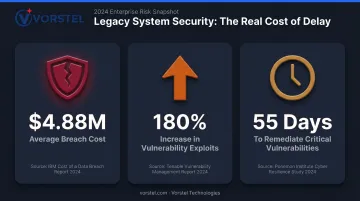
- IBM's 2024 Cost of a Data Breach Report puts the global average breach cost at $4.88 million — a 10% increase over 2023
- The Verizon 2024 DBIR found exploitation of vulnerabilities as a breach entry point increased 180% year over year
- It takes approximately 55 days to remediate just half of critical known vulnerabilities once patches become available
A sophisticated attacker isn't required. For systems that haven't received a patch in years, that 55-day remediation window has effectively been open indefinitely.
The Business Case for Cloud-Based Modernization
Modernization is a strategic repositioning, not a straightforward technology upgrade. The decision affects competitive positioning, revenue potential, and operational resilience in ways a simple "maintenance cost vs. migration cost" analysis misses.
Operational Efficiency at Scale
Cloud systems replace siloed, manual processes with automated, integrated workflows. Finance, supply chain, and customer service data becomes accessible in real time rather than extracted through batch processes or manual spreadsheet reconciliation.
McKinsey's 2025 analysis found that organizations transforming their operating model during cloud migration achieve:
- 20–25% operational efficiency improvement
- 60–70% reduction in cycle times
- 30%+ improvement in application resilience and security
The qualifier matters: these gains come from modernizing the operating model alongside the technology, not from a lift-and-shift alone.
Data-Driven Decision-Making
Operational gains are only part of the picture. Modernized cloud infrastructure also consolidates enterprise data, making analytics and AI-driven insights possible. Legacy architectures actively prevent this — data lives in incompatible formats across disconnected systems.
The performance gap between data-capable and data-limited organizations is measurable. A Harvard Business Review survey summarized by Google Cloud found that data and AI leaders outperformed peers on revenues (77% vs. 61%), customer loyalty (77% vs. 45%), and operational efficiency (81% vs. 58%).
Customer Agility and Competitive Positioning
Better data directly shapes how fast organizations can respond to customers. In retail and financial services, release cycles measured in quarters translate into lost revenue and eroding loyalty. Cloud-native infrastructure supports continuous deployment, multi-channel service delivery, and real-time personalization — capabilities customers now treat as baseline expectations.
Scalability Without Capital Expenditure
On-premises infrastructure requires hardware procurement lead times and capital commitments that can't respond to demand spikes or rapid growth. Cloud infrastructure scales on demand. For global enterprises managing seasonal volume peaks, this eliminates costly over-provisioning. For fast-moving startups, it redirects capital from hardware procurement into product development and growth initiatives.
The 6 Cloud Migration Strategies: Choosing the Right Path
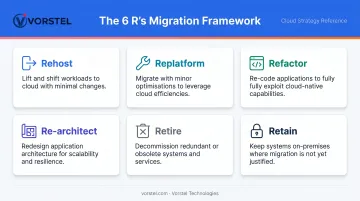
Not every system migrates the same way. Using the wrong strategy wastes resources or, worse, breaks critical operations. The 6 R's framework — originally developed for AWS but applicable across providers — gives each application in your portfolio a structured migration path.
Rehost (Lift-and-Shift)
Move applications to the cloud as-is, with no changes to architecture or code. This is the fastest, least disruptive option — the right choice when the primary goal is escaping aging on-premises infrastructure quickly.
Rehosting doesn't optimize for cloud-native capabilities, but that's intentional. It creates a stable foundation for future modernization rather than delivering the full efficiency gains possible with deeper approaches.
Replatform (Lift-Tinker-and-Shift)
Make targeted optimizations before migration — for example, moving from an on-premises database to a cloud-managed data store — without changing core application logic. This middle-ground approach unlocks managed services and performance improvements while keeping refactoring effort minimal.
Refactor and Re-architect
When rehosting or replatforming won't meet your scalability or innovation requirements, these two strategies deliver the highest long-term value — and require the most investment:
- Refactor: Improve internal code structure without changing functionality — addressing technical debt and improving maintainability
- Re-architect: Redesign the application to be cloud-native, typically moving from monolithic to microservices architecture
Retire and Retain
A thorough application portfolio audit regularly surfaces two strategies that get skipped in rushed migration plans:
- Retire: Decommission systems that no longer serve a business purpose, reducing IT footprint and eliminating maintenance costs
- Retain: Deliberately keep certain legacy systems in place where migration risk outweighs near-term benefit
Starting with lower-complexity systems consistently outperforms single-phase migrations. Vorstel Technologies joins transformation engagements at any stage — from early strategy through execution. Enterprise clients have achieved a 45% reduction in system downtime and 92% faster deployment cycles through this targeted, phased approach.
Common Challenges in Legacy Cloud Migration — and How to Navigate Them
Technical Debt
Technical debt is the accumulated cost of shortcuts, quick fixes, and deferred decisions in legacy code — and migration brings all of it to the surface.
McKinsey's 2023 research quantifies the burden: technical debt equals 20–40% of the total technology estate's value and adds 10–20% to every project. Organizations in the worst 20th percentile for technical debt severity are 40% more likely to have incomplete or cancelled modernization efforts.
Cloud-native migration combined with DevOps practices is the most effective way to address this systematically — treating each phase of migration as an opportunity to reduce debt rather than carry it into the new environment.
Integration Complexity and Data Silos
Legacy systems hold years of critical business data in formats incompatible with modern platforms. Undocumented data pipelines, siloed databases, and inconsistent data structures all create migration risk.
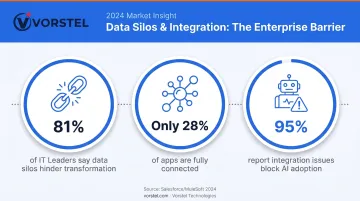
The scale of the problem: according to Salesforce/MuleSoft's 2024 Connectivity Benchmark, 81% of IT leaders say data silos hinder digital transformation, only 28% of applications are fully connected on average, and 95% report integration issues impede AI adoption.
Mapping data dependencies before migration begins — not during — is essential to avoiding production outages and data loss.
Change Management and Stakeholder Resistance
Technical risks aren't the only thing that derails modernization — organizational resistance is just as common. Employees with years of muscle memory around legacy workflows push back on change, and executives question ROI timelines when benefits aren't immediate. Addressing this requires a deliberate change management strategy:
Effective change management includes:
- Phased rollouts that minimize disruption to daily operations
- Training coordinated with deployment milestones, not after
- Leadership sponsorship that makes modernization a strategic priority, not an IT project
- Clear communication of what changes, when, and why
Vendor Lock-in and Cost Overruns
Cost overruns are common when migration scope is underestimated or when organizations attempt to move all systems simultaneously. Evaluating cloud vendors on price alone introduces long-term risk.
Key vendor evaluation criteria beyond price:
- Service Level Agreements (response times, uptime guarantees, credits)
- Support tier structures for production incidents
- Portability of data and workloads if vendor relationships change
- Multi-cloud compatibility of the architecture
Choosing the Right Cloud Model for Legacy System Integration
Deployment Models: Public, Private, and Hybrid
| Model | Best Fit | Key Consideration |
|---|---|---|
| Public Cloud (AWS, Azure, GCP) | Organizations ready to fully migrate workloads | Managed services, elastic scaling, lower upfront cost |
| Private Cloud | Highly regulated industries with strict data control requirements | Greater control, higher infrastructure investment |
| Hybrid Cloud | Organizations that can't fully retire legacy on-prem systems | Gradual migration while maintaining continuity |
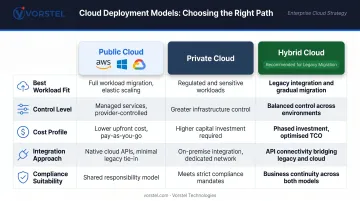
Hybrid cloud is the most relevant model for legacy integration. Flexera's 2024 State of the Cloud Report found that 89% of organizations use multi-cloud and 73% use hybrid cloud. IDC's 2025 data reinforces this: 88% of enterprise cloud buyers were deploying or operating hybrid environments as of Q3 2024. Hybrid architectures connect cloud-native services to on-premises systems via APIs, enabling gradual modernization without requiring full system replacement.
Service Layers: IaaS, PaaS, and SaaS
Each service model maps to a different migration scenario:
- IaaS suits lift-and-shift migrations where you need cloud infrastructure without changing the application
- PaaS accelerates refactoring by providing managed environments that reduce infrastructure management overhead
- SaaS replaces entire legacy applications — migrating from an on-premises ERP to SAP S/4HANA, or from a legacy CRM to Salesforce, for example
Vorstel Technologies has delivered 200+ SAP projects and maintains a 95% success rate in Salesforce CRM implementations across SAP, Microsoft, and Salesforce platforms. For organizations assessing their cloud model options, Vorstel offers a zero-fee solution evaluation covering cloud solutions, migration planning, and IT strategy.
Practical Selection Criteria
Cloud model selection should be driven by more than upfront cost:
- Existing licensing arrangements and vendor relationships
- Data sensitivity and regulatory requirements (particularly relevant for European clients under GDPR)
- System interdependencies that complicate workload portability
- Long-term scalability requirements and team skillsets
How AI-Powered Modernization Is Accelerating the Transition
AI is changing both how migration happens and what becomes possible once it's complete.
During migration, AI and automation tools reduce the manual effort that historically made large-scale modernization so expensive:
- Automated codebase analysis identifies technical debt and refactoring candidates
- Intelligent data mapping accelerates the translation of legacy data formats to modern schemas
- Automated testing catches regressions during refactoring without manual test case execution
After migration, cloud infrastructure becomes the foundation for AI and ML capabilities that legacy architectures structurally cannot support. IDC's 2025 data shows that among cloud buyers, 51% had deployed generative AI, 49% predictive AI, and 46% interpretive AI by end of 2024. Flexera reports ML/AI PaaS adoption at 41% among enterprises in 2024.
Vorstel Technologies has applied this model with enterprise clients across industries:
- A retail client replaced manual spreadsheet forecasting with a predictive analytics model trained on historical sales, seasonal trends, and promotional data
- A manufacturing client eliminated manual ERP data entry through an AI-powered invoice processing workflow
Each completed migration phase unlocks new AI capabilities — meaning organizations that move incrementally still accelerate their AI readiness over time.
Frequently Asked Questions
How do you migrate legacy applications to the cloud?
Start with an application portfolio audit to inventory what you have and classify each system's complexity. Select a migration strategy from the 6 R's framework based on business criticality and technical requirements, then execute in phases — beginning with lower-risk systems to minimize disruption and build organizational confidence.
Which cloud model is best for integrating with existing legacy systems?
Hybrid cloud is the most common recommendation because it lets organizations keep sensitive or complex on-premises systems running while connecting them to cloud-native services via APIs. This supports gradual modernization without requiring a full system replacement on day one.
What's the difference between legacy modernization and digital transformation?
Legacy modernization is one component of digital transformation, focused specifically on updating or replacing outdated systems. Digital transformation is the broader initiative that includes process redesign, cultural change, and technology integration across the entire organization.
What are the biggest risks of not modernizing?
Three risks compound over time if modernization stalls:
- Escalating maintenance costs consuming an ever-larger share of IT budget
- Cybersecurity exposure from unpatched, unsupported software
- Inability to integrate modern tools, threatening long-term business continuity
How long does a legacy cloud migration typically take?
Timelines vary widely. Rehosting a single application can take weeks; a full enterprise re-architecture typically spans 12–36 months. Phased approaches with defined milestones outperform big-bang migrations, which carry higher risk of cost overruns and disruption.
What is the "lift-and-shift" approach?
Lift-and-shift (rehosting) moves an application from on-premises to cloud infrastructure without changing its architecture or code. It's the fastest migration strategy, best suited for organizations that need to escape aging infrastructure quickly, with deeper optimization addressed in later phases.