These are real questions. And they're becoming more urgent. According to McKinsey, generative AI combined with other automation technologies could affect work activities absorbing 60% to 70% of employees' time. Meanwhile, the intelligent process automation market is projected to reach $44.74 billion by 2030, growing at a 22.6% annual rate.
The pressure to move faster with leaner teams is real across industries — manufacturing, retail, e-commerce, enterprises, and fast-scaling startups alike. But adoption without direction rarely delivers results.
This guide covers when AI automation makes sense, where it creates the most impact across business functions, what benefits you can realistically expect, and how to implement it without the common pitfalls.
Key Takeaways
- AI automation uses ML and NLP to handle complex, context-aware workflows — not just rigid rule-based tasks
- Best suited for high-volume, repetitive, data-rich processes that span multiple systems or departments
- Top use cases: customer service, finance, HR, sales, IT operations, and supply chain
- Key benefits: faster processing, fewer errors, lower costs, and scalable growth
- Start with process mapping and data readiness — not with buying tools
When Is AI Automation the Right Move for Your Business?
AI automation isn't the right answer for every process. Before investing in tools, it helps to be honest about which workflows actually warrant it.
Processes Worth Automating
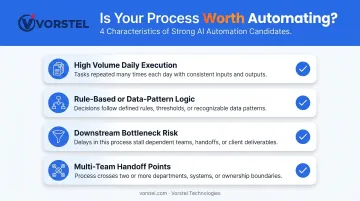
The strongest candidates share a few characteristics:
- Executed at high volume daily — across large document sets or structured datasets
- Follow rule-based logic or draw from consistent, reliable data patterns
- Create downstream bottlenecks when delayed
- Involve multiple team handoffs where errors accumulate across systems
Common examples include invoice processing, customer query routing, resume screening, and compliance reporting.
Signals Your Business Is Ready
Readiness shows up in specific, recognizable ways. Watch for patterns like these:
- Finance teams processing invoices manually across disconnected systems
- Support agents buried under query volume with no routing logic
- Operations teams running demand forecasting through spreadsheets
- Hours lost daily to manual data entry that structured tools could handle
Vorstel Technologies has seen these signals across client engagements — including a global e-commerce client where support agents were manually sorting thousands of daily queries, and a manufacturing client running invoice processing entirely by hand through ERP entry and file archiving.
Where Automation Goes Wrong
The failure patterns are consistent. RAND's research on AI project failures points to the same root causes: misunderstanding the problem, inadequate data, and technology-first thinking. Automating a broken or poorly defined process just makes the dysfunction faster.
Avoid automation when:
- The workflow isn't clearly mapped or has no defined exception handling
- Data quality is too poor to support reliable model outputs
- The task requires contextual judgment, nuance, or human empathy
- Volume is low enough that manual handling is cheaper and simpler
Key AI Automation Use Cases Across Business Functions
AI automation delivers the highest impact where workflows are data-intensive, repetitive, and time-sensitive. Here's where it's gaining the most traction.
Customer Service and Support
AI-powered virtual agents handle high volumes of routine queries around the clock — resolving common cases without human agents and escalating complex issues with full context already captured.
According to Gartner, 85% of customer service leaders planned to explore or pilot customer-facing conversational AI in 2025. A Gartner case study of Solo Brands found their generative AI chatbot resolved 75% of customer interactions, up from 40% previously.
Vorstel implemented an NLP-based solution using Microsoft Azure Cognitive Services for a global e-commerce client struggling with slow response times. The system automatically classifies incoming messages by intent and urgency, eliminating the manual sorting bottleneck entirely.
Sales and Marketing
AI enables sales teams to focus on the leads most likely to convert. Core capabilities include:
- Surface high-intent prospects automatically through lead scoring models
- Run follow-up sequences without manual scheduling
- Deploy personalized campaign content at scale
- Integrate directly into existing CRM workflows via platforms like Salesforce Agentforce and Einstein Lead Scoring
Sales teams using AI are 1.3x more likely to see revenue growth — 83% of AI-using teams reported revenue growth versus 66% without it, per Salesforce's research across 5,500 sales professionals. McKinsey's personalization research found that well-executed AI-driven personalization typically drives 10% to 15% revenue lift.
HR and Operations
HR teams carry a significant administrative load — resume screening, interview coordination, onboarding paperwork, records management. AI reduces that overhead considerably.
SHRM found 43% of organizations used AI in HR tasks in 2025, nearly double the 26% reported the year prior. Of those using AI for recruiting, nearly 9 in 10 HR professionals said it saves time or increases efficiency.
IBM's internal AskHR tool illustrates the scale of impact: it automates over 80 common HR processes and saved one department 12,000 hours in a single quarter.
Finance and Accounting
Invoice processing is one of the clearest ROI opportunities in finance automation. According to Ardent Partners' 2025 AP benchmarks, the average AP team takes 9.2 days and $9.40 to process a single invoice. Best-in-class teams using automation get that down to 3.1 days and $2.78 — with nearly twice the touchless processing rate.
Vorstel replaced a manual invoice workflow for a manufacturing client using AI Builder: the system now reads, validates, updates the ERP record, and files each invoice automatically — with no manual intervention.
Beyond AP, AI also supports real-time fraud detection, automated expense categorization, and financial reporting that once consumed significant analyst hours.
IT and Supply Chain
In manufacturing, AI-based predictive maintenance monitors equipment sensor data to catch failures before they happen. The World Economic Forum reports AI on the factory floor can improve productivity by up to 20% and reduce energy consumption by 15%.
On the supply chain side, McKinsey found AI-driven inventory optimization can reduce inventory levels by 20% to 30% through better demand forecasting. Vorstel built a predictive analytics model for a retail client previously relying on manual spreadsheets — training it on historical sales, seasonal trends, and promotional data to generate weekly demand forecasts.
The Real Benefits of AI Business Automation
Efficiency and Productivity
The case for time recovery is straightforward. Asana research found knowledge workers spend 60% of their time on "work about work" — status updates, searching for information, switching between apps. AI automation reclaims that time for higher-value work.
Accuracy and Error Reduction
Human error in manual data entry scales with volume. The more transactions you process manually, the more errors accumulate. AI systems maintain consistent accuracy across thousands of transactions. The Ardent Partners AP benchmark puts numbers to it: average AP teams see a 14% invoice exception rate, while best-in-class automated teams get it to 9%.
In regulated industries — financial services, healthcare, compliance-heavy manufacturing — this isn't just an efficiency gain. It's a risk reduction.
Cost Reduction and Scalability
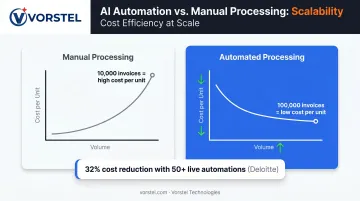
That error reduction compounds into direct cost savings. Deloitte found intelligent automation programs with more than 50 live automations achieved 32% cost reduction. Critically, that's not headcount elimination — it's reallocation. Resources previously tied up processing invoices or sorting queries get redirected toward strategic work.
Scaling up reinforces this advantage:
- Automated systems handle volume increases without proportional cost increases
- A team processing 10,000 invoices monthly can handle 100,000 on the same infrastructure
- Unit costs drop as throughput grows, widening the ROI gap over time
Data-Driven Decision Making
AI continuously analyzes patterns across datasets that would be impractical to review manually — surfacing forecasting insights, flagging anomalies, and enabling personalization at scale. Microsoft-commissioned IDC research found companies averaged 3.7x ROI for every dollar invested in generative AI.
How to Implement AI Automation: A Step-by-Step Guide
Organizations that skip foundational steps — process mapping and data readiness in particular — end up reconfiguring expensive implementations or abandoning failed pilots. These four steps keep that from happening.
Step 1: Assess and Identify — Map Your Automatable Processes
Start with a workflow audit. For each process under consideration, assess:
- How often it runs and at what volume
- Where humans intervene — and why those touchpoints exist
- Where errors occur and what they cost downstream
- What breaks when the process slows or fails
The highest-ROI targets are usually processes that are both manually intensive and time-sensitive. Common setup error: automating without getting input from the teams who actually run those workflows daily. They know where the edge cases live.
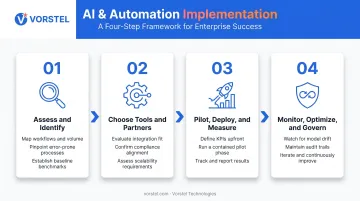
Step 2: Choose the Right AI Tools and Partners
Evaluate tools based on:
- Whether it connects with your existing ERP, CRM, or cloud platform
- Whether it meets your regulatory and data security requirements
- Whether it can scale as your process volume grows
Platforms like SAP Build Process Automation, Microsoft Power Automate with AI Builder, and Salesforce Agentforce all offer embedded AI automation within ecosystems most enterprises already use. For organizations with more complex multi-system environments, a consulting partner with cross-domain expertise accelerates implementation and reduces integration risk.
Vorstel Technologies works across SAP, Microsoft, and Salesforce implementations and offers a zero-fee solution evaluation for businesses at any stage of their automation journey — useful if you're still scoping which tools fit your environment.
Step 3: Pilot, Deploy, and Measure
Start contained. One department, one process. Before launch, define:
- Success metrics — time saved, error rate reduction, processing speed
- Data inputs — what feeds the system, and is it clean?
- Stakeholder training — who needs to understand the new workflow and how it handles exceptions?
Without defined KPIs in the pilot phase, you have no evidence to justify broader rollout. McKinsey found fewer than 1 in 5 organizations tracked well-defined KPIs for AI solutions to measure ROI and adoption.
Step 4: Monitor, Optimize, and Govern
Post-deployment isn't the finish line. Watch for:
- Model drift — outputs becoming less accurate as real-world data diverges from training data
- Upstream data changes that quietly degrade input quality
- Edge cases the system handles incorrectly that testing didn't surface
- Adoption gaps — employees working around the system rather than through it
Governance matters here. AI systems need audit trails, access controls, and defined human review checkpoints for high-stakes outputs. NIST's AI Risk Management Framework provides practical guidance on structuring human-AI oversight configurations to stay compliant and trustworthy.
Common Challenges and How to Navigate Them
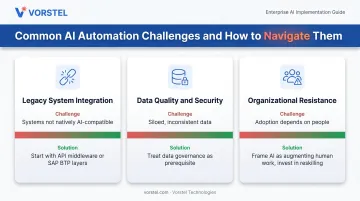
Most AI automation projects don't fail because the technology is wrong. They stall on three recurring problems — each with a clear path forward:
- Legacy system integration: Most enterprise environments weren't built to connect with AI platforms natively. Starting with API-based middleware or SAP BTP integration layers reduces risk; attempting full-scale integration upfront almost always backfires.
- Data quality and security: Automation is only as reliable as the data it runs on. Siloed data, inconsistent formats, and inadequate privacy controls all create failure points. Treat data governance as a prerequisite, not a follow-up task.
- Organizational resistance: IBM surveyed 3,000 CEOs and found 64% said AI success depends more on people's adoption than the technology itself. The most successful programs frame AI as augmenting human work — handling the routine so people can focus on what actually requires judgment. Reskilling and honest communication about role changes matter as much as the implementation itself.
Best Practices for Sustainable AI Automation Success
Getting AI automation right is less about picking the best tools and more about how you build the program around them. Four principles separate organizations that scale successfully from those that stall after the first pilot:
- Define before you automate: Map workflows, edge cases, and exception-handling rules before selecting tools. Businesses that do this consistently outperform those that choose technology first.
- Keep humans in the loop: For high-stakes decisions — financial approvals, compliance actions, escalations — human review checkpoints are governance best practice, not a limitation.
- Treat it as a program, not a project: Deloitte research found that intelligent automation scalers with 50+ live automations achieved 32% cost reduction. Organizations that stop at the first pilot miss most of that value.
- Measure everything: Define KPIs before launch and track them consistently. Without measurement, there's no basis for optimization or expansion.
Done right, these practices turn a one-off automation experiment into a compounding business advantage.
Frequently Asked Questions
What AI automations can be done for businesses?
AI automation applies across virtually every business function — customer service, HR, finance, IT, marketing, and supply chain. The strongest candidates are high-volume, repetitive, or data-intensive workflows where manual effort creates delays, errors, or significant overhead.
Which AI is best for automation?
The right platform depends on your use case, existing tech stack, and scale. Microsoft Power Automate, SAP Build, and Salesforce Agentforce offer embedded AI automation within enterprise ecosystems. For RPA, NLP, or agentic workflows, purpose-built tools provide the deeper customization most enterprise platforms can't match out of the box.
What is the difference between AI automation and traditional automation?
Traditional automation (RPA) follows fixed rules for predefined tasks. AI automation uses machine learning and NLP to adapt, learn from data, and handle complex or unstructured workflows — including documents, natural language, and scenarios that rule-based systems can't manage.
How much does it cost to implement AI automation?
Costs vary widely based on scope, tools, and existing infrastructure. Cloud-based and low-code platforms have significantly lowered entry barriers. IDC research found companies average 3.7x ROI per dollar invested in generative AI — though that return hinges on workflow redesign and adoption, not just tool deployment.
What are the biggest challenges businesses face when adopting AI automation?
The top three: integrating with legacy systems, ensuring data quality and security before deployment, and managing organizational resistance during rollout. All three are addressable with the right sequencing and change management investment.
How long does it take to see results from AI business automation?
Pilot results in contained workflows can appear within weeks. IDC research found AI deployments averaged under 8 months to complete, with organizations realizing measurable value within 13 months on average.