Introduction
Salesforce Service Cloud implementation is a complex program — one that demands process redesign, phased configuration, and coordinated effort across business, IT, and project leadership.
Without a structured approach, the consequences are predictable: low agent adoption, broken workflows, integration failures, and expensive rework. Research consistently shows that CRM failure rates hover around 55% — and most failures trace back to decisions made (or skipped) before the first configuration step.
Getting those early decisions right depends heavily on who's in the room. Experienced Salesforce administrators can manage smaller rollouts, but enterprise-scale deployments typically require a certified implementation partner or a cross-functional team with a dedicated project lead, business sponsors, and relevant subject matter experts.
This guide covers the complete zero-to-hero journey: pre-implementation readiness, the four-phase build roadmap, post-go-live monitoring, and how to fix the most common problems before they compound.
Key Takeaways
- Service Cloud follows four phases (Foundation, Build, Flex, Innovate) — skipping ahead creates compounding problems down the line
- Pre-implementation readiness — team structure, data quality, and defined KPIs — determines how cleanly rollout goes
- Start with core case management and Email-to-Case before investing in live chat, telephony, or AI features
- Post-launch adoption monitoring determines whether the platform delivers real ROI
- Most failures come from over-customization, poor data hygiene, and stopping user training at go-live
Before You Begin: Pre-Implementation Readiness Checklist
Implementation quality is decided before the first configuration step. Skipping readiness assessments leads to costly mid-build rework — undefined requirements and unresolved data issues are far cheaper to fix before you start building than after.
Define Your KPIs Before You Build
Establish your baseline metrics before any configuration begins. These become your post-launch benchmark:
- Average case resolution time — how long cases take from open to close today
- SLA compliance rate — what percentage of cases meet contracted response times
- First contact resolution (FCR) — cases resolved without follow-up contact
- Cost per ticket — operational cost per case handled
Without these numbers pre-implementation, you cannot demonstrate ROI after go-live.
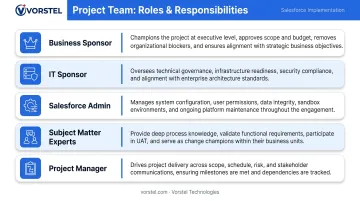
Assemble the Right Team
| Role | Responsibility |
|---|---|
| Business Sponsor | Decision authority; champions adoption from leadership |
| IT Sponsor | Manages infrastructure, security, and integration dependencies |
| Salesforce Admin | Owns configuration, testing, and ongoing platform management |
| Subject Matter Experts (SMEs) | Represent actual agent workflows during design |
| Project Manager | Owns timeline, scope, risk, and stakeholder communication |
Audit Your Current Support Process and Data
Map your "as-is" support flow before designing the "to-be" state in Salesforce. This matters for three reasons:
- Configuration built around an undocumented process won't reflect how agents actually work
- Data quality issues found during migration compress testing timelines and drive up costs
- Unreviewed integrations with legacy systems often introduce scope gaps mid-build
If you're approaching this for the first time, Vorstel Technologies offers a Zero-Fee Solution Evaluation — a no-cost virtual consultation covering IT strategy, automation, and cloud solutions — to identify these gaps before you commit to a build.
Non-Negotiables Before Work Starts
Do not proceed without these in place:
- Business requirements documented and signed off by the Business Sponsor
- Data migration strategy in place, with a clear source-of-truth defined for each object
- An executive sponsor with actual authority to resolve scope decisions quickly
- Salesforce Enterprise Edition or above (required for Service Cloud features)
- Inventory of existing system dependencies — legacy CRM, ERP, telephony — that require integration planning
Salesforce Service Cloud Implementation: The Zero-to-Hero Roadmap
The four-phase framework — Foundation → Build → Flex → Innovate — exists because sequencing matters. Features like AI-assisted routing or live chat require a stable foundation of process, automation, and knowledge to deliver on their ROI claims. Deploy them before the foundation is ready and you expose agents to unsupported real-time interactions. Deploy them before the foundation is ready and you expose agents to unsupported real-time interactions. Each phase below builds directly on the last — skip ahead and the gaps will surface at the worst possible moment.
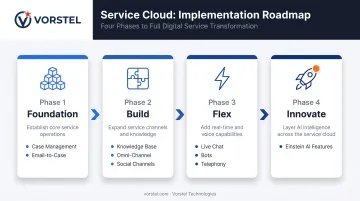
Foundation Phase
Build your support process architecture first. This means:
- Configure case record types, statuses, and priorities to match your actual support workflows
- Set up Milestones and Entitlements to formalize SLAs and create accountability for resolution timelines
- Design agent-first Lightning page layouts using three-column case record views — embed key related data and reduce click paths
- Use Actions & Recommendations to host Flow automations that guide agents through repeatable processes
Activate Email-to-Case as your first integrated channel. This creates a centralized case picture, activates auto-assignment rules, and lets you test triage logic before opening faster-paced channels. If your routing logic fails here, it will fail everywhere — better to find it now.
Build Phase
Once Foundation is stable, expand channels and routing intelligence.
Enable Knowledge and Experience Cloud:
- Knowledge licenses are included in the base Service Cloud license — agents can surface articles directly during case resolution
- Experience Cloud's unauthenticated guest tier allows a public self-help library without additional licensing cost
With knowledge in place, connect social channels and activate Omni-Channel routing to bring all incoming work items into a single, managed queue:
Social channels and Omni-Channel routing:
- Service Cloud supports two free social channel integrations; use these for direct/private messaging rather than public feed monitoring
- Omni-Channel routes work items to available agents based on capacity, queue assignment, and skill level. Enable it here, once queue structures and agent capacity are defined.
Flex Phase
Introduce Digital Engagement (live chat, bots) and Integrated Telephony only after Foundation and Build are stable. Live channels require:
- A mature Knowledge base agents can actually use
- Functioning Omni-Channel routing
- Solid automation to prevent agents from receiving unsupported real-time interactions
Integrated Telephony adds screen-pop capability for inbound calls, surfacing the caller's record automatically and reducing handling time. That benefit only lands if the underlying case data is clean — which is exactly what the first two phases establish. Once live channels are performing reliably, the platform is ready for its final layer.
Innovate Phase
Deploy Service Cloud Einstein features as the final layer. Start with the freemium tier included in the base license:
- Next Best Action
- Case Classification
- Case Wrap-Up
Einstein Reply Recommendations, Case Routing, and Article Recommendations are premium features. Upgrade only after you can demonstrate that the foundation is performing and agents are actively using the tools beneath the AI layer.
Post-Go-Live: Validation, Monitoring, and Optimization
Pre-Go-Live Validation
Before full launch, run:
- Functional testing of every workflow and integration against defined requirements
- Load simulation across common support scenarios to verify routing performance under volume
- User Acceptance Testing (UAT) with real agents working real case types — not administrators testing hypothetical scenarios
Skipping UAT is the single most common cause of visible post-launch failures. Agents encounter unexpected behavior, workarounds develop, and data quality degrades quickly.
Post-Launch KPI Review Cycle
Track your metrics against the pre-implementation baseline on a defined schedule:
- Weeks 1–4: Weekly review of case resolution time, SLA compliance, and system error logs
- Month 2 onwards: Monthly operational review comparing actuals to baseline
Rising resolution times, SLA breaches, or a drop in Knowledge article usage are early signals. Catch them at the monthly review level and you can course-correct before they compound into broader adoption problems.
Post-Launch Risk Areas
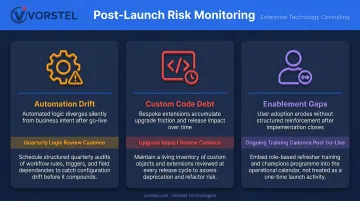
Monitor these three areas proactively:
- Automation drift: Business processes evolve, but automation rules don't update themselves. Schedule quarterly logic reviews to catch misalignment early.
- Custom code debt: Salesforce ships three major releases per year. Excessive customization creates upgrade friction that slows your ability to adopt new features.
- Enablement gaps: Agents revert to old habits when training ends at go-live. Build a lightweight ongoing enablement cadence into your post-launch plan.
Common Implementation Problems and How to Fix Them
Even well-planned Service Cloud rollouts run into predictable obstacles. Here are the three most common — and how to address each one.
Low User Adoption After Go-Live
Problem: Agents continue using email, spreadsheets, or legacy systems alongside Service Cloud, making case data incomplete and reporting unreliable.
Likely cause: Training ended at launch; no internal champion was assigned; page layouts did not reflect actual agent workflows.
Fix:
- Implement role-based refresher training at 30, 60, and 90 days post-launch
- Assign departmental power users as ongoing advocates — not just IT contacts
- Review page layouts with frontline agents to identify and eliminate friction points
Integration Failures and Data Inconsistency
Problem: Customer data appears differently across Salesforce and connected systems — ERP, billing, telephony — leaving agents working with incomplete context.
Likely cause: Integration architecture was not fully mapped before build; synchronization rules and data ownership were not clearly defined.
Fix:
- Conduct an integration audit to establish a single source of truth for each data type
- Implement middleware monitoring to flag and log sync errors in real time
Scope Creep and Over-Customization
Problem: The platform becomes difficult to maintain or upgrade because it has accumulated undocumented custom code and logic.
Likely cause: Business requests were implemented directly — without first evaluating whether native configuration could achieve the same outcome — and without a formal review gate to catch cumulative complexity.
Fix:
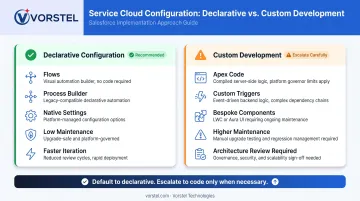
- Favor declarative configuration (Flows, Process Builder) over custom Apex wherever possible
- Establish a change request process with mandatory architecture review before any new custom development is approved
Pro Tips for Implementing Salesforce Service Cloud Effectively
Sequence your investment deliberately. The ROI claims attached to AI features, live chat, and telephony depend on the Foundation and Build phases being genuinely stable — not just the license being active.
Treat adoption as a workstream, not an afterthought. Include adoption metrics in your post-launch KPI dashboard alongside operational metrics:
- Login rates and session frequency
- Case logging compliance (are all cases being created in Salesforce?)
- Knowledge article usage per agent
Teams that measure adoption recover faster from post-launch dips because they see the problem early.
Know when to bring in specialist support. Complex integrations, multi-org architectures, data migrations from legacy systems, and AI feature rollouts are the points where internal capacity typically runs short. Working with a specialist partner at these stages can prevent costly rework. Vorstel Technologies, for example, holds a 95% Salesforce CRM implementation success rate and operates across India, Germany, Hungary, Singapore, and Finland — so teams at any stage of their implementation have access to experienced support without starting over.
Frequently Asked Questions
How long does Salesforce Service Cloud implementation typically take?
Small-scale deployments with limited integrations can go live in 4–6 weeks. Complex enterprise rollouts involving multi-system integrations, data migrations, and phased channel enablement typically take 16–20 weeks. Timeline is driven primarily by integration complexity, data quality at migration, and how quickly stakeholders can sign off on design and UAT.
Can an in-house team implement Salesforce Service Cloud without a consulting partner?
Yes — for smaller organizations with experienced Salesforce admins, limited integrations, and clear requirements. External expertise becomes necessary when scope includes complex integrations, legacy data migrations, multi-org architectures, or Einstein AI rollouts, where configuration mistakes carry significant downstream costs.
What are the most common reasons Salesforce Service Cloud implementations fail?
The most frequent causes:
- Unclear requirements before build begins
- Insufficient training leading to low user adoption
- Poor data quality at migration
- Deploying advanced features before core case management is stable
CRM failure rates remain high — most failures are process and people problems, not technology.
How do you know when you're ready to enable Omni-Channel routing?
Enable Omni-Channel once Email-to-Case and at least one additional channel are live, your queue structures are defined, and agent capacity models are in place. Enabling it before queues and routing rules are properly set up results in ineffective work distribution and agents missing or mishandling incoming cases.
What KPIs should you track after go-live to measure implementation success?
Track five core metrics against your pre-implementation baseline: average case resolution time, first contact resolution rate, SLA compliance percentage, cases handled per agent, and customer satisfaction scores. Add adoption metrics — login rates and Knowledge article usage — to catch regression early.
What is the difference between the Foundation and Build phases?
Foundation covers the core support architecture: case management, SLA milestones, Lightning page layouts, workflow automation, and Email-to-Case. Build introduces additional channels and amplifying features — Knowledge, Experience Cloud, social channel integrations, and Omni-Channel routing — that depend on a functioning Foundation to deliver value.