Introduction
Cloud migration has a reputation problem. Enterprises know they need to move. But manually coordinating infrastructure inventories, database conversions, compliance checks, and cutover windows across hundreds of interdependent applications tends to grind momentum to a halt.
IT teams get stretched thin, timelines slip, and budgets overrun before the first workload ever lands in production.
McKinsey found that the average company spends 14% more than planned on cloud migration annually, and 38% experience delays exceeding a full fiscal quarter. Those aren't edge cases — they're the norm when migrations rely on manual execution.
Automation shifts those outcomes directly. When discovery, data transfer, schema conversion, validation, and compliance monitoring are handled programmatically, migrations become faster, more predictable, and far less disruptive to daily operations.
This article breaks down what cloud migration automation is, how it works across three core phases, the key technologies involved, and the measurable outcomes organizations achieve by replacing manual execution with programmatic control.
Key Takeaways
- Cloud migration automation replaces manual, error-prone processes with orchestration tools spanning every phase — discovery through post-migration optimization
- Three core phases — automated assessment, execution, and post-migration validation — each reduce risk and cut handoff delays
- Key technologies include Infrastructure as Code, database migration services, CI/CD integration, and AI-driven tooling
- AWS documented a 50% timeline reduction and 50% cost reduction in a 16,600-server enterprise migration using hyperautomation
- Flexera's 2026 State of the Cloud report finds 29% of cloud spend is wasted post-migration — automated optimization is as critical as the migration itself
What Is Cloud Migration Automation?
Cloud migration moves applications, data, and workloads from on-premise infrastructure or legacy systems to a public, private, or hybrid cloud environment. Automation replaces the manual execution of each step — configuration, data transfer, testing, compliance checks — with tools, scripts, and orchestration engines that handle those tasks programmatically.
Manual approaches require hands-on IT involvement at every stage. One missed dependency or misconfigured setting can halt an entire workload wave. Automation handles these repetitive steps consistently, in parallel, and at scale.
That scope extends well beyond simply moving files:
- Infrastructure provisioning and environment setup
- Dependency mapping across applications and services
- Data transfer and schema conversion between database formats
- CI/CD pipeline configuration in the target environment
- Performance validation and post-migration testing
- Ongoing compliance monitoring and cost optimization
Platforms like AWS Migration & Modernization, Azure Migrate, and Google Cloud Migration Center each address this end-to-end scope — covering discovery, assessment, execution, and post-cutover management as a connected workflow. That full-lifecycle coverage is what distinguishes genuine migration automation from one-off scripting.
How Cloud Migration Automation Works: The Three Core Phases
Phase 1 — Automated Discovery and Pre-Migration Assessment
Automation begins before a single workload moves. Automated discovery tools scan the entire on-premise environment to catalog hardware, software, applications, and their interdependencies, producing a complete asset map without manual inventory effort.
Azure Migrate, for example, supports appliance-based, Arc-based, and import-based discovery modes. Arc-based assessments typically generate default business cases within one hour; manual documentation of the same scope typically takes weeks. Similarly, Google Cloud Migration Center scans and assesses infrastructure and estimates cloud costs without touching the source environment.
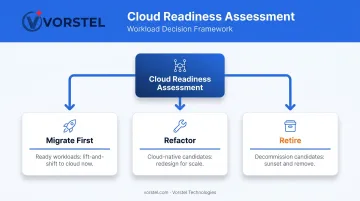
Cloud readiness scoring adds another layer. Automation platforms analyze each workload's resource usage, security profile, and performance demands to recommend:
- Which applications to migrate first
- Which to refactor for cloud-native architectures
- Which to retire rather than carry forward
This sequencing prevents the mid-migration surprises that derail manually planned programs.
Phase 2 — Automated Migration Execution
Execution automation handles three distinct tasks simultaneously.
Zero-touch data pipeline orchestration manages the sequenced transfer of data and applications from source to destination, ensuring workloads launch in the correct dependency order, data integrity is preserved, and downtime windows are minimized. AWS Database Migration Service reports customers have migrated over 1.5 million databases with minimal downtime and zero data loss.
Automated schema conversion translates database structures, data types, and relationships from legacy formats into cloud-compatible schemas. The AWS Schema Conversion Tool assesses heterogeneous migrations, converts compatible objects automatically, and generates action items for objects requiring manual review. What might take weeks of re-coding is often completed in hours.
CI/CD pipeline setup ensures migrated workloads aren't just moved: they're deployed into a properly configured delivery pipeline from day one. Continuous integration, testing, and deployment workflows are configured as part of the migration itself, not added retroactively.
Phase 3 — Post-Migration Validation and Optimization
Cutover is not the finish line. Automated validation tools compare pre- and post-migration data states to confirm all records, relationships, and configurations transferred accurately, catching discrepancies at a scale manual review cannot match.
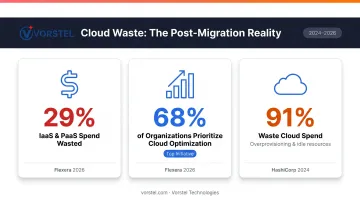
Post-cutover optimization matters just as much. The numbers make the case:
- Flexera's 2026 State of the Cloud report estimates wasted IaaS and PaaS spend at 29%
- 68% of organizations rank optimizing existing cloud use as their top cloud initiative
- HashiCorp's 2024 survey found 91% of respondents waste cloud spend, typically through overprovisioning and idle resources
Automated monitoring addresses this directly. Continuous audits flag cost inefficiencies, right-sizing opportunities, and compliance drift against standards like GDPR, HIPAA, and SOC 2 before they compound into larger problems.
Key Technologies Powering Cloud Migration Automation
Infrastructure as Code
Infrastructure as Code tools — Terraform and AWS CloudFormation being the most widely adopted — allow teams to define, provision, and replicate cloud environments through versioned code rather than manual configuration. Every environment becomes auditable, reproducible, and rollback-capable.
HashiCorp's 2024 survey found that 75% of platform teams build security and compliance directly into their IaC frameworks — meaning security controls aren't retrofitted after provisioning, they're embedded from the start.
Automated Database Migration Services
AWS DMS and Azure Database Migration Service handle the mechanics of moving data between heterogeneous environments with minimal downtime. The AWS Schema Conversion Tool layers on top, assessing migration feasibility and automating schema translation where possible — then flagging the remaining items for targeted engineering effort.
CI/CD Pipeline Integration
As DORA's 2024 research notes, flexible cloud infrastructure improves organizational performance — but only when organizations actually use that flexibility. Migrating workloads without connecting them to automated build, test, and deploy pipelines means teams inherit a cloud environment that still operates like a data center.
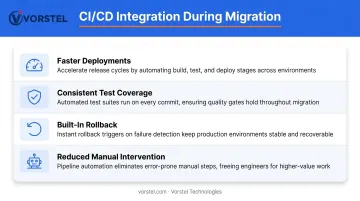
CI/CD integration during migration converts the move into a repeatable, version-controlled process. Done well, it produces measurable operational improvements:
- Faster, more predictable deployment cycles across migrated workloads
- Consistent test coverage applied automatically at each stage
- Rollback capabilities built into the pipeline from day one
- Reduced manual intervention as environments scale
AI-Driven Migration Intelligence
AI tooling is accelerating what automation can do. AWS Transform, generally available as of 2025, uses agentic AI to analyze enterprise workloads and claims up to 4x faster transformation timelines. HashiCorp reports 70% of organizations use or plan to use AI for cloud infrastructure management.
One caveat applies: DORA's 2024 report warns that AI can improve productivity while negatively affecting delivery stability and throughput if not paired with proper validation, rollback planning, and human review.
Vorstel Technologies' cloud and DevOps practice reflects this same philosophy. AI-enhanced tooling accelerates discovery, sequencing, and optimization, but it operates within governed workflows rather than replacing the expert judgment that complex enterprise migrations require.
Top Benefits of Automating Your Cloud Migration
Faster Timelines
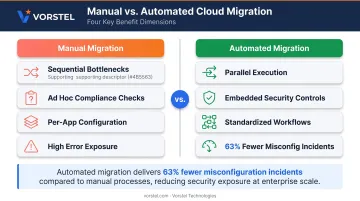
Manual migrations create sequential bottlenecks: one team finishes a configuration step before the next can begin. Automation handles tasks in parallel, eliminating that queuing. AWS documented a concrete example: Danske Bank's hyperautomation-driven migration program covering 16,600 servers delivered a 50% reduction in projected timeline and 50% reduction in migration cost compared to the original manual plan.
Reduced Budget Overruns
McKinsey's data on the 14% average budget overrun and 38% delay rate traces directly to manual execution: missed dependencies, rework after failed cutovers, and extended timelines that consume resource budgets. Automation reduces each of these drivers. Repeatable orchestration eliminates the ad hoc problem-solving that inflates costs.
Lower Downtime and Business Disruption
Automated migration pipelines execute transfers in controlled, tested sequences. Vorstel Technologies reports a 45% reduction in system downtime for enterprise clients across cloud engagements, a direct outcome of systematic execution rather than manual coordination under time pressure.
Scalability Without Proportional Headcount
Automated tools handle terabyte-scale data migrations and hundreds of interdependent applications without requiring proportional increases in engineering resources. In practice, this means:
- Managing complex dependency chains across hundreds of apps simultaneously
- Scaling migration throughput without adding headcount
- Maintaining consistent execution quality regardless of workload size
AWS DMS's 1.5 million database migrations and the Danske Bank 16,600-server program both demonstrate what that scale looks like in practice.
Built-In Security and Compliance
Security controls embedded directly in the migration workflow — encryption, role-based access, audit trails, policy validation — apply consistently to every workload rather than being configured manually per application. The Cloud Security Alliance's 2022 research attributed up to 63% of security incidents to SaaS misconfigurations. Automation doesn't eliminate that risk entirely, but it standardizes the checks that catch the most common configuration errors before they reach production.
Common Cloud Migration Strategies and How Automation Applies
Gartner identified five original cloud migration strategies in 2011. AWS has since expanded the framework — current AWS Prescriptive Guidance describes seven strategies. For most enterprise programs, five remain most relevant:
| Strategy | Description | Automation Fit |
|---|---|---|
| Rehost | Lift and shift to cloud without changes | Highest — tools automate the full move |
| Replatform | Migrate with targeted optimizations | High — automation handles core transfer, tools assist tuning |
| Refactor | Re-architect for cloud-native design | Moderate — requires AI-enhanced tooling and expert involvement |
| Rebuild | Rewrite application from scratch | Low — migration automation plays a supporting role |
| Retire/Replace | Decommission and adopt SaaS | Low — automation assists decommissioning workflows |
AWS Prescriptive Guidance notes that refactoring is generally not recommended as the primary strategy for large-scale migrations due to complexity and risk. In practice, rehost, replatform, and retire handle the majority of workloads in enterprise programs.
That distribution shapes how most organizations sequence their migrations. A typical program starts with rehosting for speed and risk reduction, then layers in replatforming or selective refactoring for priority applications. Automation supports both phases — making it relevant whether a team is just starting its cloud journey or optimizing workloads mid-program.
Best Practices for a Successful Automated Cloud Migration
A successful automated migration depends less on the tools you pick and more on the discipline around them. These three practices separate programs that deliver on their promise from ones that stall mid-flight.
1. Assess before you select tools
Flexera's 2026 report identifies understanding application dependencies and assessing technical feasibility as the top migration challenges. Jumping to tooling before that groundwork creates mid-migration surprises that automation cannot prevent.
Vorstel Technologies' Zero-Fee Solution Evaluation provides this kind of structured entry point — covering cloud strategy, infrastructure assessment, and scope definition before any execution begins.
2. Define measurable KPIs upfront
Migration success isn't purely technical. Misaligned expectations and organizational resistance derail well-automated programs just as surely as technical failures. Set specific, visible targets across IT, operations, and business leadership before the program starts:
- Maximum acceptable downtime per workload
- Target cost reduction percentage at 90-day post-migration
- Deployment speed improvement benchmarks
3. Treat post-migration as an ongoing discipline, not a finish line
Flexera's 29% wasted cloud spend figure isn't a migration failure. It's what happens when teams declare victory at cutover and stop managing the environment. Right-sizing, tagging enforcement, and compliance auditing need to become operational habits — not one-time checklist items.
Frequently Asked Questions
What is cloud migration automation?
Cloud migration automation uses specialized tools and orchestration engines to move applications, data, and workloads to the cloud without heavy manual intervention. It reduces human error, accelerates timelines, and applies the same validated process across every phase, from discovery through post-migration validation.
How is automated cloud migration different from manual migration?
Manual migration requires IT teams to execute every step hands-on (configuration, data transfer, testing, compliance checks), making it slower and highly error-prone. Automation handles these tasks programmatically, runs many of them in parallel, and applies built-in validation at each stage.
How long does an automated cloud migration typically take?
Timelines vary by workload size and complexity. AWS documented a 50% timeline reduction in a 16,600-server enterprise migration using hyperautomation. Actual results vary by environment and strategy, but automated approaches reliably outpace manual ones.
What are the most common strategies used in cloud migration automation?
Rehosting and replatforming are the most automation-friendly entry points because tools can handle the full transfer with minimal manual intervention. Refactoring benefits from AI-enhanced tooling and typically requires deeper expert involvement alongside the automation platform.
Is automated cloud migration secure?
Yes. Automation embeds encryption, access controls, and compliance checks directly into the migration workflow, applying them uniformly rather than configuring them manually per application. Manual configuration is one of the leading causes of cloud security incidents — embedded automation removes that exposure at the source.
How do I get started with cloud migration automation?
Start with an infrastructure assessment to map dependencies and define compliance requirements, then set clear migration goals and select tooling matched to your environment. Vorstel Technologies offers a Zero-Fee Solution Evaluation covering cloud strategy and migration planning — no commitment required — if you want expert input before committing to a path.